
5d •
如何不畫歪刻面線?
有人私訊我,要怎麼樣刻面線才不會畫歪? 這是新手常見的問題,也是實體課的學生會問我的。 除了多練習之外,我下面分享幾個步驟方法給你 🚀Step1是調整心態 你仔細看那些畫得很精緻的專業人士他們多多少少也會有點不對稱。 所以不小心歪了,也不要太苛責自己。👍 🚀Step2放大你的寶石尺寸 如果尺寸太小,眼睛對得很吃力的話,先從大一點的寶石開始練習。 🚀Step3 善用你的筆(要領在此) 先把筆尖點在你出發的位置,尺再靠過去貼著筆尖, 然後將尺對準你要前往的點,接著筆貼著尺連過去。 🚀Step4反復練習(最重要) 多練習幾次就會越來越好,不要只練習一次。 你也有在練習怎麼畫刻面寶石嗎? 趕快分享你的練習成果給我看看吧!不要害怕自己畫不好 所有人都是從不擅長逐漸變得擅長的, 你只需要先開始,不要等準備好。 🤗最後提醒,「畫出你的第一件墜子」課程優惠即將結束! 之後將恢復成原價不再回頭! 想要了解金工結構、畫出能打金的墜子的人,趕快先收藏起來吧!
1
0
22d •
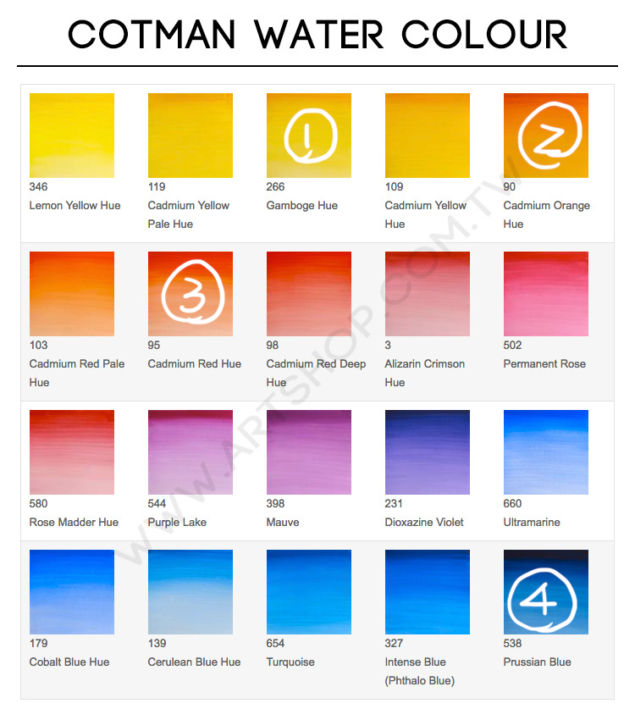
我用的水彩顏料與水彩筆
我們之後會慢慢進入水彩上色的課程, 大家可以先準備起來。 我們需要的是「透明塊狀水彩」與白色不透明水彩。🥰 沒有特定的牌子,我自己是用溫莎牛頓,你可以選擇你喜歡的品牌。 一開始可以先買「學生級」水彩就好了, 🤫因為我在GIA學習時,學校大部分的顏色也是給我們學生級水彩。 只有少數單色是專家級水彩。 我提供了我目前使用中的顏色讓大家參考, 目前的顏色已經足夠我繪製出大部分的彩色寶石。 溫莎牛頓學生級水彩(圖1、圖2) 溫莎牛頓專家級水彩(圖3) 這幾個顏色是很常用到的, 剩下的顏色你可以自由選擇要買哪些🥰 因為我也會因為好玩就去買一些水彩來試試看 或者買到顏色特殊的寶石,現有的水彩畫不出來就在去補買。 水彩筆的話, 我喜歡買硬一點的筆,因為比較好控制。 從以前用到現在最愛的是HWAHONG 356 0號與1號(圖四) 很好控制水量還有筆觸。 有任何問題都可以在下面留言問我~
Apr 16 •
不用模板就畫出寶石的方法How to Draw Gemstones Without Using Templates
附的影片,是我設計媽媽的手環的片段。 對我來說,模板在做多石設計的時候,有時候會遮蔽圖面反而會成為一種阻礙 所以我更偏向直接徒手畫出來。 那要怎麼畫出來呢? 可以試著拆解一下寶石,不要想著一口氣畫出來。 以梨形切割為例子, 它是由一個圓的下半部「︶」+2個「()」畫出來的 那就拆解他,先畫「︶」再畫「()」 多練習幾次,就可以畫出形狀完整的寶石囉! 如果你嘗試了,還是有哪邊卡卡的、畫不好 歡迎在下方留言 我可以解答。🫶 The attached video shows a clip of me designing a bracelet for my mom. For me, when working on multi-stone designs, templates can sometimes block the view of the composition and actually become a limitation. That’s why I prefer drawing freehand. So how can you do it? Try breaking the gemstone down instead of thinking about drawing it all at once. Take a pear cut as an example: It can be constructed from the lower half of a circle “︶” + two “()” shapes. So, break it down—start by drawing the “︶”, then add the “()”. With a bit of practice, you’ll be able to draw a complete gemstone shape! If you give it a try and still feel stuck or something doesn’t look right, feel free to leave a comment below I’ll help you out. 🫶
0
0

Mar 19 •
Templates are helpful—but why should you still learn to draw gemstones without them?
Gemstone templates of different shapes are definitely useful. So why do I only teach using circle templates and oval templates? Templates are great—especially when you're working on multi-stone designs. They help you align sizes quickly and improve your efficiency. 【But here’s what happens in real situations:】 Templates come with limited sizes and proportions. You might run into problems like: - The proportion you need isn’t available in your template - You want to scale up your design, but the template is too small - You’re working on a custom piece and need a very specific proportion—but there’s no matching template When that happens, if you rely only on templates…you get stuck. 【But if you know how to use circles and ovals—】 Everything changes. You’ll be able to: - Control proportions on your own - Scale your drawings freely - Draw almost any gemstone outline (including most faceted shapes) Because in reality,most gemstone outlines can be built from a circle or an oval, then adjusted and refined. 【The key isn’t to stop using templates—】 it’s to not be limited by them. I’m not saying you shouldn’t use templates. In certain situations (like multi-stone layouts),they are still incredibly efficient tools. But there’s one skill you need to have: 👉 Even without the perfect template, you can still draw it. If you’re still at the stage whereyou only feel confident drawing when a template matches perfectly— this mindset shift will be your breakthrough. 🔥
1
0
Mar 19 •
模板很好用,但為什麼你還是要學會「不靠寶石模板畫寶石」?
各種寶石形狀的模板很好用, 為什麼我的教學還是都只教使用「圓形模板」和「橢圓模板」? 模板確實很好用,尤其在畫「多寶石排列設計」的時候, 它可以幫你快速對齊尺寸、提高效率。 【有時候現實中會遇到的狀況是】 模板的尺寸與比例,是有限的。 你可能會遇到這些情況: - 想畫的寶石比例,模板上沒有 - 想要做設計放大,但模板尺寸不夠 - 客製化設計,需要「剛好某個比例」,但找不到對應模板 這時候如果你只依賴「模板」,就會畫不出來。 【如果你會用圓形+橢圓模板】 情況就完全不一樣了。 你可以: - 自己抓比例 - 自由放大縮小 - 畫出任何形狀的外輪廓(包含大部分刻面寶石) 因為幾乎所有寶石的外輪廓,本質上都可以從「圓」或「橢圓」去延伸出來。 【重點不是不用模板,而是不要被模板限制】 我並不是要你「不要用模板」。 在某些情境下(例如多石設計),模板依然是非常有效率的工具。 但你需要具備一個能力: 👉 就算沒有完整模板,你也能畫出來 如果你現在還在「一定要對到模板才敢畫」的階段, 那這個觀念,會是你突破的關鍵。🔥
1
0
1-7 of 7
powered by
skool.com/jewelry-aesthetics-atelier-8829
👉這是一個沒有美術天分,也能學會畫出「能製作的珠寶」的長期學習空間。
A place where anyone can learn to design jewelry that can actually be crafted—no artistic talent required.
Suggested communities
Powered by