

21h •
Another Manus lesson learned
I asked Manus how many credits approximately it would take to build me a landing page and the credits number it came up with was really high, so I said "Wow, that's a heck of a lot of credits. That would use up everything I've got and more. I'll hold off for now." And Manus said "Totally understand! Let me clarify though - I may have overestimated. Let me give you a more realistic breakdown:" and it scaled down what it was planning to build and gave me a much better estimate, but it also said "Alternative: Free/Low-Cost Options: Since you're watching credits, here are alternatives:" And it proceeded to tell me how it could build me a landing page completely free using zero credits! Guess which option I chose? 🙂
13d •
This Manus prompt can save you thousands of credits
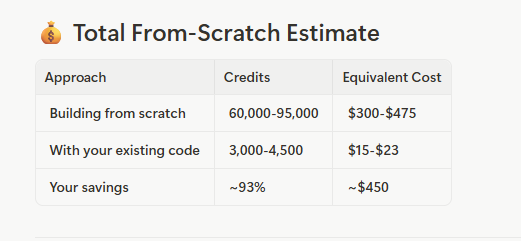
I love Manus for building powerful applications, but I don't love how many credits it uses in building them. So I had both Manus and ChatGPT do a deep dive into how and where exactly Manus was using credits when building apps. From that, I was able to come up with a prompt that saves upwards of 75% of the credits cost. A friend of mine used it last night, and he saved 93% Here's the prompt - tell Manus for every step: "Build the simplest solution possible, and don’t test; I’ll test manually. Do not rewrite or refactor any existing pages, routes, UI, or backend files unless I explicitly ask for a rewrite. Only add new files or minimally patch existing ones. Only generate what I explicitly request—nothing more, no helpers, no optimizations, and no best-practice refactors. If possible, generate the entire feature in one pass—only one shot. Do not break tasks into multiple steps. Give me a proposed implementation plan first. Do NOT start coding yet. Keep the plan minimal."

22d •
Grow on social media with this template!
Hey everyone! Ready to grow your social media in the month of December? Let’s commit to this 30 day storytelling plan. Who’s up for the challenge? Copy and paste these prompts into ChatGPT with your LLM training document (AI Business Manifesto) and create a 30 Day Storytelling Content Plan WEEK 1 — Origin Stories Day 1: “I started [business or brand] because I was tired of [struggle your ideal follower relates to].” Day 2: “The moment I realized I couldn’t keep living like that…” Day 3: “If you’ve ever felt [emotion your audience feels], you’ll understand why I created [offer or product].” Day 4: “I didn’t plan to start a business — it happened after [specific event or wake up moment].” Day 5: “This one experience changed the entire direction of my life and business.” Day 6: “I thought I wanted [goal], but what I actually needed was [truth you discovered].” Day 7: “Funny enough, [unexpected moment] was the reason I finally said ‘okay, I’m doing this.’” WEEK 2 — Lessons Learned Day 8: “I used to think [belief], but the truth is [new belief].” Day 9: “Here’s the mistake I kept making that was secretly ruining my [growth or confidence].” Day 10: “If I could go back, I’d tell my younger self this about [topic].” Day 11: “Nobody talks about how hard it actually is to [task related to your niche].” Day 12: “This lesson took me years to learn, but it changed everything.” Day 13: “When I finally stopped [old habit], that’s when things started working.” Day 14: “The day I realized I was doing it all wrong was the day my results started changing.” WEEK 3 — Social Proof Stories Day 15: “When [name] came to me, they were [describe struggle]. Now they’re [result].” Day 16: “The message that made my whole week: ‘[quote or win].’” Day 17: “Here’s what happened when one of my ___ tried [your method].” Day 18: “This result still gives me chills every time [share transformation].” Day 19: “Before using ___, they felt [pain point]. After, they [new feeling or outcome].”


18d •
Make automate w/ Kevin
I had a chance to look at Kevin's webinar RE: Make automation - honestly, I can think of an easier intro to Make than what he presented. For those of you 'following along' I wanted to highlight that for 'Idea' - don't feel obligated to stick to a keyword - if you published a blog or article use the URL for 'Idea' column - and write the prompt as the video describes - you can create social media posts to go with that article. *And, there's no reason why you can't map that image description to an AirTable column as well in case you want to tweak the image. You can still gen the image w/ Replicate as shown in video but this way you can also gen image using another tool. I took the liberty of extending the example GPT prompt a bit for those of you who do not like risking garbled text in an image: You are a helpful social media manager and content writer that writes platform specific social media content for LinkedIn, Instagram, Twitter and Facebook. Create a realistic image description to go with these posts. The image description must specify that image does not contain any text, letters or words Output in JSON using this format: { "linkedin":"linkedPostGoesHere", "instagram":"instagramPostGoesHere", "facebook":"facebookPostGoesHere", "twitter":"twitterPostGoesHere", "Image":"ImageDescriptionGoesHere" } Also, he mentioned it, but since it was beyond the scope of webinar did not go over Primary Key (PK) aka the Record_ID. I am highlighting this because I've seen a few instances where members of the community have indicated they want to create their own CRM - personally, I think there are plenty of affordable CRM platforms out there but if you feel adventurous - PKs will matter (a lot) along with FKs (foreign keys). So to fully leverage AirTable or other DIY CRM solutions, Google 'normalize a database' and map your entities...
Nov 15 •
Some things I've learned in recent vibe-coding.
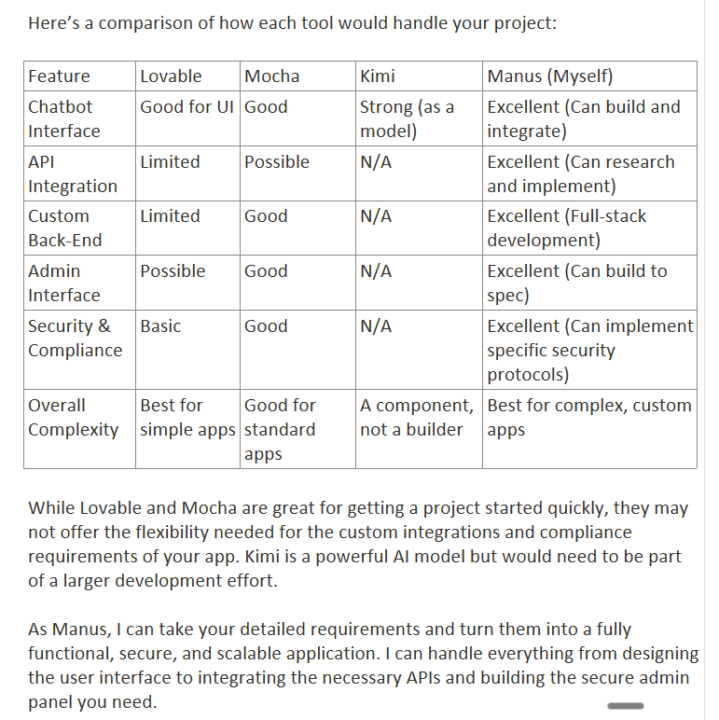
I'm working on a client project, building a very sophisticated web portal/app that has to do a lot of things, with API's, RAG databases, chatbots etc.I started in Lovable but ran into some limitations and last night I told Manus everything the app needed to do, and asked it which of four vibe-coding tools it would recommend for this particular project, and why, and as part of its reply, it produced an interesting table, which I've attached as a screenshot. As you'll see, surprise, surprise, it recommended itself. :) It also seemed to prefer Mocha slightly over Lovable. I didn't include Replit because I'm not fond of Replit since they "improved" it. So I decided to try it in Manus. Amusingly, at first Manus told me it would take 5 people and gave me an estimate of 2-3 months to build it! I asked if this was based on humans doing it, and it confirmed that it was so I asked, "Well, what would it be in Manus time, with just you and me building it?" And it changed its estimate to 6-10 days of work - but it pointed out that because of the speed with which it works, an "8-hour day" to Manus would go by in 5-10 minutes for me, in terms of it actually being done in front of me, and with us working together. Well I worked with it for a couple of hours last night and another hour today, and most of the app is built, looks great, and is working beautifully! The only downside is that so far it has taken about 2,800 credits. I think going forward I'll probably prototype in Lovable or Mocha which use a lot less credits, figure out all the kinks, and then build the real apps in Manus. Manus did some incredibly complex stuff without breaking a sweat, and it also constantly checked its work and when it found an issue, it just fixed it. Overall I'm very impressed with Manus as a vibe coder.
1-30 of 52

skool.com/jamoutai
Ready to join a community of entrepreneurs, gain access to AI prompts, tips and tools? Learn how to power your business with AI
Leaderboard (30-day)
1

🔥
+27
2

+23
3

+22
4
+14
5

+12
Powered by