
Write something
Jan 6 •
Serious About Building Your Personal Brand in 2026?
Anyone serious about building out your Personal Brand in 2026? I am looking for 10 people who want to turn their SPEAK Brand Voice KnowledgeBase into actual content on autopilot. If you’re tired of manually turning your stories, values and frameworks into posts, this new brand-voice app will plug into your SPEAK knowledgebase and spin out LinkedIn + Instagram captions, emails and a 30-day content calendar in under two hours. If you’re serious about building your Personal AI Knowledgebase and want to be a founding tester, comment “SPEAK APP” below or DM me and I’ll send you the details.

Dec '25 •
Still Stuck on Christmas Ideas? 👓🎄
Alright, hands up 🙌 who’s still pretending they’ve got all their Christmas gifts figured out… but secretly panic-scrolling between calls? 😂 I’ve gotta admit, after catching up with the amazing @Ina Jalil face-to-face (in Fiji last week) and seeing those AI Meta Glasses in person… I think I’ve officially found *the* gift (for @Adam Lopez Delon … and maybe myself 👀). Anyone else seen the AI Meta Glasses? I’d heard of them, but seeing the quality and how effortlessly they capture moments — it’s a total game changer, especially for content creators. You’ve got to check out Ina’s post and the footage of us and our girls — it’s wild how slick the results are. https://www.skool.com/gtmacademy-ai/lovely-to-meet-in-person 🤯 So now I’m curious — what’s everyone else secretly hoping “Santa (aka you)” brings this year? 🎁
Nov '25 •
JUST BUILT: End-to-End LinkedIn Post Automation in n8n! 🚀
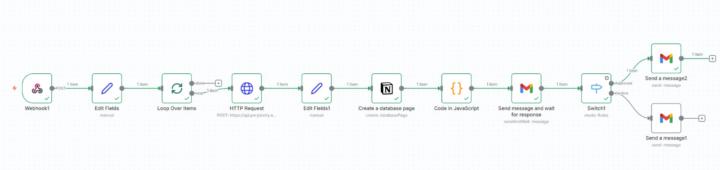
Has anyone heard of n8n for automating processes? Tried my first automation for LinkedIn this week while building SalesCommand Personal Brand — and helping Adam get online too. As busy entrepreneurs, showing up consistently is tough, especially as clients and work keep piling up. In talking with others, I realized this is a common challenge. So, I decided to take action and learned n8n to save 5 to 7 hours a week. (Check out the attached screenshot!) Here’s the simple version of how it works: → Fireflies: I use meeting notes with Fireflies → then n8n automatically picks us the transcript → Perplexity with custom prompting turns these into LinkedIn posts with AI (x3 posts for each meeting) → Notion then organizes them into a Content Calendar Schedule → Via Gmail, these captions are sent to Adam for approval → Via Gmail I get notified to tell me they are ready to post—all without extra effort. If you’re interested in seeing how I’m doing this or want to follow along, please like or comment. I’ll be testing it out this week, and if it works well, I’d love to host a masterclass for anyone keen to save time and show up more consistently online!

Nov '25 •
The Ultimate Holiday Photo & Card AI Toolkit 📸
Hey All! The holiday season is afoot, and we all know the biggest stressor: the perfect photo and the perfect card. Good news- Google's AI tools have become the ultimate holiday assistant, moving way beyond simple editing. Below are my top recommendations for conquering your creative tasks and making memories truly shine: ✨ Rescue the Near-Perfect Picture: Did someone blink, wear a distracting accessory, or forget to smile in your family photo? Not a problem: Google Photos now uses AI for personalized edits to remove items or correct expressions, ensuring everyone looks their authentic best. 🖼️ Instantly Transform Your Scene: Use Nano Banana in Google Photos' editor via "Help me edit" or the Create tab. You can instantly generate your photo in any festive style—like adding a Christmas sweater—with a simple prompt. 🕰️ Unlock Your Photo Archive: Use Ask Photos to instantly search and gather all your holiday memories from the last few years for a nostalgic journey. 🎞️ Preserve the Past: Give a second life to historical memories by using Google Photos to restore damaged old family photos or add motion with animation. 🎁 Gift a Custom Photo Book: Design a professional photo book right in Google Photos and send it directly for printing as a thoughtful gift. 🎬 Auto-Generate Highlight Reels: Create a festive video montage from your past images. Go to Photos’ Create tab, choose “Highlight video,” and use search terms like “family” or “winter” to let AI compile a perfect reel. 💡 Elevate Your Photography: Facing tricky lighting? Get immediate guidance and inspiration with Camera Coach or explore deeper Pixel Camera settings and Pro Controls for mastery.
Nov '25 •
Any AI Hacks Worth Sharing?
Hello team, I'm genuinely curious — what AI hack have you discovered recently that you're genuinely excited about? Here's the thing: some of the best solutions live in the comments of communities like ours, not in expensive software tools or masterclasses. So I'd love to encourage us to continue sharing insights with each other. You never know - the workflow automation that saved you an hour might be the exact breakthrough someone in this community has been searching for. What AI hack are you excited about right now? Share it in the comments below and include: ✨ The AI hack or tool you're using ✨ What specific problem it solved for you ✨ One quick takeaway others can walk away with Your contribution matters - let's lift each other up by sharing what we're learning. That's what this community is all about. Looking forward to learning from you all. - Evelyn
1-9 of 9

skool.com/gtmacademy-ai
Master AI implementation or be replaced. Get proven templates, live masterclasses & 1:1 strategy calls. Scale without adding headcount. FREE.
Powered by