
Write something

18d •
Our MNQ build of Quantivus
I want to walk you through the new MNQ version of Quantivus — why we built it, one setting you'll want to check, and one thing to keep in mind about how closely it tracks the NQ version. First, why the two can take different trades at all. NQ and MNQ follow the same Nasdaq index, but they're two separate contracts trading in two separate markets. MNQ is the smaller, lighter-volume contract, so its price chart isn't a perfect mirror of NQ's — it prints a few more small wicks, the occasional off-price tick, a high or low sitting a hair away from where NQ's lands. Quantivus makes its decisions by checking a long list of precise conditions, and each one is a pass/fail gate. When the underlying data differs even slightly, a borderline setup can clear the gates on one chart and just miss on the other. That's why your MNQ chart took a couple of trades the NQ chart didn't — the micro's noisier data tipped a marginal signal over the line. Here's what we changed. We rebuilt the MNQ version so it makes all of its decisions off the full-size NQ data — the same clean, high-volume feed the NQ version uses — while still placing your orders on the MNQ contract. In plain terms, it now thinks with NQ and trades with MNQ. Since both versions now read their signals from the exact same source, they produce the same setups on the same bars. You get NQ-quality decision-making with the smaller size and lower margin of the micro. One setup note, because of how this works. Since the strategy now reads the full-size NQ feed to make its decisions, it needs to know which NQ contract to pull. You'll find that in the strategy settings under "24. Data Configuration," in the field labeled Signal Instrument. It ships set to NQ ##-##, which automatically follows the current front-month NQ, so in most cases you won't need to touch it. If your data feed doesn't recognize that shorthand, just type in the matching NQ contract by hand, using the same expiration month as the MNQ you're trading — so if you're on MNQ 09-26, set it to NQ 09-26. The one thing to watch: that field takes the full-size NQ contract, not MNQ. MNQ is what you chart and trade; NQ is only what the strategy reads to make its decisions. When contracts roll each quarter, update it to the new month along with your chart, or leave the ##-## default in place and it will handle that for you.
2
0
19d •
Post-Market Recap — Wednesday, June 24
A clean green day where the short side and the divergence engine ran the show. Live, the suite banked about 1,580 — Quantivus twice, Nexum once — as a calmer but choppy tape ground lower in waves into tonight's Micron print. The market: after yesterday's global chip rout, today steadied but stayed two-sided. Oil cracked (Brent down more than 4% to an eight-month low) as the Iran picture eased, Treasury yields slipped, and stocks tried to rebound in the morning before fading into the close ahead of Micron's after-the-bell earnings — the season's grand finale and the market's verdict on AI-memory demand. The result was no clean trend, just a swinging, lower-drifting grind across a 450-point range. A day made for selective shorts, not for trend-riding. - Quantivus — the star, +$1,081 on two shorts. • Short 29,692.00 at 10:00:00, covered 29,668.00 at 10:01:08 (+478) • Short 29,471.75 at 2:40:00, covered 29,441.50 at 2:40:33 (+603) With memory and chip names sinking while parts of Big Tech held up, the Mag 7 fragmented exactly the way Quantivus is built to exploit. Its divergence engine read the spread short both times, morning and afternoon, and both resolved fast to target. - Nexum — back in action, and it made it count. +$498. Short 29,891.25 at 11:00:00, profit target 29,866.25 the same minute. After yesterday's precautionary review, Nexum returned to the lineup and caught the top of the mid-morning bounce, riding the rollover to a clean, quick winner. - Praedor (sim) — net minus $404 on two MNQ trades. Long 29,767.00 at 9:55:00, stopped 29,562.50 at 10:20:06 (minus 409); short 29,493.00 at 1:20:00, stopped 29,490.50 at 3:54:07 (plus 5). Its fade-the-sweep logic kept reaching for a bounce the grind would not give — the early drop it faded was trend, not a sweep. A small, instructive sim day. - Volturon, Parallax — no trade. The swinging, trendless tape gave Volturon's ADX no sustained direction, and Parallax no qualifying regime.
2
0
21d •
Introducing AEME — our newest NQ/MNQ strategy, and how we're rolling it out
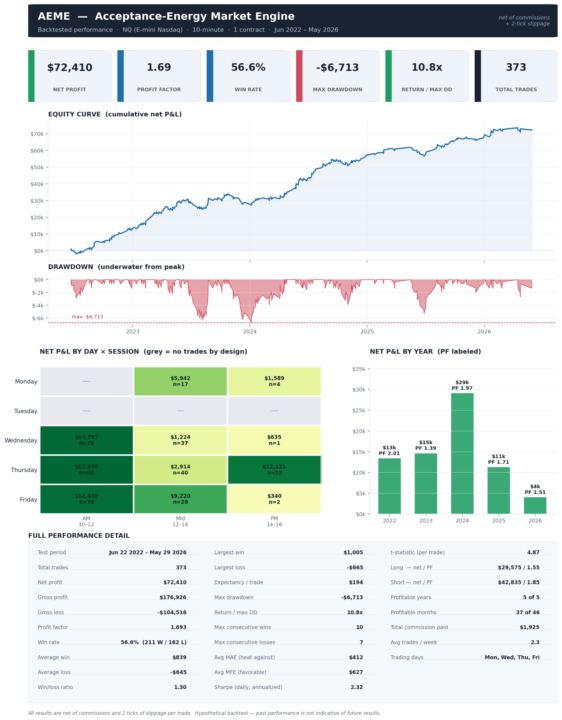
We're happy to introduce the newest addition to the Volturon suite: AEME, short for Acceptance-Energy Market Engine. It trades NQ and MNQ on NinjaTrader 8, and the name says what it does — it measures the energy behind an unusual price move, then judges whether the market accepts that move and continues, or rejects it and reverses. We put AEME through a four-year backtest on a single NQ contract, with commissions and two ticks of slippage already taken out. A few things stood out, and they're worth sharing plainly: - A profit factor of 1.69 and a win rate near 57 percent. - Every calendar year from 2022 through 2026 was profitable — and the strongest years were the most recent ones, not the oldest. - It earns on both the long and the short side, so it isn't simply riding the market higher. - The deepest equity dip across the full four years stayed under 6,800 on one contract. That's a strong backtest and we're proud of it. But a backtest is history, and we won't pretend otherwise. Here's how we're handling it, and what we ask of you. We are running AEME in simulation in our own accounts before we put real money behind it, and we encourage you to do exactly the same. Load it on a 10-minute chart in sim, on your own broker and data feed and watch how it behaves for yourself — especially the fill quality on entries, which is where live trading and a backtest are most likely to part ways. We would rather you reach your own conclusion from your own results than take our numbers on faith. Two notes on expectations. AEME's gains arrive in bursts, not as steady daily income, so it's best judged by the week and the month rather than any single day. And like everything we build, it's designed to work as part of a diversified suite, not to carry an account on its own. Capital preservation comes first; growth follows. Attached you'll find the AEME user guide covering setup, settings, the trading schedule, and the complete performance breakdown, along with a separate tear sheet. The defaults are the tested configuration, so there's nothing to tune to match what we've shown. Download the AEME strategy here
2
0
21d •
Quantivus Update — Q2 2026 Component Weight Refresh
Hi everyone, We're pushing a routine update to Quantivus today that refreshes the Nasdaq-100 component weights used by the CDI signal engine. This is a calibration update only — no logic changes, no new parameters, no settings to adjust on your end. What changed: The seven Mag 7 stocks that Quantivus tracks (NVDA, AAPL, MSFT, AMZN, GOOGL, TSLA, META) shift in index weight over time as their market caps move relative to the rest of the Nasdaq-100. We update these weights quarterly to keep the divergence calculation accurate. The biggest movers this quarter were Microsoft (down about 1.5 percentage points) and Meta (down about 1 point), reflecting broader market rotation. What you need to do: 1. Download the update at https://volturon.com/software-downloads 2. Remove Quantivus from any active charts. 3. Import the new QUANTIVUS.cs file via Tools > Import > NinjaScript Add-On. 4. Re-add the strategy to your chart. 5. Verify your settings carried over (they should, but a quick check never hurts). All of your existing parameters remain unchanged. The strategy will compile and run exactly as before, just with more accurate component weighting. We plan to do these weight refreshes quarterly going forward, timed to the Nasdaq rebalance review dates. The next update will come in late September. As always, reach out if you have any questions.
2
0
28d •
Volturon_MNQ
We've released a newly tuned version of Volturon for MNQ. You can download it here What's new in this build: - Profit target: 40 ticks - Protective stop: 100 ticks - VWAP entry filter: off by default - RSI entry filter: off by default - Friday filter: no new positions opened on Fridays Both the VWAP and RSI filters are still built into the strategy and can be switched back on at any time — Volturon_MNQ just runs without them by default now, keying off its core EMA crossover signal. On a single MNQ contract, the target and stop work out to roughly $20–25 of profit against about $50 of risk per trade, scaling proportionally if you run more contracts. The Friday filter is the change we're most confident in: walk-forward testing across two multi-year windows (2022–2024 and 2024–2026) showed that sitting out Fridays improved consistency in both — a higher profit factor and shallower drawdowns. We tested the full configuration over those same windows, and it held up positive in both. One more note: going forward, our daily briefs and recaps will follow Volturon_MNQ on the micro contract rather than the e-mini — same system and coverage, now reported on MNQ. If you have any questions about the install or the changes, just reply.
2
0
1-17 of 17
powered by

skool.com/futures-trading-group-7221
Automated trading software for Nasdaq 100 futures. Algorithmic strategies for day trading with institutional precision. Join us!
Suggested communities
Powered by