

May 27 •
What If It Doesn’t Work? (I spent the last 2 hours writing this, hope you enjoy)
I was on a call this week and something happened that stayed with me longer than I expected. We were talking about the next stage of my business. Not a small tweak. Not a little side idea. The real next stage. The bigger move. The thing that requires more responsibility, more pressure, more moving parts, and probably a lot more moments where I’ll have to figure things out while I’m already in motion. I was explaining it the way I see it in my head. The direction. The opportunity. The machine I want to build. The version of the business that doesn’t just make money, but compounds. The version that can scale without depending on me doing every little thing forever. And then the person paused and asked me a very normal question. “What if it doesn’t work?” I remember sitting there for a second, because the question almost felt like it came from a different world. Not because it was a bad question. It’s probably the question most people would ask. It’s the responsible question. It’s the safe question. It’s the question people ask before they start posting, before they launch the funnel, before they send the message, before they make the offer, before they commit to something that might make them look stupid if it doesn’t land. But the strange thing was this. That thought had never crossed my mind. Not once. And I don’t mean that in a motivational speaker way, like I believe everything I touch turns to gold. That’s definitely not true. I’ve had things flop. I’ve had ideas I thought were amazing, and the market just looked at them and said nothing. I’ve had ads burn money. I’ve had funnels that looked perfect in my head and then did absolutely nothing in real life. I’ve had content that I thought would hit hard and then it got ignored like I posted it into an empty room. So it’s not that I don’t believe things can fail. I know they can. I think the difference is that I don’t see failure as the conclusion anymore. I see it as one of the rooms you have to walk through before you get to the room where things start making sense.

May 27 •
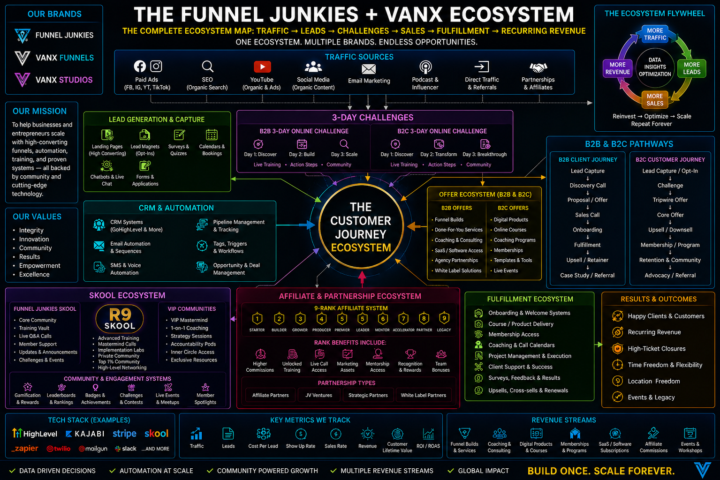
🔥 FUNNEL JUNKIES + VANX ECOSYSTEM ORGANOGRAM 🔥
To make things simpler and easier to understand, we created the official Funnel Junkies + VanX Ecosystem Organogram for all affiliates and community members. This gives you a clear visual overview of: • The ecosystem structure • Traffic → leads → sales → fulfilment flow • B2B & B2C pathways • Community, affiliate & automation systems • Revenue streams & support structure Everything is mapped out in one place so you can better understand how the entire ecosystem works together. You can: • Print it out • Save it to your phone • Use it as your desktop wallpaper/background • Keep it nearby while learning the system It’s just something cool and useful to have while growing inside the ecosystem We hope you enjoy it, and we would genuinely love your feedback on it once you’ve had a look. Let us know what you think

Sep '25 •
FirstPromoter Walkthrough
Hi Affiliates! This video gives you a short walkthrough of FirstPromoter. You will see where you can find your affiliate link/s, where to see your referrals, as well as your payouts. This link is the "help" page of FirstPromoter, here you can view some of the FAQs and other help categories: https://help.firstpromoter.com/en/

Mar 11 •
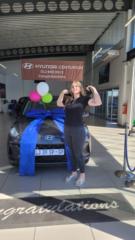
Facebook Basic's with Megan
Thanks to everyone that made the time to sit on my session today - I appreciate all of you! I have posted the training in the courses under recordings - you'll see my name there, and is where I'll load all the recording regarding any Facebook training. https://us06web.zoom.us/rec/share/Z2Mrg6BH1518b6XDSykQxwKNzIJa3ealq-DZ1IwUWj_AAz2y1VC0H54XRFpNezsD.CqQtOJM1wqT1-lNp Passcode: sy@tR0w! I'm sharing the link here as well, just in case See you in the next session
Sep '25 •
Quick-Start Guide
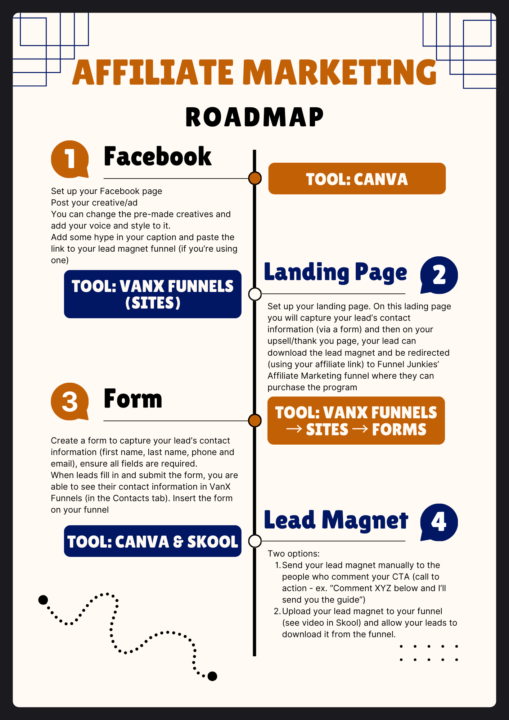
Good day Affiliates This is a quick-start guide that I made for you. These are the bare minimum things you need to do to start your affiliate journey. 1. Your Facebook needs to be set up. We recommend creating a new Facebook page for your affiliate marketing business, this is so that there isn't such a big jump from your "official" business to the affiliate marketing. However, there are some exceptions and it's up to you to decide - if your current business can link with affiliate marketing then you can post and share your affiliate marketing posts on your already-existing Facebook page, but if the two are too different (and your official business has nothing to do with affiliate marketing, or the two don't link together easily) then we recommend that you create a new page to post your affiliate content on. We have provided pre-made creatives for you to use in your posts. You can make changes to the creatives (change colours, certain phrases etc) to add your own voice and style. In your caption, create some hype around the lead magnet and/or digital nomadism. You want to get people excited so that they would feel inclined to click on your link. For this step you will mainly use Canva; either to create your post and lead magnet, or to download the ones that are already created for you. 2. Your funnel needs to be set up. The landing page (first page of your funnel) is the place where you will capture your lead's contact information so that you can contact them again at a later stage (either to nurture them, follow up with them, or upsell them into the program if they didn't buy the first time). Please refer to the video in the message below "How to Set Up Your First Affiliate Marketing Funnel", to see how to set up your buttons and links within the funnel. Once your lead has filled in and submitted the form on your landing page, they are redirected to your upsell page (second page of your funnel), this is where they will be able to download the lead magnet that your post promised (again refer to the video to see how to set this up). Once they have downloaded the lead magnet they have the option to go to the Funnel Junkies page (with your affiliate link - again refer to the video for the set up).
1-9 of 9
skool.com/funnel-junkies-sa
A growing Community focused on affiliate marketing, online business and funnels that turns traffic into income effortlessly.
Leaderboard (30-day)
1

+673
2

+534
3

+217
4

+208
5

+191
Powered by