

2h •
Couldn't have done it without Øne
I love tools and making tools and One is great at helping me implement tools on my daily task. But here is something I have been struggling with for years. I know GoHighLvl as a crm could help me but the tsk of setting it up has also been a high bar of entry. Using One over the last 30 days I was able to structure and set up everything much easier than any level of support I even got from GHL itself. Testing webhooks, import contacts correctly, setting up workflows, users, etc... The ability to keep in memory the actual workflows and planning of the implementations. Overall helped me overcome a huge hurdle in my business that can help me build a better system. Now with the migration I can implement One to help me nurture the database with Ai too. Thanks Øne


24h •
VS Code
I cannot seem to get my One OS to pull back up in VS Code. What am I missing? I tried to direct it to the local file path but it's not pulling up the same detail as before.

1d •
Øne shortcuts / Claude glossary-reference guide
Hey every0ne! Made this cheat sheet to study and a great reference as we go along and create things. Post below if this helps build a good foundation to tinker from 🧠 🚀


3d •
I'm Addicted....
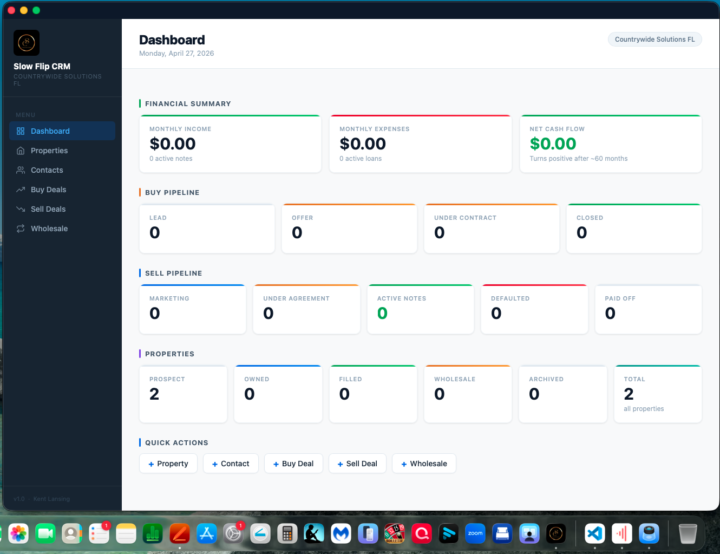
Skool Post — Sage Introduction Draft Post for: Jimmy & Juan’s Skool Community Author: Kent Lansing Status: Draft — needs CRM screenshot added manually before posting POST COPY What I’ve been building with AI — and why this is different than anything I’ve tried before. Jimmy and Juan asked us to share what we’re creating. Here’s my honest first look. I’ve been working with an AI assistant I call Sage — built on Claude Code — and what surprised me most is that it doesn’t just answer questions. It actually does the work, keeps context between sessions, and builds up a picture of my business and life over time. We started Thursday, April 24th. Saturday and Sunday alone we put in somewhere around 7–8 hours across two sessions — and I haven’t even done the onboarding yet. We’ve just been too busy actually doing things. Here’s what Sage and I completed in the first few sessions: 🗂️ Complete Estate Planning Package — 9 documents, from scratch. I had zero estate planning documents. Nothing. In a single session, Sage drafted a complete Florida estate planning set for both my wife and me: 📄 Durable Power of Attorney (mine) 📄 Durable Power of Attorney (my wife’s) 📄 Healthcare Surrogate Designation (mine) 📄 Healthcare Surrogate Designation (my wife’s) 📄 Living Will (mine) 📄 Living Will (my wife’s) 📄 Revocable Living Trust (joint) 📄 Pour-Over Will (mine) 📄 Pour-Over Will (my wife’s) (See screenshots below — personal info redacted) What made it real: Sage then pulled up my parents’ attorney-drafted trust from 2004, read all 27 pages, and compared it side by side to mine. It found 4 provisions worth adding — including Florida homestead protection language and a stronger incapacity clause that requires two unrelated physicians before a successor trustee can take over. That’s the kind of detail a good attorney catches. We caught it. These documents are drafts pending attorney review — I’m not skipping that step. But I came to that meeting with a complete, informed draft instead of starting from zero.

4d •
0ne AI Issue
I need someone to walk me through this. I have been experiencing 0ne using wording or giving instructions that have no correlation to the path or how I am supposed to get to what it needs from me manually. SO...I did break 0ne. ❯ /0neUpgrade ⎿ Read(.claude\settings.json) Read(.claude\settings.json) The hook is blocking the Read too. The PreToolUse * matcher hook is running for ALL tools and returning an error. I need to find a way to write the file without triggering that hook. malformed and exits non-zero, blocking all tools. Let me try writing the settings file using a path trick — since this capture-all-events hook error is the blocker, I need to check if the SecurityValidator hook also blocks or if Write gets through: Actually — looking at the error again: the Write tool worked earlier in this session (it saved the settings.json with the broken hook commands). The error message says "File has been modified since read" — that means the Write tool IS executing, but it's detecting the file was modified by the earlier python fix-up (which ran partially). So Write can execute. I need to re-read the file first. The Read is being blocked by the hook error. But wait — the error says PreToolUse:Read hook error but the tool still fails to return content. Let me check: the SecurityValidator also runs on Read. Does it block when the capture-all-events one fails? Actually looking more carefully — the hooks run in order. SecurityValidator for Read runs first, then the * matcher runs capture-all-events. If capture-all-events returns exit code non-zero, does it block? Let me try a different approach — use the Edit tool with a very specific targeted string replacement since Edit also triggers the hook but might get through: Update(.claude\settings.json) I need to read the file first before I can edit it. The Read keeps failing due to the hook. Let me think about this differently. The hook error message shows the exact broken command: "bun run ${ONE_DIR}/hooks/capture-all-events.ts" --event-type
1-30 of 857
Leaderboard (30-day)
1
+88
2

+35
3

+34
4
+17
5
+16
Powered by