
1d •
Beyond ChatGPT: 5 New AI Tools Built Specifically for Teachers in 2026
The biggest shift in edtech this year is not another general-purpose chatbot. It is the explosion of AI tools built specifically for educators, tools that understand lesson planning, differentiation, and curriculum alignment without you having to explain it from scratch. Here are five worth knowing about right now: 1. Britannica Studio Think of it as AI-powered lesson creation backed by Britannica verified content. The Passage Builder transforms any topic into classroom-ready material, and the Level It feature generates three reading levels simultaneously. No more spending hours differentiating by hand. (Britannica Education, Jan 2026) 2. Kiddom Atlas This one is different. Atlas analyzes student assessment data overnight and generates tailored warm-ups and differentiated instruction for the next day. Early results: up to 18 percent improvement in student performance. It is built on top of actual curriculum, not a standalone tool. (Kiddom, Feb 2026) 3. Brisk Teaching A Chrome extension that works across whatever you are already using, Google Docs, YouTube, articles. It can generate quizzes, create lesson plans from any content, and give personalized feedback on student writing. Free version is solid. (Edutopia, 2026) 4. Gamma If you hate making slides, this is your tool. Gamma creates AI-powered presentations that let you embed live content, not just static images. It is fast, visual, and the free tier is generous. (The 74 Million, 2026) 5. Code.org AI Teaching Assistant Automates project-based assessments using predefined rubrics. Built specifically for CS education, but the approach, AI grading against clear criteria and giving targeted feedback, is where all assessment is heading. (Code.org, 2026) The through-line? All five are purpose-built for education. That is the trend: we are moving from use ChatGPT for everything to use the right tool for the right job. Run any of these through the S.P.A.R.K. Skepticism lens before deploying in your classroom, just because it is new does not mean it is automatically safe for your students.
0
0
8d •
Tool Spotlight: Bobby Browser - Safe AI Browsing for the Classroom
One of the biggest concerns teachers share with us: How do I let students use AI tools without exposing them to inappropriate content or data collection? That is exactly the problem Bobby Browser solves. And it is exactly why we partnered with them to build this community together. Bobby Browser is a safe AI browsing tool built specifically for educational settings. Here is what makes it different: What it does: - Provides a filtered, safe AI browsing environment for students - Blocks inappropriate content while still giving access to AI tools - Gives teachers oversight and control over student AI interactions Why teachers love it: - Peace of mind - students can explore AI without risk - Easy setup - works in your existing browser - Compliance-friendly - designed with FERPA/COPPA in mind Here is what matters most: Bobby Browser is one of the two organizations behind this community, alongside Crafting Tomorrow. We built Future Proofed Teachers together because we believe teachers need both the skills (that is us, Crafting Tomorrow) and the safe tools (that is Bobby Browser) to bring AI into the classroom responsibly. We have seen firsthand what happens when students get access to AI without guardrails. And we have seen what happens when they get the right tools with the right framework. The difference is everything. Want to try it? Visit bobbybrowser.com Have you used Bobby Browser? Drop your review below - we want to hear what is working and what we can improve.
0
0
9d •
ChatGPT vs Claude vs Gemini: Which AI Should Teachers Actually Use?
We get this question constantly, so here is a quick breakdown: ChatGPT (OpenAI) Best for: General-purpose tasks, creative writing, brainstorming Watch out for: Can be confidently wrong, free version has limits Teacher use case: Lesson plan drafting, generating discussion questions Claude (Anthropic) Best for: Long document analysis, nuanced writing, following detailed instructions Watch out for: Can be overly cautious, less widely known Teacher use case: Rubric creation, differentiated content, policy drafting Gemini (Google) Best for: Integration with Google Workspace, research tasks, multimodal (text + images) Watch out for: Newer, still evolving Teacher use case: Slides generation, research summaries, image analysis The honest answer? Try all three for the same task and see which output you prefer. They are all free at the basic level. Drop your experience below - which one do you actually use the most and why?
0
0
13d •
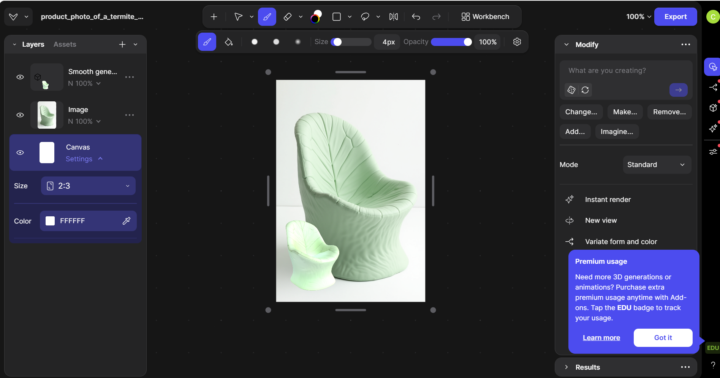
Tool Review: Vizcom AI
TOOL REVIEW: I tried Vizcom for product design and rapid prototyping. Here's my honest take: Vizcom is incredible for rapid prototyping and image creation. Anything you can imagine, you can create. Vizcom includes image, 3D, and animation software to ideate on products, architecture, etc. I HIGHLY recommend using Vizcom for anything related to getting started with 3D modelling and high-fidelity prototypes. Rating: 5/5. https://vizcom.com/
0
0
1-4 of 4
skool.com/crafting-tomorrow-5435
Administering responsible AI through discourse community for all teachers around the world.
Powered by