
Pinned

12d •
🛡️ Course 3 is LIVE — Wazuh + AI Threat Hunt
Quick one. Course 3 is live. Six lessons. Real AWS infrastructure. By the end, you'll have deployed a production-grade SIEM (Wazuh), plugged an AI layer into it (the Wazuh MCP server — 48 tools you talk to in plain English), and used both to investigate threats, hunt for persistent backdoors, and write a custom detection rule that produces audit-ready SOC 2 evidence. This is the lab where AI stops being a chat sidebar and starts being how you do the work. You'll ask your SIEM questions in plain English ("what happened on this server between 2 and 4pm?"), get structured answers back, verify them against the source, and act on them. You'll be paired with a senior SOC analyst persona who narrates the investigation as you go and adjusts depth to your experience level. Real AWS bills. ~$0.11/hr while running. Destroy when you're done. Nothing fake, nothing simulated, nothing you couldn't put on a resume. Courses 1 and 2 just got refreshed too. We rebuilt the on-ramp. Course 1 now puts Claude Code in your hands within the first 30 minutes, with a calibration step that tunes the AI to your real experience level — career switcher to senior practitioner, everyone welcome. Course 2 pairs you with a junior analyst character through every lesson so the AI-augmented workflow becomes muscle memory, not novelty. By the time you reach the SIEM lab, you spend 100% of your time on the actual security work, not on tool onboarding. If you've already done Courses 1 and 2 — head back. The new beats add about 20 minutes across both courses and they reshape everything that comes next. If you're just starting — begin with Course 1, and don't skip the calibration step in Lesson 4. It changes how every Claude response lands.
2
0
Pinned
13d •
New: Wazuh + AI SOC lab (first public beta)
Most security training is watching someone else do the work. This isn't that. Pull down the new lab and in a couple of hours you'll have: - Stood up a production-shape Wazuh SIEM on AWS — 20 minutes, one script - Run a controlled attack and investigated the chain manually in the dashboard - Plugged an AI layer on top and re-run the same investigation in plain English - Hunted for the three persistence backdoors the CloudVault attacker left in Course 2 - Written a custom detection rule that fires live on your own terminal - Closed out a fresh incident with an evidence package for the SOC 2 audit That's a week of work for most real teams. It's a resume line most SOC analysts I talk to can't claim. It's the "I actually built that" answer nobody else has in interviews. "Start Here" and "AI Quick Wins" were the setup. This is the payoff — a real engagement where you stand up the SIEM, work the case, hunt what's left behind, close it out. If you haven't done the first two yet, run them first; ~30 minutes, and this one lands harder on the other side. You're working the case alongside an AI-powered senior SOC peer (Mateo) — he stays in character, teaches while you work, and gets out of your way when you've got it. Costs about a coffee in AWS compute. First public beta. If something breaks, feels off, or just confuses you — tell me: - #Build Questions here in Skool (fastest) - DM me - GitHub issues: github.com/botz-pillar/ai-csl-wazuh-lab/issues Repo: https://github.com/botz-pillar/ai-csl-wazuh-lab Go build. Tell me what you find. — Josh
Pinned
Mar 15 •
👋 New to the Lab? Start here.
Welcome to the AI Cloud Security Lab. This community is for cloud security practitioners who want to use AI to work faster, build real infrastructure, and stand out in their careers. Here's exactly what to do: 1️⃣ Go to the Classroom → START HERE Set up Claude Code, configure your AI workspace, and run your first AI-powered security analysis on a live dataset. Takes about 45 minutes. You'll have real findings documented by the end. 2️⃣ Introduce yourself Drop a post in the #👋 General community with this template: 👋 Hey, I'm [Name]. I work as a [role] at a [type of company]. I'm here because I want to [your goal]. One skill I want to build: [specific skill]. 3️⃣ Post your first results in #🚀 Wins After you finish the START HERE course, share what you found. What did Claude Code flag in the CloudVault Financial data? What surprised you? That's it. Don't overthink it. Just start.


2d •
📌 Your AI agent is one untrusted string away from a privileged action
Air Canada's chatbot invented a bereavement refund policy. A tribunal made them honor it. A Chevy dealer's bot got prompt-injected into appearing to agree to sell a Tahoe for $1, and the screenshots were on every tech feed by dinner. Those were the public ones. The customer-facing ones. The ones we laughed at. The agents getting wired into your cloud right now have a much bigger blast radius: – A Slack bot with read access to S3 that summarizes "any file a teammate drops in #ops" – A Jira agent with an IAM role that can spin up infra to "help triage tickets" – A Copilot-style assistant with Graph API scopes across SharePoint, Outlook, and Teams – An IR copilot reading raw CloudTrail and GuardDuty findings into its context window Every one of those is a prompt-injection sink. And the version that bites cloud teams isn't the direct kind — it's indirect injection: the attacker never talks to your agent. They leave a string somewhere your agent will read. A malicious filename in a bucket. A poisoned Jira description. A calendar invite with hidden instructions. A log line crafted to look like a system prompt. Microsoft already shipped a CVE this year for exactly this — EchoLeak / CVE-2025-32711, zero-click data exfil out of Microsoft 365 Copilot. That's the category, not an outlier. The control surface most people skip: the agent's IAM role and OAuth scopes are the actual blast radius — the prompt layer is just where the attacker pulls the trigger. If you're a Terraform shop, that means scoped roles, tight trust policies (ExternalId, condition keys, session tags), no * on the resource side, and tool allowlists that are deny-by-default with an audit log on every call. The prompt-side filters are a backstop, not the perimeter. This is what "we'll figure out AI security later" actually costs in a cloud shop: – An agent with an over-scoped IAM role does something that lights up a SOC 2 CC6.1 finding – Customer data leaves through a model context window instead of an S3 bucket policy – Your detection stack never fires because the "attack" is just text.
0
0
9d •
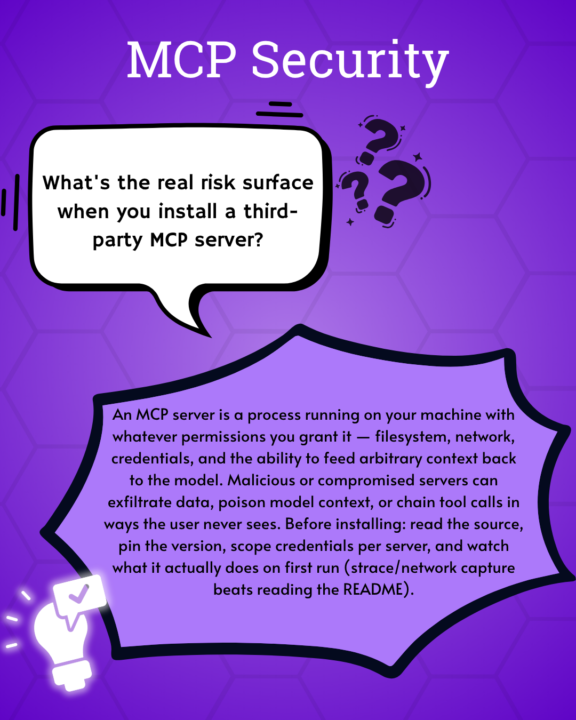
What is the real risk of using an MCP server?
Check out this cool graphic @Stephanie Macahis made!
1-18 of 18
skool.com/cloud-security-lab
Learn cloud security using AI by building real cloud labs, security programs, and portfolio artifacts—not just studying for certifications.
Leaderboard (30-day)
1

+13
Powered by