

Nov 6 •
SyncroMSP
Every possible SyncroMSP Tool operation is included: 📋 Available Operations (20 total) 📇 Contact (5 operations) • Create a contact • Delete a contact • Get a contact • Get many contacts • Update a contact 🔧 Customer (5 operations) • Create a customer • Delete a customer • Get a customer • Get many customers • Update a customer 🔧 Rmm (5 operations) • Create an RMM alert • Delete an RMM alert • Get an RMM alert • Get many RMM alerts • Mute an RMM alert 🔧 Ticket (5 operations) • Create a ticket • Delete a ticket • Get a ticket • Get many tickets • Update a ticket $45 on n8n, included with your membership here: https://www.skool.com/beyond-nodes-automation-lab-2006/classroom/a33a0c19?md=a5ddf0c3f1c34e3daa5d2e4ae53ac0cb
1
0
Oct 20 •
Every Workflows sold in Aug-Sep added to Classroom content!
It's been a bit since I've done a release, and we just broke $4k in workflow sales (you get them all included in the cost of membership) so here is every new workflow that has sold since the last were added. I will eventually create a post for each of these, but I promise I won't email you for each one haha! Check them out in the Classroom -> Paid Workflows Microsoft To Do Tool MCP Server ($15) Google Drive Tool MCP Server ($45) Splunk Tool MCP Server ($45) Matrix Tool MCP Server ($25) Microsoft SharePoint Tool MCP Server ($15) Dropbox Tool MCP Server ($45) Trello Tool MCP Server ($45) Coda Tool MCP Server ($45) Elastic Security Tool MCP Server ($45) MISP Tool MCP Server ($22) Harvest Tool MCP Server ($105) - You will even get access to this soon! And it's updated thanks to community feedback!
Aug 11 •
🚀 New Workflow: Google Contacts Tool MCP Server with 5 operations for your AI agents
Complete MCP server exposing all Google Contacts Tool operations to AI agents. Zero configuration needed - all 5 operations pre-built. ## ⚡ Quick Setup 1. **Import** this workflow into your n8n instance 2. **Activate** the workflow to start your MCP server 3. **Copy** the webhook URL from the MCP trigger node 4. **Connect** AI agents using the MCP URL ## 🔧 How it Works • **MCP Trigger**: Serves as your server endpoint for AI agent requests • **Tool Nodes**: Pre-configured for every Google Contacts Tool operation • **AI Expressions**: Automatically populate parameters via `$fromAI()` placeholders • **Native Integration**: Uses official n8n Google Contacts Tool tool with full error handling ## 📋 Available Operations (5 total) Every possible Google Contacts Tool operation is included: ### 📇 Contact (5 operations) • **Create a contact** • **Delete a contact** • **Get a contact** • **Get many contacts** • **Update a contact** ## 🤖 AI Integration **Parameter Handling**: AI agents automatically provide values for: • Resource IDs and identifiers • Search queries and filters • Content and data payloads • Configuration options **Response Format**: Native Google Contacts Tool API responses with full data structure **Error Handling**: Built-in n8n error management and retry logic ## 💡 Usage Examples Connect this MCP server to any AI agent or workflow: • **Claude Desktop**: Add MCP server URL to configuration • **Custom AI Apps**: Use MCP URL as tool endpoint • **Other n8n Workflows**: Call MCP tools from any workflow • **API Integration**: Direct HTTP calls to MCP endpoints ## ✨ Benefits • **Complete Coverage**: Every Google Contacts Tool operation available • **Zero Setup**: No parameter mapping or configuration needed • **AI-Ready**: Built-in `$fromAI()` expressions for all parameters • **Production Ready**: Native n8n error handling and logging • **Extensible**: Easily modify or add custom logic Download here: https://www.skool.com/beyond-nodes-automation-lab-2006/classroom/a33a0c19?md=d4bd4259a9c046c8b5d25b7e256dd28c
Aug 19 •
New workflow - Asana Agent, 1 shot updates via chat or webhook
🤖 Asana AI Assistant: Project Management via Natural Language Transform chat conversations into Asana actions - This workflow creates an AI agent that lets users manage Asana through conversational commands instead of manual clicks. Key Use Cases: ✅ Accelerated Project Creation→ "Create 'Q3 Campaign' project in Marketing workspace with Design team"→ Generates projects with correct teams/workspaces in 1 request ✅ Dynamic Task Management→ *"Add 'Finalize assets' subtask to TSK-123"*→ "Update 'Blog Post' due date to Friday"→ Modifies tasks/subtasks without searching ✅ Automated Reporting→ "Show open tasks in Product Launch"→ "List last 5 projects in Design workspace"→ Pulls live data via conversational queries ✅ Collaboration Boost→ *"Add comment to TSK-456: Client approved visuals"*→ Posts context-rich updates while multitasking Ideal For: - Managers creating projects during calls - Teams updating tasks via Slack/chat - PMs generating quick status reports - Reducing Asana onboarding friction Get it in the classroom
2
0
Aug 5 •
🚀 New Workflow: Instant WordPress MCP Server for Your AI Agents 🛠️
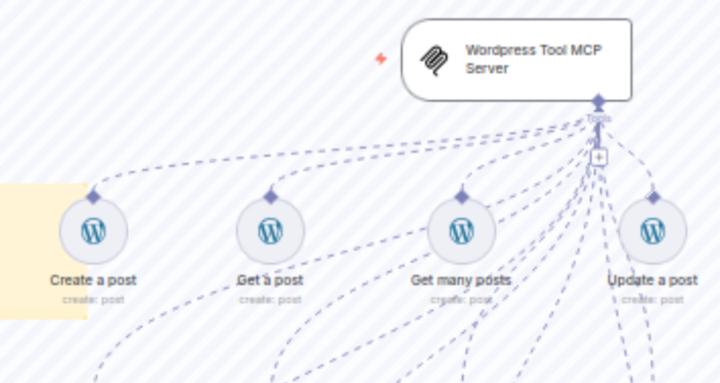
Hey everyone, Super excited to share a new n8n workflow that will make connecting your AI agents to WordPress an absolute breeze. I've built a complete WordPress Tool MCP Server. This is a zero-configuration, plug-and-play server that exposes all 12 native WordPress Tool operations to any AI agent. No more building out individual tools or mapping parameters – it's all done for you. ⚡ Quick Setup Getting started is incredibly fast: 1. Import this workflow into your n8n instance. 2. Activate the workflow to start your MCP server. 3. Copy the webhook URL from the MCP trigger node. 4. Connect your AI agents using the copied MCP URL. That's it! Your AI agent can now create, get, and update WordPress posts, pages, and users. 🔧 How it Works - MCP Trigger: Serves as a single server endpoint for all AI agent requests. - Tool Nodes: Pre-configured for every single WordPress Tool operation. - AI Expressions: Automatically populates all parameters via $fromAI() placeholders. Your AI just needs to provide the values. - Native Integration: Uses the official n8n WordPress node with full error handling and retry logic. 📋 Available Operations (12 total) This workflow includes every possible operation from the native n8n WordPress node. 🔧 Post (4 operations) - Create a post - Get a post - Get many posts - Update a post 📄 Page (4 operations) - Create a page - Get a page - Get many pages - Update a page 👤 User (4 operations) - Create a user - Get a user - Get many users - Update a user ✨ Key Benefits - Complete Coverage: Every WordPress Tool operation is available out-of-the-box. - Zero Setup: Truly plug-and-play. No manual parameter mapping required. - AI-Ready: Built from the ground up for seamless integration with AI agents. - Production Ready: Includes native n8n error handling, logging, and reliability. - Extensible: Easily modify the workflow or add your own custom logic. You can connect this MCP server to any AI agent or workflow, including Claude Desktop, custom AI apps, other n8n workflows, or even direct API integrations.
1-7 of 7
Leaderboard (30-day)
1

+1
Powered by