
Write something

Jun 9 •
Claude Fable 5 vs Opus
The core differences between Claude Opus and the newly released Claude Fable 5 revolve around autonomy, reliability, workflow mentality, and pricing. - Shift from Micro-Management to Autonomous Goals: When using Opus, users typically had to guide the model step-by-step, assigning micro-tasks and building out features one by one. Fable is designed to operate autonomously using "loops". Instead of telling Fable what to do next, you give it a high-level, massive end goal, and it will independently find its way there to build complex projects all at once. - Trust and Bug-Free Generation: With Opus, the standard workflow involved assigning a task and constantly checking to see if the model did the work right or produced buggy code. Fable shifts this mentality entirely; it is highly reliable and builds without bugs, meaning you only need to verify that it is doing the "right work" rather than checking if the work itself is functional. - Acting as an Equal "Thought Partner": While Opus was largely treated as a tool to execute commands, Fable operates at a level of "super intelligence" where it should be treated as an equal collaborator. Users are advised to lean on Fable for advanced planning, asking it questions about how to approach a build or having it fully flesh out an idea before writing any code. - System Settings and Token Usage: Because Fable does a tremendous amount of deep thinking, it "torches tokens" much faster than previous models. In the Claude Code CLI, the recommended /effort setting for Opus was typically "extra high," but for Fable, the recommendation is to lower the effort setting to "high" to start. - Pricing and Subscription Availability: Fable is double the price of Opus when used via the API. Additionally, Fable will not be permanently available as part of a standard monthly subscription; it is only available to subscribers for a two-week promotional window (until June 22nd), after which users will be required to pay for it entirely via API usage.
0
0
Feb 5 •
⚡ Automation Hack: Using Gemini Auto-Browse to Manage Skool (No API Needed!)
Hey Squad! I just uploaded a quick demonstration of the new Google Gemini Auto-Browse feature inside Chrome, and honestly, the potential here is wild. 🤯 We all know the struggle of automating sites that don't have an API (or have a limited one). In this video, I test out using Gemini’s agentic layer to handle my daily Skool checks for me. In this demo, you’ll see: - 🤖 Navigation: Gemini logging in and finding our specific community. - 👀 Detection: Scanning for new comments that need a reply. - ✍️ Interaction: Drafting and posting a response directly to a member—hands-free. It wasn't perfect (it missed the "like" button on the first try), but for a tool that can learn and execute "human" browsing tasks while you work on other things, it’s a game-changer. Watch the full demo here: https://www.youtube.com/watch?v=gzYiG0zgw8Y How are you guys using these new agentic browser features? Let me know in the comments! 👇
Aug '25 •
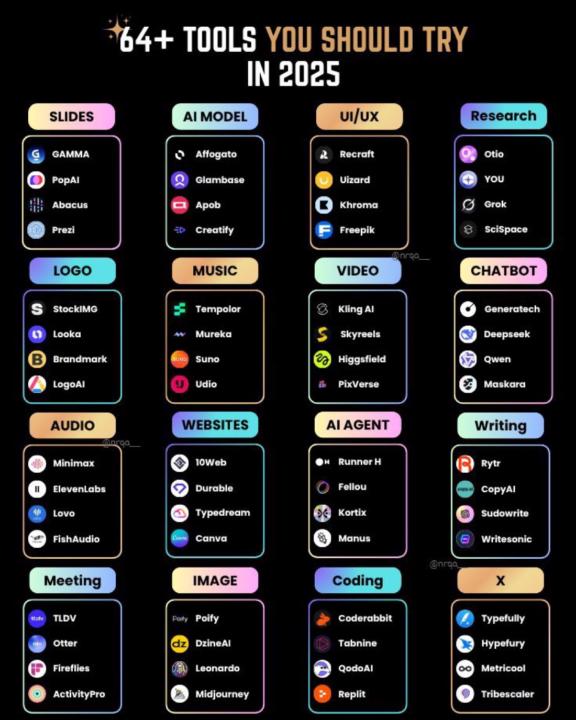
Some Ai Tools to Consider
A lot of times I see these images on LinkedIn and X and don’t necessarily agree with the tools they feature. Many of them are usually outdated or ones that I’ve tried and not really liked. But this one has some pretty good tools on it and my opinion! So I figured I’d share for everybody!
Feb 5 •
🚨 JUST DROPPED: The Samsara MCP (Turn Claude into an AI Dispatcher) 🚚 🤖
Hey Squad! I’m super pumped to announce that we just shipped something massive, and I wanted you guys to be the first to see it. We’ve officially open-sourced the Automation Squad MCP for Samsara. 🔗 Link: https://github.com/automationsquadhq/mcp-samsara What is it? It connects Claude directly to the Samsara API. This isn't just a wrapper; it allows you to literally talk to a physical truck fleet. You can now build Agents that: ✅ Optimize Routes: "Find the fastest route for Truck 5 avoiding traffic." ✅ Track Live: "Where is driver John right now?" ✅ Check Compliance: "Who is about to hit their HOS violation limit?" Why this matters: This is one of the first real-world bridges between LLMs and physical logistics operations. And we are giving it away for free. 👇 I need a huge favor from the Squad: We want to get this trending on GitHub to blow up the Automation Squad brand (which helps all of us). 1. Click the link below. 2. Hit the ⭐️ Star button in the top right corner. 3. Try it out and let me know what you think in the comments! 🔗 Link: https://github.com/automationsquadhq/mcp-samsara I’m going to be dropping a full YouTube breakdown on how to set this up later this week, but the code is live right now. Let’s build! 🚀 — Rob
1
0
Jan 28 •
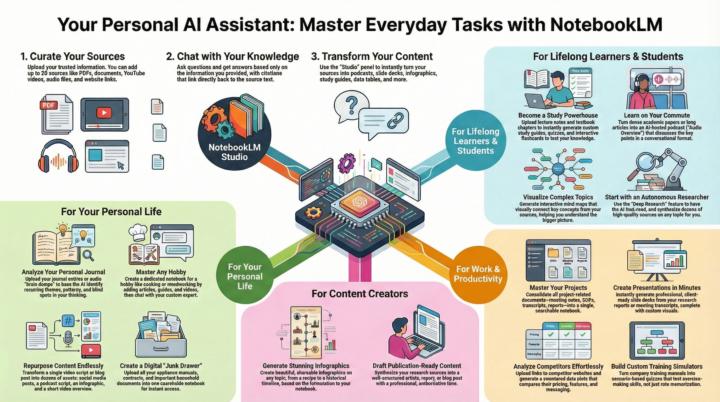
🧠 Stop just collecting links. Start "chatting" with your brain.
I’ve been experimenting with NotebookLM heavily lately, and honestly, the "Audio Overview" feature gets all the hype, but the real power is in the workflow. I just uploaded a breakdown (see the infographic below) of how to actually use this thing beyond just a party trick. The 3-Step Flow shown here is a game changer: - Curate (The Input): Dump your PDFs, YouTube links, and messy Google Docs into one notebook. It eats up to 50 sources at once. - Chat (The Analysis): Instead of CTRL+F, you literally ask questions. "What are the common themes between these 3 meetings?" or "Find the contradiction in this report." - Transform (The Output): This is the money maker. Use the Studio panel to turn those messy notes into FAQs, Briefings, Timeline, or Study Guides instantly. Who this is actually for: - Devs & Creators: Turn your documentation or video scripts into instant blog posts or social snippets. - Learners: Turn a dense whitepaper into a podcast you can listen to on the drive home. - Project Managers: Consolidate 10 different spec docs into one "Source of Truth." Want to Be a NotebookLM Boss? Visit our Classroom Here! I’m curious—has anyone tried the "Deep Research" feature yet for analyzing competitors? Drop a comment below with your best use case so far. 👇
1
0
1-7 of 7
skool.com/automationsquad
Learn How to Actually USE Ai to Make Money, Grow Your Business & Scale Efficient Systems & Ops!
Powered by