

3h •
Claude Fable 5 in my life! - Video Wall Builder
The idea was simple: Build a Video Wall Builder that lets you drag-and-drop multiple videos into customizable layouts (2×2, 3×3, 4×4, etc.), play them independently, and even expand a single video inside the app without taking over the entire monitor. Before writing a single line of code, I spent time with ChatGPT refining the idea into a detailed mvp_prd.md, followed by a plan.md and an architecture.md. That upfront planning gave the AI a clear roadmap instead of just a vague prompt. Then I handed everything to Claude Fable 5 (High).. It one-shotted the project to about 75% of the way there. 🤯 The result was a working Electron + React desktop app featuring: ✅ Support for Video, URL, OBS & Camera ✅ Dynamic 1×1, 2×2, 2×3, 3×3, 4×4 & custom XxX layouts ✅ Drag-and-drop video loading ✅ Independent playback controls for every tile ✅ Container-scoped full-screen (expand a tile without taking over the monitor) ✅ Windowed, maximized, and borderless modes ✅ A polished UI that already feels like a real desktop application I didn't stop after the initial build. I continued refining the architecture, playback engine strategy, workspaces, scenes, custom layouts, plugin-oriented design, and long-term roadmap. Each iteration made the next coding session even more effective. One thing that really surprised me was how far I was able to push Claude Fable 5 (High) on the $20/month Claude Pro plan. Although the project spanned three 5-hour usage windows because of the Pro plan's session limits, the actual development only took about 4 hours and 7 minutes of active coding time. The first usage window was exhausted in 1 hour 21 minutes, the second in 54 minutes, and the third in 1 hour 52 minutes. We completed the project in just two conversation contexts, staying well under Claude's available context window. By the end of those sessions, the app had grown from an idea into a polished MVP with dynamic layouts, drag-and-drop media loading, workspaces, scenes, source management, persistent settings, an FFmpeg-backed playback strategy, Windows packaging, and a documented long-term architecture.
1
0

3d •
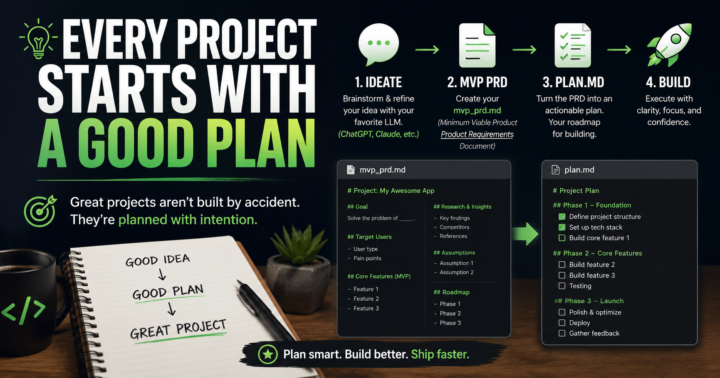
Every Project Starts with a Good Plan
One of the biggest upgrades to my AI workflow has been spending more time planning before I start building. I'll usually have a back-and-forth conversation with ChatGPT or Claude to discuss my concept, pressure-test ideas, uncover edge cases, and shape the project into something that actually makes sense. Once the idea is solid, I turn it into an mvp_prd.md (Minimum Viable Product Product Requirements Document), which is a living source of truth document that captures the project's goals, scope, research, assumptions, and roadmap. From there, I convert the mvp_prd.md into plan.md, which becomes the actionable task list I work through while building. A few extra minutes of planning can save hours (or days) of rebuilding later. How do you ideate your projects before you start coding?
1-2 of 2

skool.com/aicodethatworks
Build the app you've been thinking about — with AI, without writing a line of code.
For anyone starting from zero, or stuck trying to make AI work.
Leaderboard (30-day)
1
+13
2
+8
3
+7
4

+7
5

+6
Powered by