
Write something

🔥
Mar 5 •
Closing This Community :(
Hi all, it's with great regret that I am closing this Skool. This was a test of a test of a test, and it has now fulfilled its purpose. Just thought I would let you know before the doors finally close.

🔥
Feb 23 •
BEYOND THE PROMPT: The Best AI Thumbnail Generators to Explode Your CTR in 2026
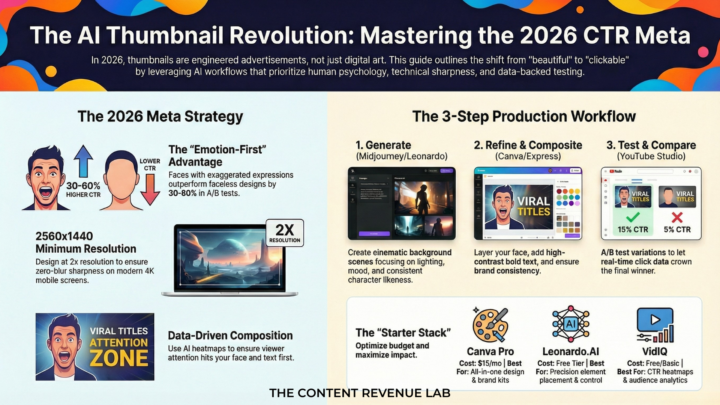
Your definitive guide to the tools, tactics, and workflows dominating the creator economy right now. Let's be direct: your thumbnail is your ad. It doesn't matter how good your video is - if nobody clicks, nobody watches. In 2026, the war for attention on YouTube has never been more intense, and the difference between a 2% CTR and a 12% CTR isn't luck. It's strategy, psychology, and increasingly, AI. The tools available to creators today would have seemed like science fiction five years ago. But with power comes noise - and the market is flooded with AI image generators that produce beautiful, soulless art that gets absolutely zero clicks. This guide cuts through the hype and tells you exactly which tools to use, why, and how to combine them into a workflow that makes your thumbnails genuinely dangerous. THE 2026 THUMBNAIL META: Why Generic AI Art Is Dead — and What Replaced It The brutal truth: most AI-generated thumbnails look like AI-generated thumbnails. Your audience has been trained, consciously or not, to scroll past polished, generic fantasy art. The brain pattern-matches "generic" to "low effort" to "skip." The three creative approaches actually winning the CTR game right now are: - High-Contrast Design: Extreme light vs. dark, limited colour palettes (often just 2-3 colours), and zero visual clutter. The thumbnail must be readable as a 100x75 pixel icon on a phone screen. If you can't read it small, it won't convert big. - The Human Face (Face-Swapped & Emotion-First): Decades of psychology research confirms it — the human brain is hardwired to look at faces. Thumbnails featuring exaggerated facial expressions (shock, delight, disgust) consistently outperform faceless designs by 30-60% in A/B tests. AI face-swap tools have made it trivially easy to put your face into any AI-generated scene without a complex photoshoot. - Predictive CTR / Data-Driven Design: The most significant shift of 2026. A new generation of AI tools don't just generate images — they analyse your specific audience's click history and predict which visual elements will trigger a click before you upload. Gut instinct is being replaced by data-backed creative decisions.
1
0
🔥
Feb 10 •
Can ChatGPT Make a YouTube Thumbnail?
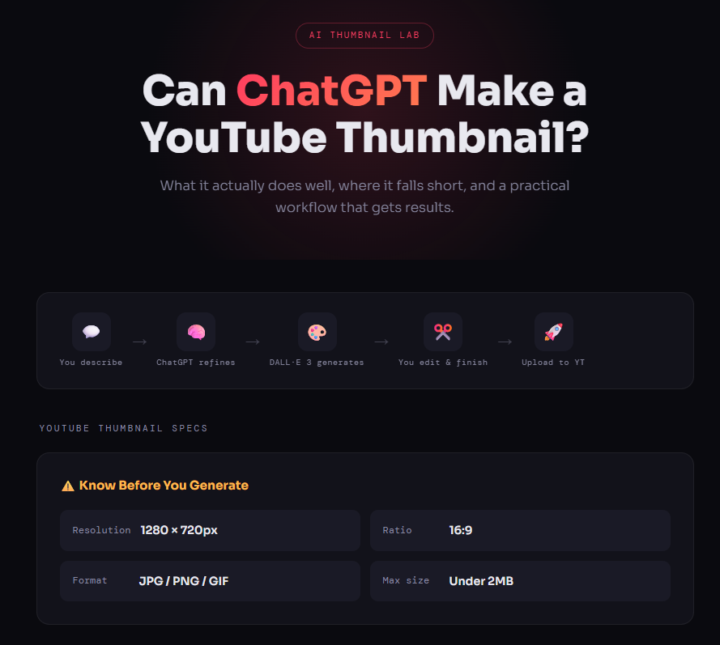
Can ChatGPT actually make a YouTube thumbnail that gets clicks? It's a fair question - and the answer is more nuanced than most people online will tell you. I've been testing AI thumbnail tools for months now, and ChatGPT with DALL·E 3 integration is one of the most accessible options out there. But "accessible" doesn't always mean "best for the job." Some creators swear by it. Others gave up after one attempt. In this post, I'll break down exactly what ChatGPT can and can't do for your YouTube thumbnails, the workarounds you need to know, and whether it's worth your time compared to other options. Here's what you'll learn: • How ChatGPT generates thumbnails using DALL·E 3 • The biggest limitations you'll hit (and how to work around them) • A step-by-step process for getting usable results • Whether it's actually worth using for your channel How ChatGPT Actually Creates Thumbnails First, let's clear something up. ChatGPT doesn't create images by itself. It uses DALL·E 3, which is OpenAI's image generation model built directly into the ChatGPT interface. When you describe what you want, ChatGPT refines your prompt behind the scenes and sends it to DALL·E to generate the visual. This matters because your results depend heavily on how well you prompt it. A vague request like "make me a thumbnail about cooking" will give you something generic. A detailed prompt like "create a bold, close-up reaction shot with bright yellow background, shocked expression, a plate of burnt food in the foreground, hyper-realistic style" will get you much closer to something clickable. The good news is that ChatGPT acts as a brainstorming partner. You can describe your video topic in plain English and it will help you develop the concept before generating anything. That alone saves time compared to staring at a blank Canva canvas. You do need a ChatGPT Plus subscription ($20/month) for reliable access to DALL·E image generation.
0
0
🔥
Jan 28 •
🎯 Just Tried Opus Clip's New AI Thumbnail Generator – Mind = Blown
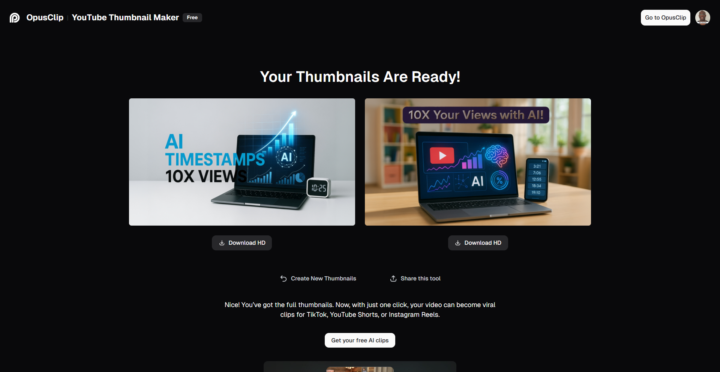
I've been testing Opus Clip's brand-new YouTube Thumbnail Creator (launched May 2025), and honestly, it's a game-changer for anyone serious about YouTube growth. What Just Happened I fed it my video "AI Timestamps to 10X Your YouTube Views in 2025!" (watch it here) and within seconds, it generated two professional thumbnails using GPT-4o-powered AI. No Photoshop. No Canva templates. Just paste your video link and watch the magic happen. Why This Matters Here's the brutal truth: 90% of viewers decide whether to click your video based on the thumbnail alone. But most creators either: - Spend hours in design tools they barely understand - Use generic templates that blend into the feed - Skip thumbnails entirely (terrible idea) Opus Clip just eliminated all three problems. How It Actually Works The Dead-Simple Process: 1. Sign up for free at https://tinyurl.com/TryOpusClip (affiliate link) 2. Paste your YouTube link (or upload a video file) 3. Optional: Upload your face/subject for personalisation 4. Hit "Generate" – AI analyses your content, niche, and what's working for top creators 5. Download in JPG/PNG/GIF and upload straight to YouTube Total time? Under 2 minutes. What Makes It Different - GPT-4o Analysis: It actually understands your video content, not just slapping text on random frames - Style Variety: Bold and colourful for engagement content, sleek and minimal for professional videos - Zero Learning Curve: If you can paste a link, you can use this - Actually Free: Part of Opus Clip's free-forever plan (no hidden costs to start) The Real Win The tool studies thumbnails from successful creators in your niche and applies those patterns to YOUR content. It's like having a designer who's analysed millions of high-performing thumbnails working for you 24/7. For creators juggling filming, editing, scripting, and everything else? This is the "set it and forget it" solution we've been waiting for.
1-7 of 7
powered by
skool.com/ai-youtube-thumbnail-lab-3410
AI YouTube thumbnail tools and prompts for creators who want high CTR, not guesswork. Free training that actually works.
Suggested communities
Powered by