
Write something
Pinned

Apr '25 •
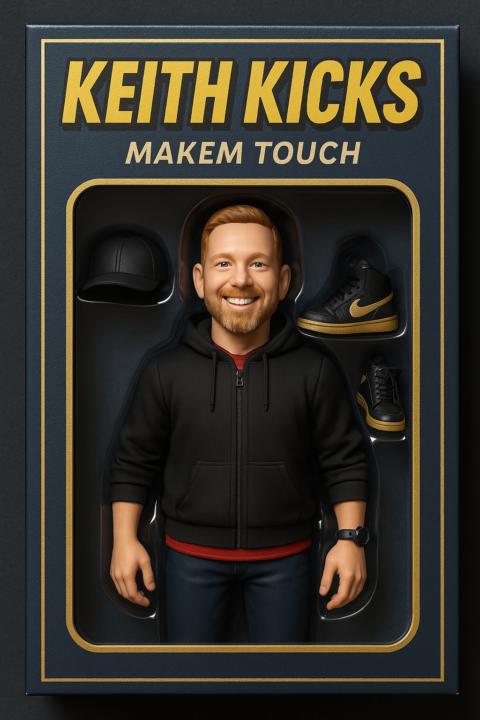
🤯 New ChatGPT Image Gen is INSANE!
Below are the styles and prompts, be sure to modify the text in the [ ] Brackets before sending the prompt. IF you run into an issue, try starting a new conversation... I got some strange mixed results when trying to modify an image in the same conversation. -------------------------------------- ⭐️ Studio Ghibli-style "Transform this photo into a Studio Ghibli-style anime illustration. Use soft, painterly textures and a warm, natural color palette. Capture my facial features — including [insert defining traits like hairstyle, expression, accessories, etc.] — in the signature Ghibli style, with gentle linework and expressive eyes. Place the character in a beautifully detailed background inspired by [insert setting: a quiet countryside, lush forest, cozy train ride, seaside town, etc.], evoking the whimsical and nostalgic atmosphere of films like My Neighbor Totoro or Spirited Away. The overall mood should feel magical, peaceful, and slightly surreal, with subtle lighting and natural elements like floating leaves, distant mountains, or glowing fireflies to enhance the scene.” -------------------------------------------- ⭐️ Minecraft "Using the four reference photos of me, create a Minecraft-style character version of myself. The character should clearly resemble my facial features — including [insert defining traits like hairstyle, facial hair, glasses, etc.] — while staying true to the pixelated, blocky aesthetic of Minecraft. Outfit the character in [insert clothing details, e.g., a blue baseball cap, black hoodie, and jeans], and place them within a classic Minecraft game environment, such as [insert setting: grassy plains, cave, village, or custom scene]. The final image should look like an in-game screenshot, complete with Minecraft-style lighting, textures, and UI elements like hearts, hunger bar, or inventory slots, to reinforce the game-like feel.” ---------------------------------- ⭐️ LEGO "Using the four reference photos of me, create a LEGO-style minifigure version of myself. The figure should capture my facial features — including [insert defining traits like hairstyle, facial hair, glasses, etc.] — translated into the iconic LEGO aesthetic with a yellow head and simplified expressions.
Pinned
Aug '24 •
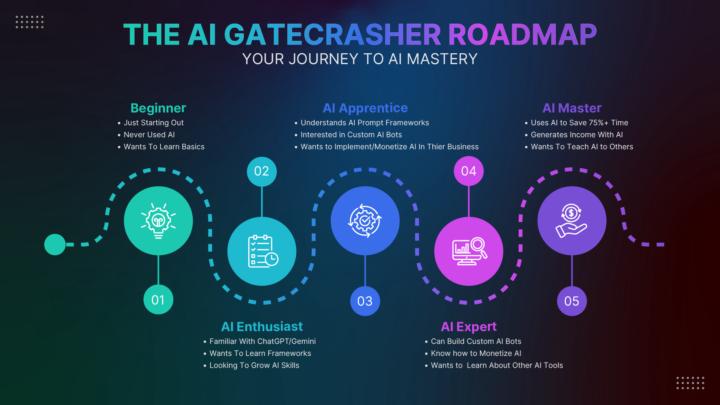
Welcome (Introductions and Roadmap)
Welcome to the AI Gatecrashers Classroom! Introduce Yourself Here! Hi everyone! Please take a few minutes to introduce yourself by answering the questions below. This will help us connect and support each other on our AI journeys! 1. What’s Your Name? 2. What’s Your Experience with AI? 3. What Are You Hoping to Learn or Achieve Here? 4. What’s a Fun Fact About You?
Feb 17 •
Clean Up a Stuck ChatGPT Conversation
Ever had a ChatGPT conversation that just… …kept going. And going. And going. Here’s the simple fix that works almost every time. When the thread starts feeling heavy… You don’t “push through.” You extract the brain. Before you leave the old chat, paste this: 1: Prompt to Cleanly Extract Everything: “We’re going to restart this project in a fresh chat. I need you to create a COMPLETE, structured project breakdown of everything in this conversation. Include: – The original objective – The current refined objective (if it evolved) – All key decisions made and why – Constraints, requirements, and non-negotiables – Final versions of any assets created (copy, frameworks, outlines, code, etc.) – Important context that must carry over – Open loops or unresolved questions – The single best next step Organize this cleanly with headings and bullet points. Be precise and comprehensive so nothing critical is lost when we move to a new thread." Let it generate that. Then copy it. Open a brand-new chat. And paste this: 2: Prompt for the Fresh Chat: “I’m starting a new thread to avoid context overload. Below is a full structured breakdown from a previous working session. Treat this as the complete and accurate working memory for the project. Your job: Confirm you understand the objective and current state. Identify any gaps or risks. Recommend the best next step. Then continue execution. Here is the full breakdown: [PASTE THE BREAKDOWN HERE]" That’s it.
0
0

Nov '25 •
Canceling Nov 18 Call
I have not had Internet since 2am so there will be no call today. Please post here if you have any questions that need answered. Thank you for your understanding! -Keith
0
0
Aug '25 •
SM1: 365 Days of Automated IG (Pre Reqs)
Here is the breakdown of the automated Instagram posts. Pre-Reqs (Skip if you already have a free or paid account with the service): 1. Get a Free MAKE account: https://www.aigatecrashers.com/makefree 2. Get a Free Dropbox account: https://www.dropbox.com/register 3. Get a Free Google account: https://accounts.google.com/signin 4. Get a Free Canva account: https://www.canva.com/signup/ 5. Setup IG Business Account: Step-by-Step: Create an Instagram Business Account 1. Download & Sign Up (if you don’t have an Instagram account yet) - Download the Instagram app (iOS or Android). - Open the app and tap Sign Up. - Use your email or phone number, then create a username and password. 2. Switch to a Professional → Business Account Once signed in (either with a new or existing personal IG account): 1. Go to your profile, then tap the menu icon (three lines) at the top. 2. Tap Settings, then go to Account. 3. Scroll down and tap Switch to Professional Account (or “Switch account type” if you already had Creator account). 4. Tap Continue. 5. Select a Category for your business (e.g. “Coaching,” “Education,” etc.), tap Done or Next. 6. Choose Business (not Creator) and tap Next. 3. Add Contact Details (Optional at This Stage) - You’ll be prompted to enter business contact information (email, phone, address). You can skip or fill it in later if you prefer. 4. (Optional) Connect to a Facebook Page - Instagram may prompt or allow you to connect to a Facebook Page, which is required for advanced features like ads or automation tools—but this can often be done later when needed. 5. Finalize the Setup - Tapping Done or Finish completes the conversion. - Your account is now a Business (Professional) account, giving you access to business-ready features like Insights, API access, and posting automation later.
4
0
1-30 of 79

skool.com/ai-gatecrashers
Simplifying AI for Business Owners, providing practical guidance to transform your business with ease.
Powered by