
Write something
Pinned

Apr 30 •
🚀 I built an AI system that creates viral X/Twitter posts for you
I built a system with Claude Code that tracks your X/Twitter competitors, analyzes their top-performing tweets, and generates ready-to-publish posts — including branded infographic images. No more staring at a blank screen. No more guessing what to post. Here's how it works: You add your competitors → the system scrapes their best tweets → Gemini does deep analysis (text + images) → Claude generates new posts in your voice → Kie AI creates branded infographics in 5 different styles. The result: a mix of infographic posts (60%), personal posts with your photos (30%), and text-only posts (10%) — all based on what's already working in your niche. It runs as a web app on your laptop. The whole thing was built with Claude Code. 👉 GitHub repo: https://github.com/melnikoff-oleg/x-ai 👉 Full step-by-step install guide attached below — covers VS Code, Claude Code, API keys, and running the pipeline. If you get stuck, drop a comment. I'll personally help you get it running.
Pinned
Apr 21 •
🚀 My Claude Code System For Viral TikTok Videos
I built a system with Claude Code that tracks your TikTok competitors, finds their most viral videos, and generates content ideas + scripts you can film right away. No more guessing what to post. No more staring at a blank screen. You add your competitors → the system scrapes their best content → AI analyzes the patterns → you get 5-10 video concepts tailored to your niche. Each one comes with a hook, structure, and CTA. It runs as a web app on your laptop. The whole thing was built with Claude Code. 👉 GitHub repo: https://github.com/melnikoff-oleg/tiktok-ai 👉 Full step-by-step install guide attached below — covers VS Code, Claude Code, API keys, and running the pipeline. If you get stuck, drop a comment. I'll personally help you get it running.
Pinned
Apr 14 •
🚀 New video: I Built My Personal Website With Claude Code
I just built my personal website with Claude Code in under 30 minutes — and now I plug it everywhere. Instagram bio, LinkedIn, YouTube, cold DMs. Every conversation turns into a warm lead because people can actually see who I am and what I've built. This works whether you're a founder, freelancer, or employee trying to stand out. A personal website is the highest-leverage asset you can own online, and you don't need a designer or a weekend to ship it anymore. I'm giving you the exact template I use — same code running on my site: https://oleg.ae 👉 Template repo: https://github.com/melnikoff-oleg/oleeeg-landing 👉 Full step-by-step PDF guide attached — install, customization with Claude Code, GitHub, Vercel, and connecting your own domain. If you get stuck, drop a comment. I'll personally help you ship it.
Apr 7 •
🚀 New Video: How I Use Claude Code To Find Viral Topics First
I built a system that scans Twitter, news websites, and YouTube every morning — filters out the noise, clusters duplicate coverage into stories, and scores everything by relevance. No more doomscrolling 10 tabs to stay informed. In this video I show the full system live and walk you through building your own. Here's the quick setup guide: 1. Connect your data sources Claude Code supports external tools through MCP and API integrations. For this system you need: - Apify — scrapes Twitter/X accounts and YouTube channels. Get an API key at apify.com, add it to your .env as APIFY_API_KEY. Claude Code calls Apify actors via REST API to pull tweets and video metadata + transcripts. - Firecrawl — scrapes any website (blogs, news sites). Get an API key at firecrawl.dev, add it as FIRECRAWL_API_KEY. Claude Code uses it to grab article content from pages like techcrunch.com, openai.com/news, etc. - Kie AI — (optional) for generating visual assets from your trend data. Add as `KIE_AI_API_KEY`. 2. Define your sources Create a list of Twitter accounts and websites relevant to YOUR niche. Mine are 10 Twitter accounts (@OpenAI, @AnthropicAI, @karpathy, @sama, etc.) and 5 news sites. You can track any industry — crypto, biotech, marketing, whatever. 3. Write a Claude Code slash command Create a file at `.claude/commands/trends.md` that tells Claude to: - Fetch latest posts from your Twitter accounts (via Apify) - Scrape your news websites (via Firecrawl) - Filter to news only (drop opinions and commentary) - Cluster items about the same event into stories - Score each story 1-10 for relevance to your niche Then just run /trends in Claude Code and it does everything. 4. Generate a web interface Ask Claude Code to build you a simple Next.js page that displays your stories grouped by day, sorted by score. Mine has color-coded badges (green = high relevance, gray = low), expandable source lists, and voting buttons so the system learns what I care about over time.

Mar 1 •
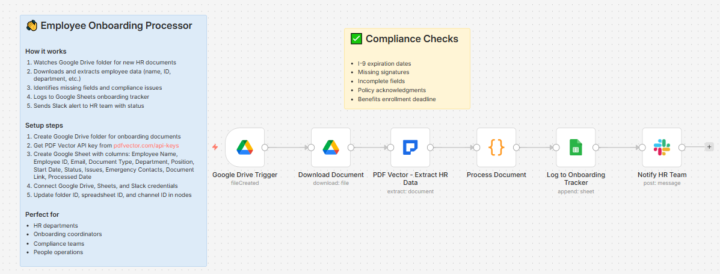
Employee Onboarding Docs Flagged Missing I-9 Signature Before HR Reviewed (6 Nodes) 🔥
New hire submitted paperwork. I-9 missing signature on page 2. Alert hit HR Slack before the folder was opened. Built onboarding processor. Compliance checks automatic. Missing fields flagged instantly. THE ONBOARDING PAPERWORK NIGHTMARE: 15 new hires monthly. Stack of documents per person. I-9, W-4, direct deposit, emergency contact, NDA, benefits enrollment. Each requires manual review. Each has different compliance requirements. Missing signatures discovered days later. THE DISCOVERY: Document extraction identifies document type. Pulls required fields. Code checks completeness and flags missing items. Same extraction handles all document types. Status assigned automatically. THE WORKFLOW: Google Drive trigger watches onboarding folder → Download document → Document extraction pulls employee info, employment details, signatures, compliance fields → Code checks completeness and determines status → Sheets logs to onboarding tracker → Slack notifies HR with status and specific issues. 6 nodes. Compliance gaps caught immediately. THE COMPLIANCE CHECKS: Code validates: - All signature fields completed - Required fields present - I-9 specific requirements met - Emergency contact included Status assigned: Complete / Incomplete / Needs Review. THE DOCUMENT TYPE HANDLING: Extraction recognizes: Offer Letter, I-9, W-4, Direct Deposit, Emergency Contact, NDA, Benefits Enrollment. Different fields extracted based on type. Same workflow handles all. THE TRANSFORMATION: Before: 38 minutes per document for manual review. Missing signatures found days later. HR chasing paperwork. After: Instant compliance check. Issues flagged immediately. Specific missing fields listed. THE NUMBERS: 127 documents processed last month 23 compliance issues caught same-day 12 missing signatures flagged 38 minutes → 3 seconds per document Template in n8n and All workflows in Github
1-30 of 152

skool.com/ai-automation-7100
A hub for builders, marketers and creators crafting AI automations with Claude Code and other tools. Learn to automate research, texts and visuals.
Leaderboard (30-day)
1

+5
2

+4
3

+3
4

+2
5

+2
Powered by