

18d •
Day 3 of the OMNI Video Challenge + Homework
Day 3 is officially complete! We took AI characters from an idea to a video. Here's what we covered: -Created a character in Gemini - Refined the style in ChatGPT - Built a 360° Character DNA Sheet to keep the character consistent - Wrote a simple 10-second script - Brought the character to life with Google Omni - Took a quick look at Google Flow for even more creative possibilities The best part? None of this has to be complicated. You don't need perfection. You just need a fun idea and a willingness to experiment. Your homework: ✔️ Create your own character (or use one you've already made) ✔️ Build a Character DNA Sheet ✔️ Create a short video in Omni ✔️ Share your video in the group so we can all see what you created! I can't wait to see your characters come to life. Every video gives you new ideas, and every experiment helps you learn something new. See you on Thursday for Day 4, where we'll start thinking more intentionally about storyboards and how to guide AI to create even better videos. 👇Replay is below.
21d •
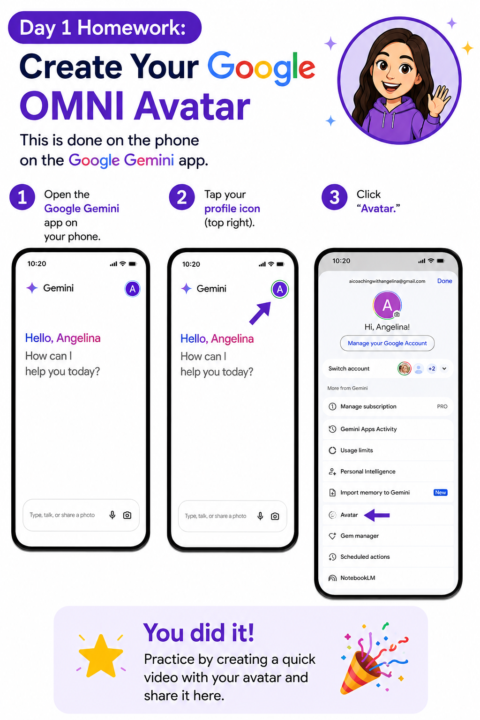
Day 1 of the OMNI Video Challenge + Homework
Today we introduced the OMNI Framework and you got your first assignment: create your Google Gemini Avatar and make a quick video with it. This is your digital you. The character that shows up so you don't always have to. When you complete your Day 1 homework, drop your video below or in the FB Group . We want to see your avatar in action! Tomorrow we are diving into Google Gemini Templates. See you here on SKOOL at 2 pm CT or you can catch the replay here as well. Day 1 Replay: https://youtu.be/QFIvpdkHxBU
6d •
Here's what you missed on Today's call 👀 + Q and A time Change
We dug into the YAP Challenge strategy everyone's been watching, swapped real production tips for short-form video, and had an honest conversation about focus because building cool things doesn't pay the electric bill. Selling does. :) What we covered: - The YAP Challenge breakdown — why 60-90 second videos built around YOUR life stories are converting, and the 80% connection / 20% selling content rule - The story bank exercise — uploading the workbook to Claude and having it interview you to pull out stories you've never shared publicly - Content pillars that rotate so you always know what to post (and never stare at a blank screen) - The camera trick that changes everything — flip your phone so you can't see yourself, and talk to the lens like it's a first date - Caption tools compared — Instagram's built-in captions, the free Edits app, Captions.ai, and CapCut - Why captions matter — nearly half of viewers watch with the sound off - The algorithm secret on captions — keep fonts simple and close to the platform's native style, one word at a time - The editing order that saves hours — fix your vocals FIRST, then trim by transcript instead of listening through - The 3-second hook triangle — visual hook, verbal hook, and text hook working together - Why platform metadata matters — TikTok can tell when you upload a video downloaded from Instagram - The restack-with-a-note strategy for growing on Substack fast - Email marketing math — a $37 return for every $1 spent, and why you build your list BEFORE your book or offer launches - The DM strategy that converts — personally messaging the people who already raised their hand in your community - A brand new Content Seed System built live with Fable 5 — one Sunday content seed becomes six deliverables, pushed straight to Notion What your fellow members are actively working on: - One member is rebranding around her book and building an idea bank of content pillars ahead of her launch - Someone is pulling vocal clips from client testimonials to create authentic short-form content - One member grew her Substack to new followers in her first month by batching articles and Notes in under an hour a week - A member is running four focused TikTok channels, each built around a specific niche - One action taker vibe-coded an entire membership platform in a day and a half — courses, live Zoom links, member collaboration, all of it — the kind of build agencies charge $3,500+ for - Someone is refining her product ecosystem with a mid-tier portfolio builder to bridge her free and premium offers - A member redesigned her landing page, added community testimonials, and welcomed two new members to her club this week
20d •
Day 2 of the OMNI Video Challenge + Homework
Today we explored Google Gemini Templates and how to use them to create short videos with your avatar. There are so many styles to choose from — memes, anime, doodle effects, photo booth, event invites, and more. I showed you how I used the Meme Me template to create a quick little ad and why going to ChatGPT or Claude first saves your Gemini credits. Your Day 2 homework: pick a template, come up with a concept for something you want to promote, and make a video. Then drop it below or in the FB Group! Tomorrow we are working with characters and bringing them to life with a 360 turn. See you here on SKOOL at 2 pm CT or catch the replay. Day 2 Replay:
18d •
Day 4 of the OMNI Video Challenge + Homework
In Day 4 of the Google Omni Video Challenge, we looked at how to create short AI videos featuring your avatar and custom characters using Google Gemini. I'll show you how to use the free Omni Prompt Skill, combine multiple video clips, edit them together in Descript (or the free Edits app), and create fun, engaging videos in just minutes. Plus, get a sneak peek at my new AI household assistant, Maggie!
1-30 of 47
skool.com/ai-amplified-entrepreneur
Where entrepreneurs learn AI by actually using it: building real tools, workflows, and systems inside a community that shows up and builds with you.
Leaderboard (30-day)
1

+25
2

+18
3

+17
4

+17
5

+16
Powered by