Activity
Mon
Wed
Fri
Sun
Apr
May
Jun
Jul
Aug
Sep
Oct
Nov
Dec
Jan
Feb
Mar
What is this?
Less
More
Memberships
AI Creator Tools (ACT)
1.9k members • Free
AI Creator Labs
669 members • Free
Ninjas AI Automation
1.5k members • $9/month
AI Production Studios
2.4k members • $9/month
Vibe Coders
922 members • Free
Creative AI Education w/ West
425 members • Free
AI Influencer Model training
22 members • $59
Onlyfans - OFM CEOs
600 members • Free
Hybrid AI Free
111 members • Free
2 contributions to MyAIForce

Nov '25 •
Perfect Relighting with Qwen Image Edit (Realistic Shadows & Details Perserved)
YouTube: https://youtu.be/MhG4NByzB34 Level up your relighting in ComfyUI! In this video I show a custom workflow that beats the basic Qwen Edit setup—preserving details, preventing subject shifts, and adding realistic, angle-correct shadows. We’ll use Qwen Image Edit 2509 + Lightning LoRA (8-steps) + a Relighting LoRA, an Inpaint Crop (1024×1024) to lock composition, a two-pass inpaint → repaint for sharpness, and Frequency Detail Restore to bring back fine details. Works great for portraits and product shots. Relighting LoRA: https://huggingface.co/dx8152/Qwen-Image-Edit-2509-Relight/tree/main I have attached the basic workflow. If you want the advanced workflow, please join our paid group and try it free: https://myaiforce.com/pg

0 likes • Nov '25
https://docs.google.com/document/d/1qgZFBbB3RNxj8NNJoXTQJWOXMcPl0QdzlcrvyBpuHm0/edit?tab=t.0#heading=h.ogqcvzirrgod
0 likes • Nov '25
want this
Sep '25 •
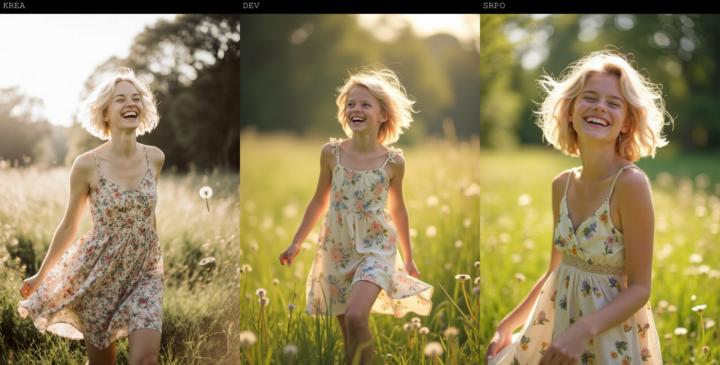
Flux Krea vs. Flux SRPO
Hey everyone, I just compared Flux Krea, Flux SRPO, and Flux Dev. They're all FP8 versions. - Flux Krea Dev FP8: https://huggingface.co/Comfy-Org/FLUX.1-Krea-dev_ComfyUI/tree/main/split_files/diffusion_models - Flux SRPO Dev FP8: https://huggingface.co/rockerBOO/flux.1-dev-SRPO/tree/3cb809f044916556a9c1c5e336d93c4fd6b509a9 Here's the link to the Reddit post: https://www.reddit.com/r/comfyui/comments/1nhg5yw/flux_krea_vs_flux_srpo/
1 like • Nov '25
Flux SRPO clearly winner
1-2 of 2