Activity
Mon
Wed
Fri
Sun
May
Jun
Jul
Aug
Sep
Oct
Nov
Dec
Jan
Feb
Mar
Apr
What is this?
Less
More
Memberships
Elite Architects AI
1.3k members • $80/month
AI Marketing by Kia
21.5k members • $1/month
AndyNoCode
32.9k members • Free
GHL Blueprint
1.6k members • Free
AI Automation Agency Hub
312.4k members • Free
AI Automation (A-Z)
152.8k members • Free
AI Automation Society
341.7k members • Free
Vertical AI Builders
10.1k members • Free
Hamza's Automation Incubator™
46.4k members • Free
15 contributions to GHL Blueprint

Aug '25 •
💡 Why Pay for Email Campaign Tools When You Can Send Bulk Emails in Gmail for FREE?
Most bulk email tools charge you monthly 💸 — even for the most basic task: sending emails in bulk. Now, you can: ✅ Send bulk emails in drip mode directly from Gmail ✅ Manage recipients from Google Sheets ✅ Add attachments easily ✅ Do it all 100% free — no subscriptions, no hidden costs We’ve built a Gmail Drip Campaign Chrome Extension that’s designed only for sending emails in bulk — safely and efficiently — right inside Gmail. Who needs this? 📌 Freelancers sending proposals to multiple prospects 📌 Lead generators sending filtered contact lists 📌 Recruiters sending job details to candidates 📌 Marketers promoting offers to segmented lists 👉 See the demo here: http://bit.ly/40ZaQfc Want to try it? Comment “Interested” or send me a DM, and I’ll share it with you personally.
2
0
Jul '25 •
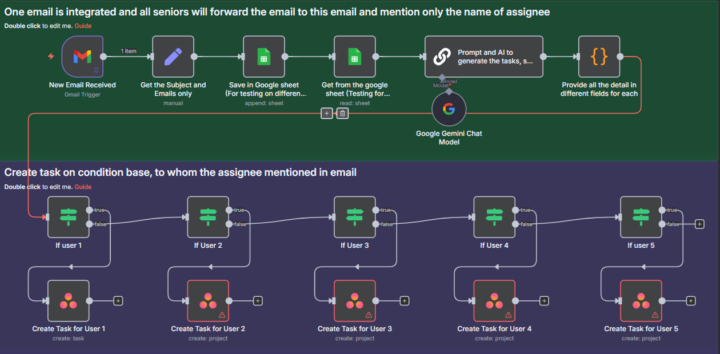
How I Built a Gmail → Asana Task Machine (and Saved Hours Every Week)
⚙️ From Inbox to Asana — Fully Automated Task Creation Tired of missing important emails just because no one turned them into actionable tasks? Here’s a solution I built for fast-moving teams 👇 Whenever a relevant email hits your Gmail inbox, this automation: ✅ Reads the email (subject + body) ✅ Extracts key details ✅ Instantly creates a fully structured task in Asana, including: 1. Task title 2. Description 3. Due date 4. Assignee 5. Subtasks 🧩 Tools Involved: Gmail – Trigger (new email received) n8n / Zapier / Make.com – Workflow automation Asana API – Task creation engine 🔁 How It Works (Step-by-Step): 1️⃣ Trigger: New email arrives in a specific Gmail label (e.g., “To-Asana”) 2️⃣ Filter: Checks sender, subject, or keywords to qualify the email 3️⃣ Parse Email: Extracts subject → Task title Email body → Task description Lists or bullets → Subtasks Dates → Due date Mentions → Assignee mapping 4️⃣ Format Data: Organizes the info to match Asana’s task schema json { "name": "Follow up on client proposal", "notes": "Client requested a revision on the Q3 budget...", "assignee": "user@domain.com", "due_on": "2025-07-30", "projects": ["1234567890"], "subtasks": [ { "name": "Revise budget" }, { "name": "Send updated version" } ] } 5️⃣ Create Task in Asana: Pushes the structured data directly into the assigned project 6️⃣ (Optional): Sends a Slack or email confirmation once the task is created 🧠 Bonus Smart Features: AI-powered parsing for long emails (OpenAI integration) Auto-tagging based on urgency or content Multiple assignees based on context File/attachment inclusion from the original email 🚀 Real-World Use Cases: Client services: Convert client emails into trackable tasks Sales: Never miss a lead follow-up Project managers: Reduce manual admin and increase clarity
1
0
Jul '25 •
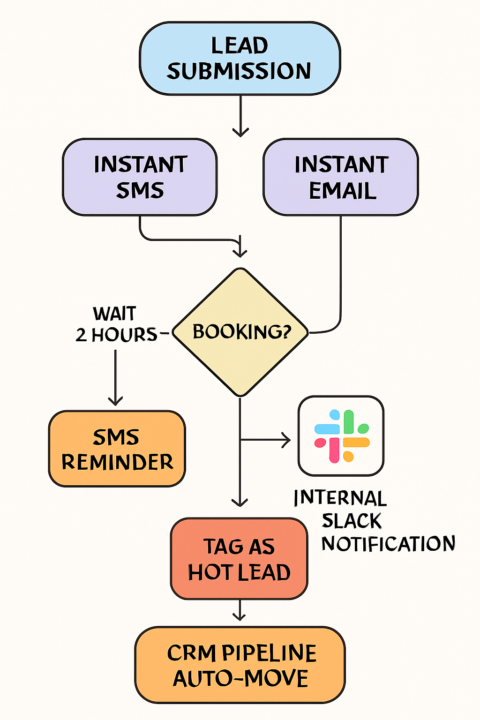
🔥 You’re Not Losing Clients Because Your Product Sucks… You’re Losing Them Because You’re Slow
Here’s what’s silently killing 7-figure potential businesses: ✅ Leads come in ❌ No instant response ❌ No lead segmentation ❌ Sales rep follows up 3 days later By that time? The lead's already gone — probably to your competitor. 💡 Using GoHighLevel (or any modern CRM), here’s a real-time lead follow-up system you can set up in under 30 minutes: 🔁 Real-Time Lead Follow-Up System 🎯 GOAL: Convert more leads by responding instantly, following up smartly, and notifying your team without lifting a finger. ✅ Step-by-Step Flow: 📥 Trigger: Lead submits a form or books a call ⏱️ 0 Seconds Later: → SMS Sent Instantly: “Hey {{first_name}}, got your request. Here’s the link to pick a time that works best.” → Email Sent Simultaneously: Personalized intro + booking link + reminder of your offer. 🕒 2 Hours Later: → IF No Booking: Send SMS: “Just making sure you didn’t miss this 👇 [booking link]” 🧠 IF Lead opens 2+ emails or views pricing page: → Add tag: Hot Lead 📣 Slack Notification: Sales rep gets pinged instantly: “🔥 {{Lead Name}} viewed pricing page twice. No call booked yet — follow up?” ✅ CRM Automatically Updates: Lead moved from “New Lead” → “Follow-Up Needed” — no manual dragging. ✅ Results We’ve Seen: 🔹 48% higher reply rate 🔹 35% fewer no-shows 🔹 Sales reps only focus on high-interest leads 🔹 Zero manual chasing or dragging in the CRM This isn’t just automation — it’s a real-time, behavior-based follow-up system that feels personal, but runs 24/7 without your team lifting a finger. .
1
0
Jul '25 •
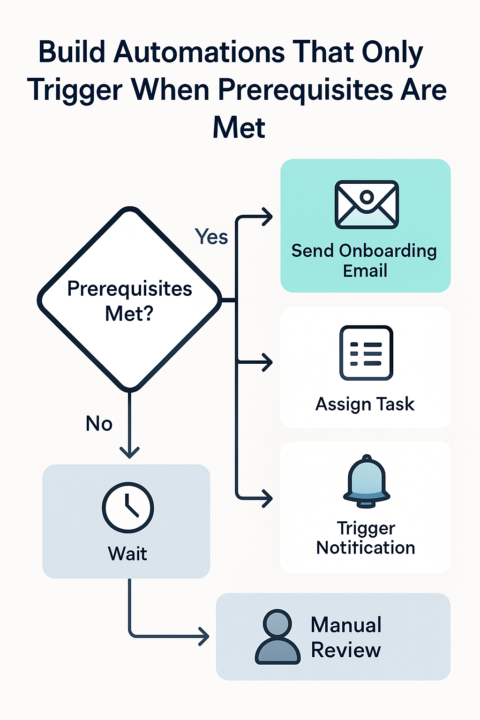
🧠 Build Automations That Only Trigger When Prerequisites Are Met
Too many automations move fast — but not smart. 💡 Precision beats speed when the goal is reliability, consistency, and customer trust. Here’s how to make sure your automations only run when the groundwork is done 👇 ✅ Why Prerequisites Matter 🔒 Prevent errors Avoid incomplete actions, missing data, or skipped steps. 🧩 Keep processes logical Trigger actions only in their proper business context. 📊 Improve data quality Validate that required fields, approvals, or conditions are in place before firing automations. 🔧 How to Build Prerequisite-Driven Workflows 🗂️ 1. Define Clear Conditions What must be true before this automation runs? (Example: Form completed, deal marked “Closed Won”, approval granted.) 🧠 2. Use Conditional Logic In tools like Zapier, Make, or n8n, build smart logic like: IF payment received AND contract signed → THEN send onboarding email 🔁 3. Stack Dependencies Sequence multi-step automations to ensure each action depends on a completed step. 🚨 4. Add Fail-Safes Build error-handling logic or alerts for missing prerequisites to avoid silent failures. 📦 Real Example: Sales Handoff Automation 🔑 Prerequisite: Deal marked “Closed Won” All contract fields are filled ⚙️ Triggered Action: Automatically generate onboarding tasks for operations ✅ Outcome: No premature handoffs Zero missing details Smoother client onboarding 🧠 Keys to Automation Success ✔ Design with dependencies—not just triggers ✔ Test for edge cases and skipped steps ✔ Regularly review and update your workflow conditions 📣 Bottom Line: Smart automations wait until they’re needed. They don’t just do things—they do the right things, at the right time. Make your workflows smarter, more predictable, and trusted.
Jul '25 •
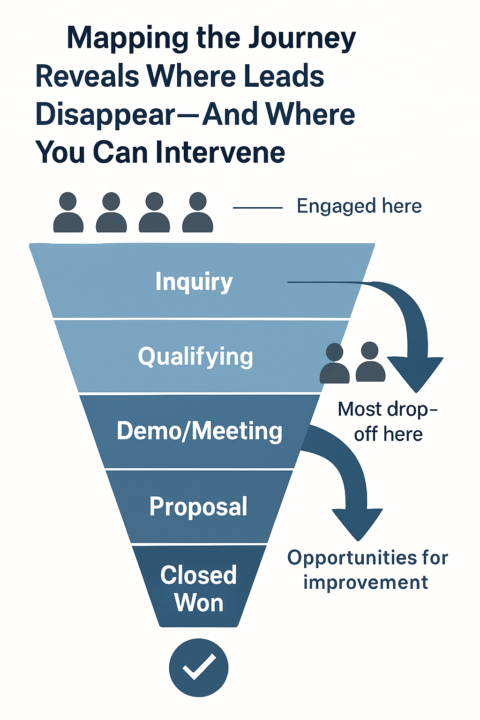
How Mapping Lead Journeys in Your CRM Uncovers Hidden Drop-Off Points
Most lost deals aren’t random—they’re the result of friction or disconnects somewhere along the customer journey. Mapping lead journeys inside your CRM doesn’t just track progress; it reveals exactly where and why potential clients slip away. Why Lead Journey Mapping Matters Makes drop-off visible: Visualizing each step lets you spot the precise stages where leads lose interest or stall. Turns guesswork into data: Instead of speculating, you get concrete evidence on where leads disengage. Guides targeted improvements: Insights uncover exactly which touchpoints or hand-offs need attention. Typical Drop-Off Triggers Revealed by Mapping Unanswered emails or follow-ups Long delays after demos or proposals Generic messaging at key decision points Missed hand-offs between sales and onboarding Confusing next steps or unclear value How to Map and Analyze Lead Journeys List Every Stage: From initial contact to closed deal, identify each touchpoint in your CRM pipeline. Track Transitions: Use CRM tags and pipeline stages to timestamp when leads move—or don’t move—to the next step. Visualize the Funnel: Use charts or dashboards to display where leads cluster or vanish. Investigate High-Exit Points: Look for patterns—are losses consistent at a certain step? Test and Optimize: Adjust the process, messaging, or timing where drop-offs occur, then measure if conversion rates improve. The Value You Unlock Higher conversion rates by patching “leaks” where you lose prospects Smoother experience for leads—less confusion, more clarity Data-driven sales process improvements over time Bottom line: Mapping lead journeys in your CRM turns the invisible into actionable insight—so you can fix what really matters, not just what’s easy to see.
1
0
1-10 of 15

@waqas-khattak-5292
CRM Specialist
Automation Engineer (Code / No-Code)
Problem Solver
System Engineer
Tools : GHL, Hubspot, N8N, Make.com, Zapier, Jira, Asana, Airtable
Active 2d ago
Joined May 2, 2025
Pakistan
Powered by