Activity
Mon
Wed
Fri
Sun
Nov
Dec
Jan
Feb
Mar
Apr
May
Jun
Jul
Aug
Sep
Oct
What is this?
Less
More
E-Ink Tablet Users
1.5k
Free
2 contributions to E-Ink Tablet Users

Jul 21 •
🚀 Binder 5.1.0 is Here
his is one of the biggest Binder updates we’ve released (Pre-Release). The headline feature is full reMarkable Cloud notebook management. You can now browse, organize, back up through reMarkable Cloud—no USB cable and no Developer Mode required. ✨ What’s New ✅ Browse and manage your reMarkable notebooks through reMarkable Cloud ✅ Fixed an issue where Binder could unexpectedly return to the connection screen while using Cloud mode ✅ Fixed restore issues where some files were not restoring correctly on reMarkable ✅ Added support for Supernote, BOOX, and other popular e-ink tablets ✅ Brand new notebook preview experience with features designed around Cloud support ✅ Notebook folders now load instantly from a local cache, with a refresh button to sync the latest changes ✅ Run multiple eInkPads applications at the same time without conflicts ✅ Faster notebook previews that display immediately while the full-quality preview loads in the background ✅ Download entire folders as PDFs with the new Download Folder feature ✅ New Backup Folder and Backup Item options with live progress and Stop controls ✅ Folder backups now include reMarkable’s proprietary notebook format, giving you a true local backup of your cloud data ✅ Connection status now clearly shows whether you’re connected through reMarkable Cloud, Direct/USB, or Universal Mode ✅ Restart Tablet button now intelligently reflects whether your tablet is reachable over USB ✅ Fixed custom templates appearing under the wrong device ✅ Improved updater, connection reliability, performance, and overall stability ✅ Refreshed user interface to match the latest generation of eInkPads applications As always, thank you all for the incredible feedback. Many of these improvements came directly from suggestions made by this community. ❤️ Downloads Windows https://www.einkpads.io/api/binder/win32/releases/latest 🍎 Apple Silicon (M1 / M2 / M3)

0 likes • Jul 26
@Jason Smith I did it. But my laptop is controlled by my company.
0 likes • Jul 28
@Jason Smith The problem is, that i cannot restore it from quaratnine, because of company secure. I have the same situation now with Calsync. I cannot update it.
Nov '25 •
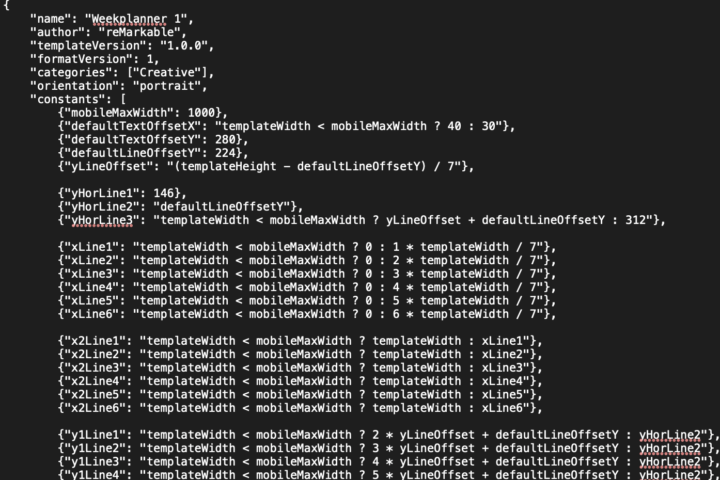
🚀 We Finally Cracked the reMarkable Template Code
Big news, everyone — we’ve officially cracked how the reMarkable handles templates, metadata, rendering, and orientation logic under the hood. Why does this matter? Because it opens the door to something HUGE: 👉 Generate templates on the fly 👉 Translate them instantly into any language 👉 Inject external data (events, notes, metrics, anything) 👉 Send them straight to your tablet — directly from the template selection window This means you’ll be able to create smarter, dynamic templates that update themselves… right on the device. We’re just getting started. If you thought custom templates were cool before… wait until you see what’s coming next.
0 likes • Nov '25
Very interesting!
1-2 of 2
Active 2h ago
Joined Nov 14, 2025
Powered by