Activity
Mon
Wed
Fri
Sun
Feb
Mar
Apr
May
Jun
Jul
Aug
Sep
Oct
Nov
Dec
Jan
What is this?
Less
More
Owned by Vitalii
Learn to create with MidJourney, edit with Gemini and turn AI visuals into income through ads, products and client work
Memberships
Gold Circle Academy
26 members • Free
Confident Introverts
96 members • Free
AI Automation (A-Z)
127.6k members • Free
Anime HQ
138 members • Free
𝙂𝙊𝙊𝙎𝙄𝙁𝙔 🍓🐛🦋🌈⭐️🩷
10.1k members • Free
AI Automation Society
241.6k members • Free
Ai Freelancer
602 members • Free
Chase AI Community
35.4k members • Free
The AI Advantage
70.9k members • Free
21 contributions to AI Automation (A-Z)

4h •
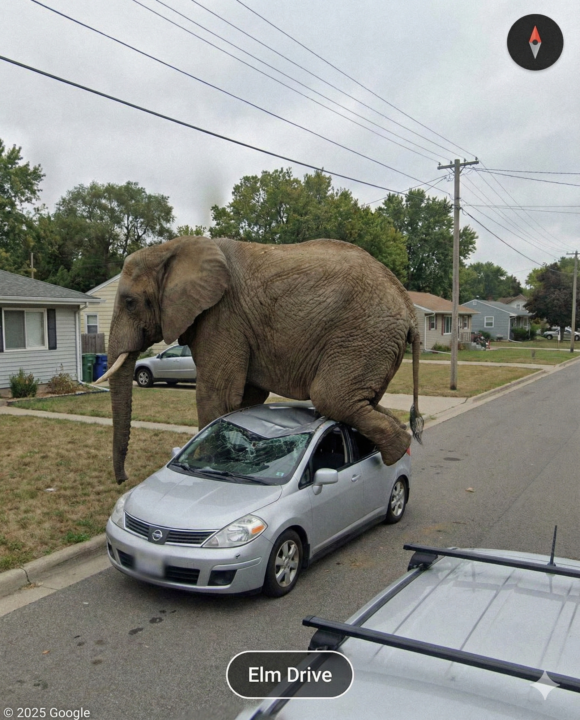
When AI Gets Creative
These are intentionally funny, surreal but realistic images made with AI. They look real at first glance, but the situations are completely absurd — that’s the whole point Here are the prompts👇 Prompt 1: 1080 x 1350 Ultra-realistic Google Street View style capture of a massive adult elephant sitting on top of a small silver hatchback car in a quiet suburban neighborhood, as if accidentally recorded by a Google Maps car. The elephant is fully realistic, heavy and detailed, crushing the windshield and roof with visible dents and cracked glass. Prompt 2: 1080 x 1350 Ultra-realistic Google Street View style capture of a Viking longship sailing through the North Atlantic Ocean, as if accidentally recorded by a Google Maps 360° camera. The wooden boat is filled with rugged Norse warriors rowing and handling ropes, wearing authentic medieval clothing, leather armor, wool tunics, and long beards. Prompt 3: 1080 x 1350 Ultra-realistic Google Street View style capture of a man walking on a frozen Arctic road, waving at the camera while a polar bear runs aggressively behind him, as if accidentally recorded by a Google Maps car. Prompt 4: 1080 x 1350 Ultra-realistic Google Street View style capture of a crashed UFO inside Area 51, surrounded by military and police forces, as if accidentally recorded by a Google Maps car.
2d •
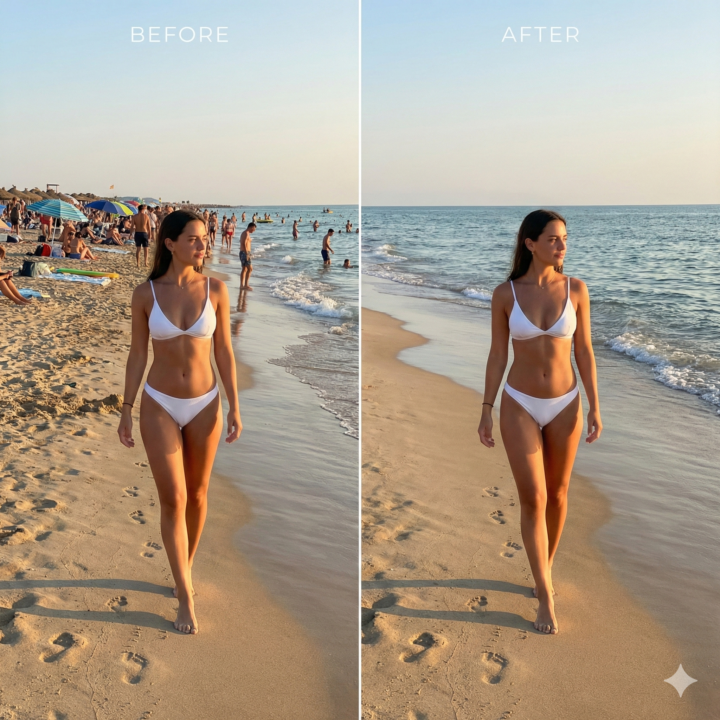
AI Background Cleanup
Check out this before/after. Same photo. Same subject. The only difference: every person in the background is gone. No cropping. No blur. No “AI look”. Just a clean, realistic edit like it was shot on an empty beach. This is the exact prompt I used: Remove all people in the background of the uploaded image. Preserve the main subject exactly. Do not change the subject’s face, body, clothing, pose, or expression. Reconstruct the background naturally where people were removed, matching the original location, architecture, lighting, shadows, and depth. Do not crop, blur, or stylize. The result should look like the photo was originally taken without background people.
4d •
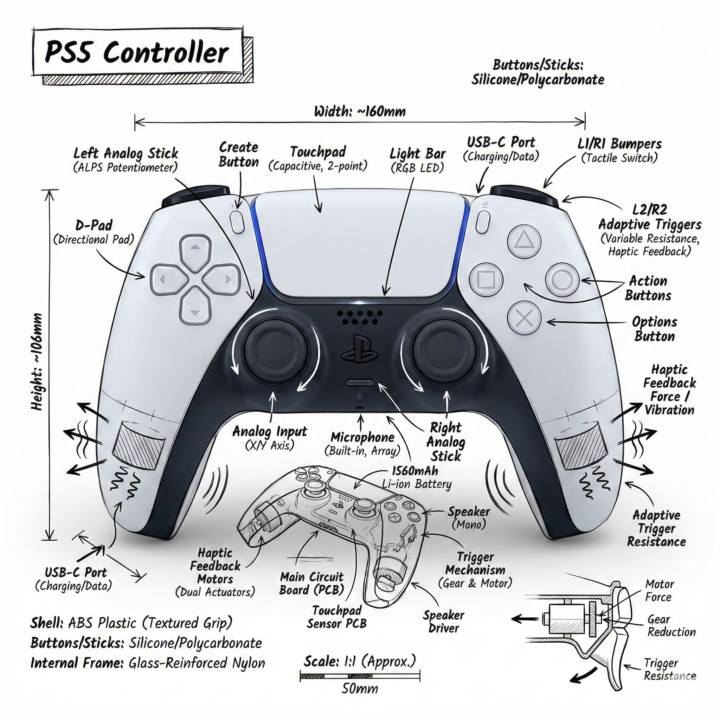
📱AI Tech Explainer Style
Lately I’ve been using this AI style to create technical-style infographics. It combines a realistic image of an object with simple hand-drawn annotations, labels, measurements, and arrows — like something you’d see in a manual or explainer guide. It works well for: - Product explainers - Educational content - “How it works” posts - Technical or brand visuals You can use it on almost any object (products, devices, tools, etc.) to make the image more informative and professional. DM me if you want the prompt for this style
4d •
🚨 NEW FEATURE 🚨
Higgsfield just launched AI Influencer Studio — a tool that lets you create your own digital influencer and generate endless video content that feels real, without ever filming or appearing on camera You design a character once, and then use it to produce Reels, TikToks, Instagram Page and Shorts on demand https://higgsfield.ai/ai-influencer
0
0

5d •
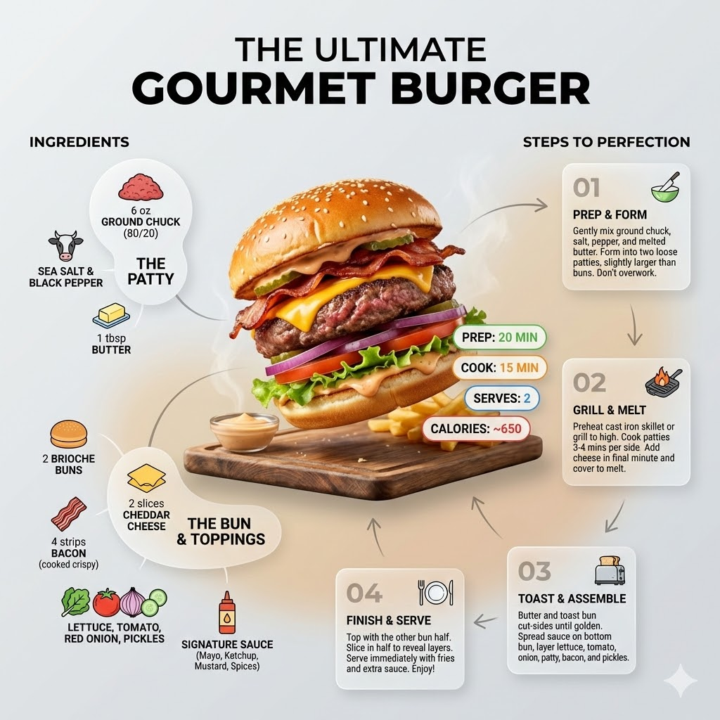
One-Line Recipe Prompt 🍽️✨
This is a universal one-input recipe prompt All you have to do is name the food — the AI generates a complete, high-quality recipe infographic with the finished dish, ingredients, step-by-step instructions, and key cooking info, all laid out in a clean, modern visual Prompt 👇 Ultra-clean modern recipe infographic. Showcase [FOOD] in a visually appealing finished form—sliced, plated, or portioned—floating slightly in perspective or angled view. Arrange ingredients, steps, and tips around the dish in a dynamic editorial layout, not restricted to top-down. Ingredients Section: Include icons or mini illustrations for each ingredient with quantities. Arrange them in clusters, lists, or circular flows connected visually to the dish. Steps Section: Show preparation steps with numbered panels, arrows, or lines, forming a logical flow around the main dish. Include small cooking icons (knife, pan, oven, timer) where helpful. Additional Info (optional): Total calories, prep/cook time, servings, spice level—displayed as clean bubbles or badges near the dish. Visual Style: Editorial infographic meets lifestyle food photography. Vibrant, natural food colors, subtle drop shadows, clean vector icons, modern typography, soft gradients or glassmorphism for step panels. Accent colors can highlight key info (calories, prep time). Composition Guidelines: Finished meal as hero visual (perspective or angled) Ingredients and steps flow dynamically around the dish Clear visual hierarchy: dish > steps > ingredients > optional stats Enough negative space to keep design airy and readable Lighting & Background: Soft, natural studio lighting, minimal textured or gradient background for premium editorial feel. Output: 1080×1080, ultra-crisp, social-feed optimized, no watermark
1-10 of 21

@vitalii-hryhorenko-4120
Big AI Enthusiast who helps creators master AI product visuals. Simple systems, repeatable results, no studio needed
Active 4h ago
Joined Dec 24, 2025
ENTJ
Leamington Spa
Powered by