Activity
Mon
Wed
Fri
Sun
Jan
Feb
Mar
Apr
May
Jun
Jul
Aug
Sep
Oct
Nov
Dec
What is this?
Less
More
Owned by Tracey
Ask your computer questions. Get clear answers. Tech help for business owners who did NOT grow up with computers.
Memberships
Detroit Entrepreneurs Network
135 members • Free
Builder’s Console Log 🛠️
1.5k members • Free
Course to Cashflow
101 members • Free
Digital Roadmap AI Academy
594 members • Free
LinkedIn For Breakfast
5.1k members • Free
AI Automation Agency Hub
277.1k members • Free
VR Creator Club
2.2k members • Free
Arlan's All-Access
362 members • $100/month
The Crafty Carpenter DIY
27 members • Free
13 contributions to Digital Roadmap AI Academy

12h •
📐What's Your AI Development Process
First, my situation: I am creating this simple scheduling app with Google AI Studio--select a job and drag the worker's name to that job. I wrote a very thorough prompt (Role, Task, Specifics, Context, Examples) but of course you can't catch everything in the prompt. So as I tweak the app and have the AI make changes, it will break another function that was working. Then I fix that, add another change, and something else breaks. (This also has also been my experience when coding manually--not new stuff.) So your opinion.⁉️ 1) Should I scrap what I have, and start over--write another even more through prompt knowing what details I need to add? I am concerned about getting a bunch of garbage in the code I have as I keep fixing things. 2) What's your process: prompting and iterating? What working for you?

🔥
4d •
🎊Saturday- What are you working on?
It's the weekend here in the US. Share your wins your accomplishments. Lessons learned, what you are building with AI , any insights, or what you just had planned for the weekend 👇
2 likes • 3d
Still working on my scheduling app in Google AI Studio.
🔥
7d •
🎊Tonight's Vibe Coding Q&A Session
What are you building with AI? What builds do you want to learn? Drop your questions for tonight's session below.👇
1 like • 7d
Deploying Google AI Studio app for client use.
13d •
AI Project: Schedule Tracker
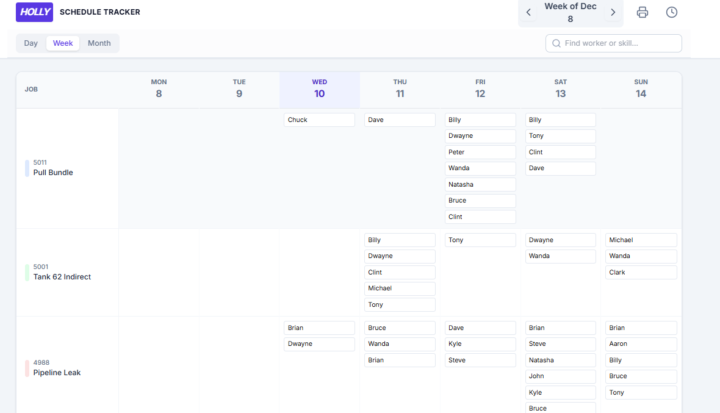
This construction company I do work with wants to start automating some of their processes--everything is on paper right now and coordination is not organized. We are starting with a Schedule Tracker--any foreman can open the app and see on which jobs any worker is scheduled. I want to show a demo, so I can get them on board with a formal project plan and then talk about money. I got great input in the last 2 Vibe Coding sessions on Tuesday--I suggest stopping in, they questions don't have to be technical. I crafted a very detailed prompt. I am working on 2 paths for the demo right now to see what is the best way to go. 1) Because the company is using Google Workspace, Gemini suggested I could build it in Google sheets using AppSheet for the interface. 2) Johnathan and Nicole suggest Google AI Studio, especially if I will build out more functions. Either way I will end up here, but I need a minute to work with the backend. I've got both started, but I need to decide which to finish a demo. The left image is AI Studio, right is Sheets and AppSheet. Will keep you posted.
🔥
14d •
Tonight's Vibe Coding ✨️
Join tonight's session! Get help in your biz and with your AI Builds!👇
1 like • 13d
Great session! Thanks for the help! I will be updating!
1-10 of 13

@traceypatterson
Tech evangelist committed to making computers more accessible, learning more relevant. youtube.com/@confidentclick
Active 8h ago
Joined Aug 7, 2025
INFJ
Detroit
Powered by