Activity
Mon
Wed
Fri
Sun
Jul
Aug
Sep
Oct
Nov
Dec
Jan
Feb
Mar
Apr
May
What is this?
Less
More
Memberships
Agent Empire
925 members • Free
AI Automation Agency Ninjas
20.8k members • Free
AI Automation Society
388.4k members • Free
Stone Scaling GHL-($0-10k/mo)
1.4k members • $700
AI Builders Circle
534 members • Free
AI Video Creators Community
4.4k members • $9/month
AI Automation Agency Hub
320.5k members • Free
8 contributions to AI Automation Society

1d •
An upgrade to Donna (my AI OS / Executive Assistant)
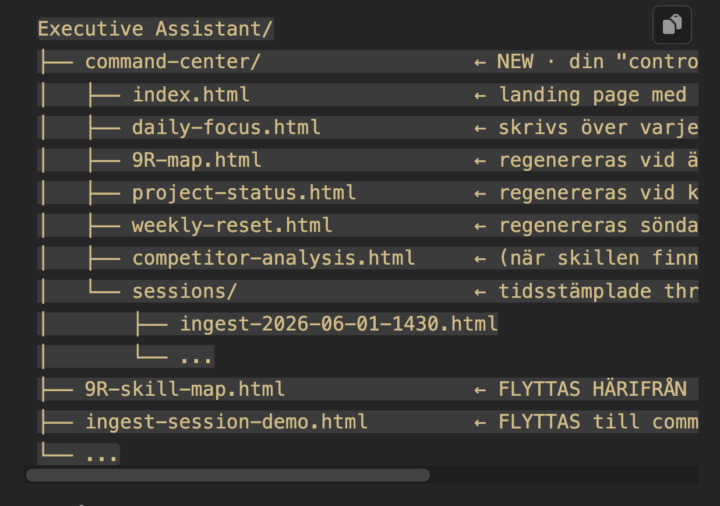
I'm a visual person. Always have been. A few months ago I set up Nate's Executive Assistant + layered Karpathy's wiki-style brain on top. Without really realizing it, that combo has been quietly evolving into my own AI OS — every skill, every workflow, every reference, all interconnected. Today I saw a post about HTML artifacts in agent workflows. Something clicked. Almost anything I run in Claude Code can be turned into a clickable, locally-hosted HTML page. A pitch deck. A project status overview. A deep research output with filters. An ingest flow with checkboxes per proposed wiki edit. A daily focus dashboard. Whatever the skill produces — text in chat OR a visual surface I can actually interact with. I started with my Daily Focus skill. It already: — scans projects, sessions, tasks, _hot.md — ranks by revenue proximity — reads my calendar for Maker Time blocks — outputs today's execution list Now it also writes a local HTML where I check off my floor + 3 build picks, add notes, see my streaks. I open it in VS Code's Live Preview — auto-refreshes whenever the file changes. The clever bit (or hack, depending on how you see it): no real two-way sync. A "Copy state" button at the bottom puts every change as JSON on the clipboard. I paste it in Claude, it updates all the relevant markdown files. Poor man's sync — nothing to maintain, no server, works offline. I built an ingest dashboard the same way. When Donna processes 25 raw files in 5 batches, each batch becomes a card with checkboxes per proposed wiki edit. Three states: approve, revise (with a required note), or skip. Click through, paste the state back, she applies only what I approved. Way more scannable than a wall of text in chat. Plus a Command Center index.html that lists every dashboard with status, last-updated time, and quick triggers. One landing for everything. I've been deep in this for hours and might keep going. Curious how others are using HTML in their workflows — anyone else stumble onto this?
0 likes • 1d
@Darren Kohlenberger Yes — the mtime-fade is sharp. Mine is hardcoded status right now ("fresh / stale / missing"). Works for v1 but doesn't scale. Stealing it tomorrow. The "95% of the job with zero maintenance" line is the whole game. I built real two-way sync once for something else and the maintenance burned more time than the manual paste ever would. Cheap > clever. What does the rest of your stack look like? Same Karpathy wiki structure or did you go your own way on the brain side? Curious what you do for ingest.
0 likes • 9h
@Jon Fin Awesome glad i could help, do you mind sharing what it is?

2d •
Grinding to Level 3 to unlock the AI OS build — but does the locked video actually go deep?
Been pushing hard to hit Level 3 so I can finally access the locked AI Operating System video. The idea of having a full personal AIOS — one system that handles routing, memory, tasks, and execution — is exactly why I joined this community. But here's the question I keep coming back to: Does the Level 3 video actually give you a full, production-ready framework you can build on? Or is it more of a high-level overview that points you in the right direction? For those who've already unlocked it — did it cover the real technical depth (prompting structure, routing logic, tool setup, memory handling)? Or did it leave you with more questions than answers? Not trying to gatekeep the grind — leveling up is part of the process and I'm here for it. Just want to know if I should be supplementing with other resources while working toward it, or if the video is genuinely the blueprint. Would love to hear from people who've been through it.
4 likes • 1d
Like many others have already said, start with Excecutive Assistant and Karpathys Obsidian wiki, and then try yourself. You can always import all your files with Claude after you've reached lvl 3. Better than waiting. 😁
1 like • 9h
@Joe Bigelli Click up are built for teams to manage projects etc. And you can connect your own AI OS to your clickup account. Nate is doing it. In clickup you can have projects, tasks, pipelines but also have a wiki structure. You have your own account and each account can have different permissions and different access. They also released their own AI bot inside their program. But it can be connected from the outside to an AI OS or LLM you use. If its for your own team that is a viable option. Then the AI can search that. While you have obsidian privately. If you're building an agent for an already existing team, they could all be connected to an obsidian on a computer. But that can become messy if alot of people on a team is talking to an agent at the same time. Then you would use something like a postgress database. Im currently learning about it now myself.

1d •
Be honest with me… am I doing this right? 👀
I’m about a week in. I’ve built 3 working AI systems. People are starting to ask me questions. Someone even said they want what I built for their business. And yet I still wake up every day like… “Am I actually good enough to charge for this?” I know the systems work. I know the problems they solve. But that voice in your head that says you’re not ready yet… Does that ever go away? 😅 For those of you who landed your first client — what finally made you feel ready? Was it a skill? A conversation? Did you just jump and figure it out? Drop your story below 👇 I need to hear it.
3 likes • 1d
Im at the start too. Same questions, same imposter voice. One thing about your post: you seem more humble than cocky. Use it. People who can't even use an iPhone are running successful companies — competence is unevenly distributed in ways that are almost funny. You probably know way more than you think. What helped me most: don't position yourself as the expert consultant. The second you do, every "I don't know" feels like a fraud reveal. But if you go in honest — "let me figure this out" — you stop performing and start solving. The other unlock was Hormozi's staircase from $100M Offers. Give it away free to your first 5, then 50% to 5, then 80%, then full price. Build proof + reps + confidence in parallel. Concrete trajectory, not vibes. I needed it. Spent 150 hours on my first client. He ghosted me. The staircase reframed it from "I failed" to "this was my free tier — now I know what to build smaller next time." The "feeling ready" thing: almost everyone I look up to online still talks about imposter syndrome. It doesn't go away. You just stop waiting for it to. Keep going. P.S. genuinely curious what the 3 systems are if you don't mind sharing. Always interested in what people pick as their first builds.
0 likes • 9h
@Kayla O I have a skill that is quite silly in my claude code AI OS, but super effective. So procrastination is basically = high percieved effort vs low perceived reward. So whenever i type i'm procrastinating X it will decrease perceived effort and increase perceived reward. And i also added a list of quotes it will quote to me just like @Lucas Mason s list. Lucas i will definitely add some of yours to my list! Thank you for sharing my friend.

1d •
Hey community! Quick question for those of you building your businesses online.
I'm just getting started with my web presence and trying to figure out the most cost-effective path. I already use Beacons for selling digital products, which handles the storefront side well. But I'm stuck on whether I actually need a full website right now, and if so, what's the smartest way to build it. Here are the options I'm seeing: Free or low-cost/fast builds - Claude Artifacts (basically a landing page you build with AI, no hosting required) - Base44 (AI app builder, good for simple interactive tools and pages) - Lovable (AI-powered site/app builder, more polished output) More traditional routes - Squarespace, Wix, or Carrd (low monthly cost, drag and drop) - Framer (beautiful, modern, a little more of a learning curve) My situation: I'm a solopreneur building a consulting and digital product brand. My Beacons page handles product sales. I'm not selling services that require complex booking or payment flows yet. My real question: Do you actually need a website in the early stage, or is a tight landing page enough to look credible and convert? What are you all doing? What's working, what's been a waste of money, and what do you wish you knew before you started? Drop your setup below. I want to know the real answer, not the polished one.
0 likes • 1d
Honestly i've spent too much time on this and too little time on selling. I've tried alot of tools. I suggest you build with claude/codex or whatever you're using already, and then host it for free on cloudflare pages. Focus on revenue and write down every idea you get about how you should present yourself. Hard to say if i don't know what you're selling. What are the products you sell that don't require complex booking and payment flows?

5d •
Who is building their own personal AI OS?
Who is building their own personal AI OS from the ground up? I would love to talk to you about your strategies and frameworks you are using. Im getting started with mine and plan to scale it to be a whole team running itself with an orchestrator.
2 likes • 3d
@Tone Glomstein I started with just an executive assistant inspired by nate 2 months ago, basically over time i've built more connectors, i've built a second brain that every session gets summarized into and then ingested into the right places, and so on... If i've understood it correctly: What i had from the beginning was more of task and project manager. Now that has evolved to a workstation that i barely have to leave. That is what makes it an "operating system". You might already have evolved your EA to become one without noticing it.
1 like • 3d
@Mansaf Manasef If i've understood it correctly EA is a part of an AI OS. Start with creating an AI OS, but you dont have to understand everything just yet. I managed projects with EA and as an example built easy websites on lovable, I'm more and more going away from all other subscriptions beacuse my EA is now starting to become my own little lovable built in. If you have access to his github and is lvl 3 start with OS, otherwise you can probably start with EA and evolve it. You can most likely find a way to port all the information from one EA to nate herks AI OS structure aswell since its all just files and an LLM can help you with that step by step. Main thing is to just start somewhere, ASAP!
1-8 of 8

Active 9h ago
Joined Mar 18, 2026
Powered by