Activity
Mon
Wed
Fri
Sun
Aug
Sep
Oct
Nov
Dec
Jan
Feb
Mar
Apr
May
Jun
What is this?
Less
More
Memberships
Funding To Fulfillment
65 members • $47/month
Six Figure Independent Income
397 members • Free
The Prime Seller Blueprint
2.2k members • Free
ECOM Fulfillment Formula
421 members • $50/month
RB
Royale Business Academy
69.4k members • Free
Standin' on Business
20.4k members • Free
32 contributions to ECOM Fulfillment Formula
0 likes • 29d
It must be my account. Nothing comes up for my computer or phone.

0 likes • 29d
Thanks!!!!!
May 27 •
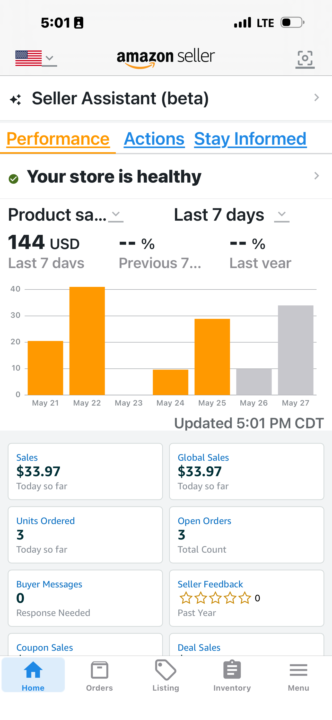
Finally!!!
I finally hit $2000 in sales. I have only 150 products sold though. Can't wait to see if things start to become auto ungated or if I need to hit 200 items sold first.
0 likes • May 27
@Diana Perez I got my first sale in March.
0 likes • May 30
@Sj Sj I didn't get any sales for about a month or so.

May 27 •
Encouraging
I haven’t even been messing with Amazon, but this has encouraged me to get back on a ball.
0 likes • May 28
That's great!!!!
May 26 •
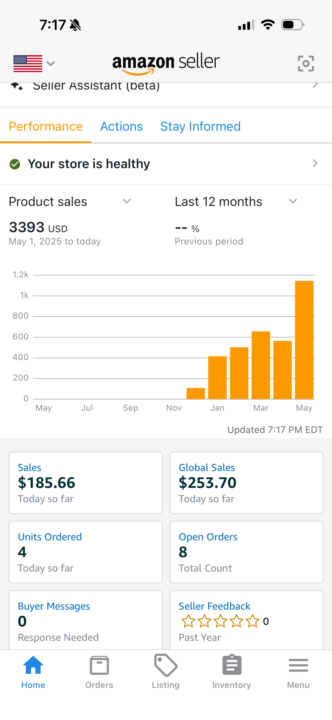
My win 🥇
I’m having a really good month. Thank you so much ladies for not allowing me to give up because I almost did last month.
0 likes • May 28
Congratulations!!! Keep pushing through!!!
1-10 of 32
@tishea-lewis-9378
I want to build wealth while educating myself and others.
Active 2d ago
Joined Jan 6, 2026
Powered by