Activity
Mon
Wed
Fri
Sun
Nov
Dec
Jan
Feb
Mar
Apr
May
Jun
Jul
Aug
Sep
Oct
What is this?
Less
More
2DAnimation101
710
Free
92 contributions to 2DAnimation101
12d •
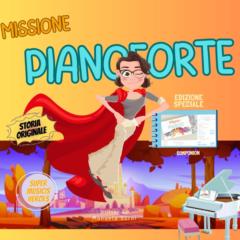
back-and-forth, cartoons for musical education
Hello everyone from Italy! 👋 I’m Manuela Gorni—a music educator, a piano teacher specializing in instruction for children and beginners, and an animation enthusiast! I’d love to share my latest project with you. It’s an animated video I created by experimenting with a blend of different techniques and software. My goal is to produce cartoons or music videos for original compositions—crafted with specific parameters—to expand the musical vocabulary of both children and adults while simultaneously conveying messages with educational value. The tracks are an integral part of the audio materials for my piano method, which is inspired by E.E. Gordon’s Music Learning Theory (yes, the kind of thing music education nerds love!). This teaching approach involves a lot of movement, reflecting the deep parallels between acquiring musical language, motor skills, and spoken language. In this video, I wanted to explore two contrasting actions—"pulling and releasing"—to visually experience tension and relaxation. These are motor movements we encounter both when playing an instrument and in our everyday physical activity. So, in a way, perceiving this motor contrast helps nurture body awareness. For this project, I’m also trying my hand at music production and orchestration, using a hybrid approach that combines traditional composition, DAW work, and artificial intelligence. The bottom line is this: children love watching cartoons... but what if, while doing so, they could acquire real musical skills and expand their learning potential—simply by watching and listening to this clip? I really wanted to post the result here to thank you all: if I managed to bring my projects to life, it is also—and above all—thanks to the invaluable advice I received from Mark’s academy, the inspiration drawn from your work, and this fantastic community over the years. 🙏https://youtu.be/Zu6PGheLxlo?si=Y5lclyYm8xh0MfBL

0 likes • 7d
Really well done!
29d •
The IT Guy
All the partials are assembled. This is my first pass at a final animation. Made a lot of fixes. But I've noted several more. But wanted to have something resembling a finished animation to critique at tonight's class. Some of my biggest issues are resolution and character consistency. I should definitely started smaller.


Aug 18 •
My Pipeline For My Animations
My characters evolved from characters in Adobe Character Animator and AI using Galaxy/Magica. I wrote the script and recorded it. Then I broke it down each character's dialogue line by character line, and used Magica/Eleven Labs to create the female voice, while keeping my own for the male character. I created different emotional facial expressions for each character relative to the animatic I created. I used Adobe Photoshop and Firefly, and sometimes, Galaxy/Magica. I also created different clothing for each, as well as for the BG environment I wanted them to act in using PS. I used "generative fill", remove BG, "generative expand" and other tools to create the layers of depth through parallax, I needed. I used Adobe After Effects as my primary video editor for each "partial". And I am using Premiere Pro for my final assembly (hopefully to be completed in a week or two). In AE, I create comps for each line of dialogue, character, and BG. I keyed the green/blue BG out using the Corridor Key by Blace plugin. I added an inner shadow to each character using the Shadow Studio 3 plugin. And I reduced the BG opacity to 50% to de-emphasize it, separate it from the character to create viewer focus. I made the layers 3D so I could apply a plugin called "AnimateParallax", along with a camera, to create the parallax motion effect. I used another plugin for AE called Railcut, in conjunction with the AE timeline to string the lines of dialogue and characters together. Railcut is nice to use because it makes the timeline look like Premiere Pro, and is easy to work with. To create videos clips from images, I created start and end frames for each line of dialogue, and use Kling 3 Pro to make the video. Occasionally, I used iClone for a specific motion I wanted and exported it using a mannequin with the assigned motion, as an MP4. I used Kling Motion Control those times. When I achieved an acceptable video, I kicked that video over to Dzine for the lipsyncing. For closeups, I let Dzine generate some motion and facial expression from a still image. It does a very nice job. I returned those final clips to the AE associated comp, and turned off the eyeball for the animatic still image. That is one thing I very much like about using AE. The process of progressing from animatic to motion video. I will primarily use Motion Array for music and sound effects. Though I have a few alternate resources. I probably left something out. So, please ask, if you have questions. I will also say that, without serious organization of all the audio track, images, videos, comps, sequences, and preliminary renders, you will have serious delays and issues, as I have.
Aug 17 •
The IT Guy - Partial 03
Nearing the finish line. One more partial to go. Then the music and sound effects.
2
0

1-10 of 92
@thomas-jennings-3861
Owner of Heaven Road Studio, a "mom and pop" studio that has produced a couple of tv series. Animation Alchemy student.
Active 14h ago
Joined Nov 28, 2025