Activity
Mon
Wed
Fri
Sun
May
Jun
Jul
Aug
Sep
Oct
Nov
Dec
Jan
Feb
Mar
Apr
What is this?
Less
More
Memberships
AI For Teachers (Free)
165 members • $9/month
8 contributions to AI For Teachers (Free)

4d •
Bridge Challenge
I used gemini with notebookLM to update my bridge build directions. Then I used Canva AI to make it look nicer. I took too long with Canva but it is a start. https://canva.link/s026w7xvpyeuuxz
2 likes • 4d
I made this yesterday in gemini canvas https://gemini.google.com/share/6431c34d0205 It gives my students last year's data as reference. I really like how it highlights how the bridges failed.
2 likes • 4d
@AI For Teachers With Diana We use Schoology LMS and are discouraged from having students access any other websites. I installed the gemini LTI on Schoology so my students are able to see what I create on that canvas. The Canva LTI is being a little wonky - I can't get that working properly right now. I like that you are able to create such a clean looking website in canva.

Mar 9 •
Recruitment
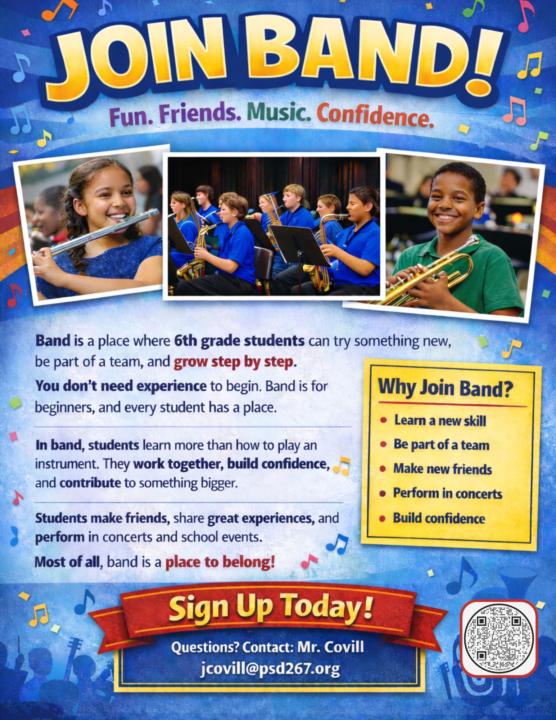
I recently experimented with using AI to design a recruiting poster for our beginning band program, and the process was surprisingly collaborative. I started by describing the message I wanted—fun, belonging, teamwork, growth, and confidence-building for incoming 6th grade band students. Using AI image tools, I generated a poster layout and then iterated step by step: adjusting grade levels, changing shirt colors, fixing instrument hand positions, removing elements that didn’t fit, and formatting it for 8.5×11 printing. I even added a QR code so families can easily access detailed band information. What started as a simple prompt turned into a polished recruiting flyer through small refinements, showing how AI can be a powerful creative partner for educators.
0 likes • 4d
This poster looks amazing! I really struggle using AI to make things with lots of visual appeal. Which platform did you use?
5d •
🎵 My first HELPFUL GEM.
🎵 Here's the link to it. The GEM will ask me questions to update a weekly parent email. https://gemini.google.com/gem/10bRbH9PSTSFCM5sgH11RkrBEKAJA7VEC?usp=sharing Please let me know if the link works.
2 likes • 5d
Yes the link worked! The gem worked as well
Mar 9 •
NotebookLM Video - Writing a Concert Review
This video started with my master teaching profile and the attached document, which gave me the core ideas and direction. I used ChatGPT, Google Gemini, and NotebookLM to help shape those ideas into a polished final video. What I like most is that the technology did not replace my teaching voice. It helped me turn my experience, priorities, and approach into something clear, creative, and ready to share.

1 like • 6d
What is in your master teaching profile? It sounds intriguing. What different parts did Chat and Gemini do? They seem the same to me
1 like • 5d
Wow - that is amazing! Such an incredibly high level of detail. That really seems to help give good direction to the ai
6d •
Lesson Plan Creation
I created a unit plan for the next topic I am teaching. I used the base prompt in the lesson and then added follow up prompts to get the unit plan close to what i would like. This is the initial prompt: You are an expert 11th grade AP Physics 1 teacher. Design a comprehensive angular momentum unit of study.This unit should include 1 lab and should take about 7 class days. Include clear learning objectives aligned to standards, required materials, step-by-step procedures, an engaging core activities, a note deck, and a formative exit tickets to assess understanding. My largest frustration is I work on different sections and get them the way I like them but then need to search all over the place for the versions I like. Not sure what the easiest way to keep these portions organized is. I was using Chat - will try gemini next to see if it is easier
1-8 of 8
@therese-heidelberger-2355
Engineer and educator. Single mom with adult kids
Active 6h ago
Joined Apr 9, 2026
Powered by