Activity
Mon
Wed
Fri
Sun
Nov
Dec
Jan
Feb
Mar
Apr
May
Jun
Jul
Aug
Sep
Oct
What is this?
Less
More
CG Python Academy
1.4k
Free
40 contributions to CG Python Academy

May '25 •
One Tiny Add-on, One Giant Leap for Node-Based Workflows
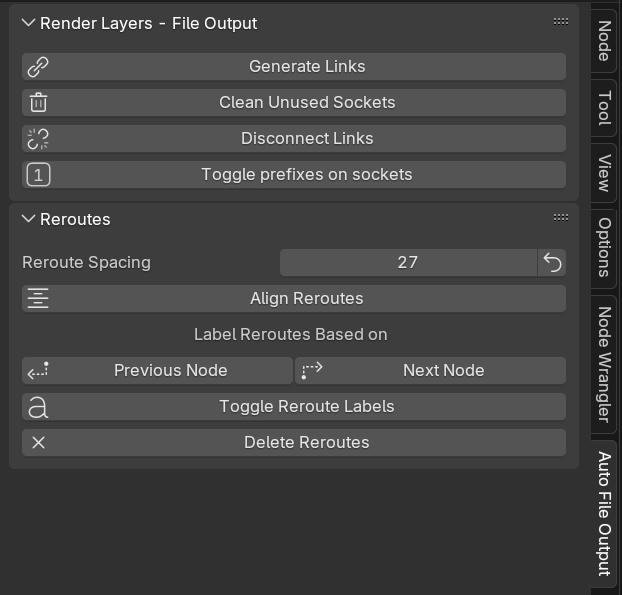
🚀 Auto File Output add-on for Blender Compositor is cleared for launch! What started as a small quality-of-life script has grown into a robust Blender add-on — and version 4.0 brings a serious boost: ✅ Fully optimized and cleaned-up codebase ✅ Smarter, more stable tool logic ✅ New features added without bloating the UI ✅ Still as intuitive and beginner-friendly as ever ✅ Now with built-in logging to help troubleshoot any hiccups ✨ Available soon on Gumroad and Blender Market — all it takes is one cup of coffee to fuel more late-night coding magic!☕ Thanks so much to everyone who encouraged me not to give up on this little project. Your support truly keeps it alive and evolving! 💜
3 likes • May '25
@Victor Stepanov Thank you! 🙌 But of course… I went to sleep last night and suddenly had that classic "wait a second..." moment. 😅 Realized there's one more crucial feature missing — and now I absolutely have to add it. Welp, back to coding we go!
May '25 •
From Pause to Progress 🎨
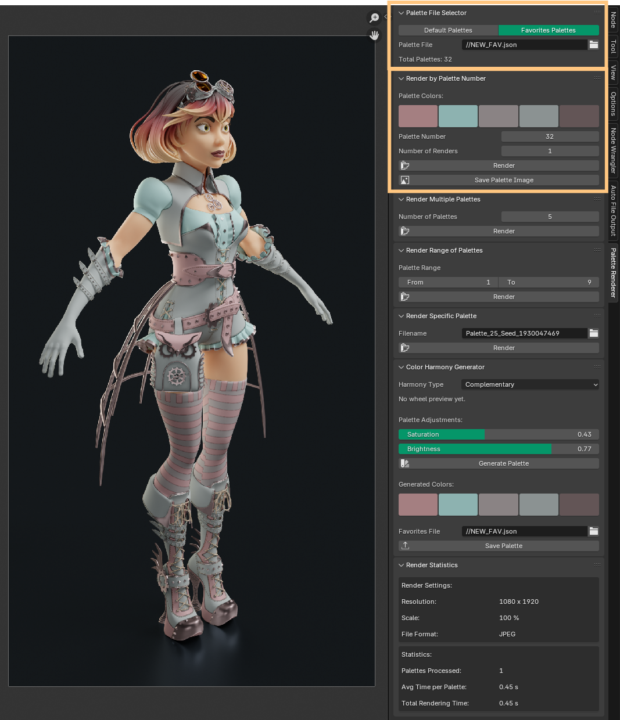
Hey everyone!😃 After a short break (had to deal with some urgent real-life stuff), I’m finally back—and really happy to return to this amazing community! ✨ I’ve missed a lot and will definitely take time to catch up on everything I’ve missed during my absence. Meanwhile, I’ve reopened my addon… and wow, turns out it is possible to forget parts of your own code. Debugging your own logic after a break? Mildly painful. 😅 I haven’t yet implemented everything I originally planned, but no worries — @Christian Coppes and @Victor Stepanov, your awesome suggestions are safely noted and still on my roadmap! Thank you so much for your help and advices! 🙏 For now, I’ve decided to focus on fixing some bugs and tweaking a few key features. A couple of small improvements made it in too: - The addon now comes with a built-in default palette file and supports loading custom palette files—perfect if you've saved your favorite color combos directly from the addon. - You can now generate a visual+numeric image of any selected palette. So not only can you save palettes as JSON, but you can also build a beautiful little library of images with HEX, RGB, and HSV values. Handy, right?🥰 More to come—slowly but surely. It's good to be back 💛
1 like • May '25
@Victor Stepanov Hey Victor! 😊 Thanks a lot! 1️⃣ Yeah, I figured a time estimate might come in handy — especially for that button where a user could potentially render 120,120 renders from a file with 1,001 palettes 😅 I thought it might be good to know what you're getting into before pressing go. Right now, Blender’s UI freezes during rendering, so there’s no way to cancel once it starts. By the way, do you know if that’s normal behavior, or if there’s any way around it? 2️⃣ I’ve reworked the logic — I’m no longer using Seeds. Now I use permutations instead (just like we once discussed!) which gives full control over generating every possible combination, or targeting a specific one.🤓 3️⃣ I’m not totally sure I understood your “power user” idea. Did you mean something like a simplified mode with just a few buttons, and then an advanced toggle to unlock more features? My current thought was to make two separate versions: a minimal one (just rendering from the default file) and a full one (with palette generation and extras), so users can choose what fits them best. 4️⃣ I’ve been brainstorming ways to simplify the scene prep process for users. I put it off for a while since it’s a lot of work, but it’s definitely needed. Right now, the user has to prepare render passes manually, and make sure all materials use white base colors — otherwise the palette overlay won’t look right. So I’m thinking about adding a whole automated setup module that: - Sets up render passes - Replaces colors in shaders - Automatically generates a clean node tree - Then restores the original shader colors afterwards🤪 …with a simple UI panel where users could trigger it all with a few buttons. The tricky part: shader setups can be messy, and Base Color isn’t always what actually drives the look. A friend suggested I just make a tutorial video for setup instead of automating it. But I’m not sure. What would you recommend — go the extra mile and automate, or keep it simple for now and explain it clearly?
2 likes • May '25
@Victor Stepanov @Christian Coppes Here's how it works for now (a bit slow cause of OBS😅)

May '25 •
Book on UX in Tools
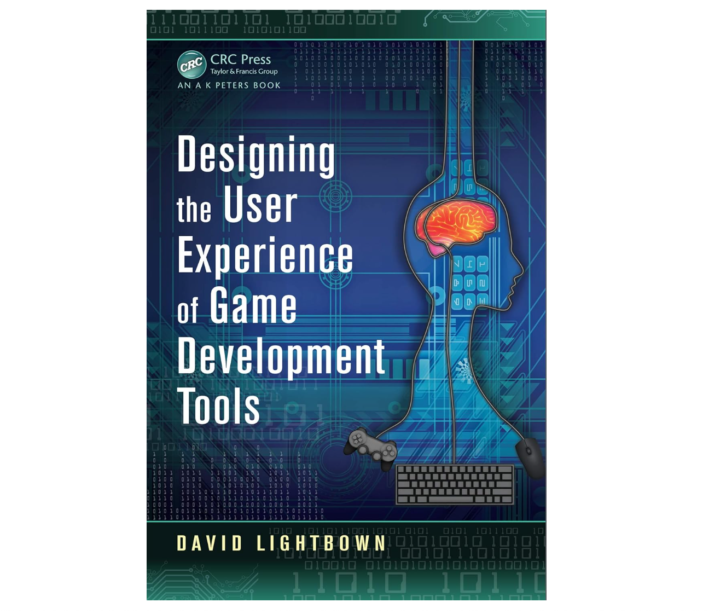
This is also a great resource on getting started with UX in Tools. Designing the User Experience of Game Development Tools https://www.amazon.com/Designing-User-Experience-Development-Tools-ebook/dp/B0CVV9MHDP/
1 like • May '25
Thank you! 👍
Feb '25 •
Looking for a brainstorming crew!🎨
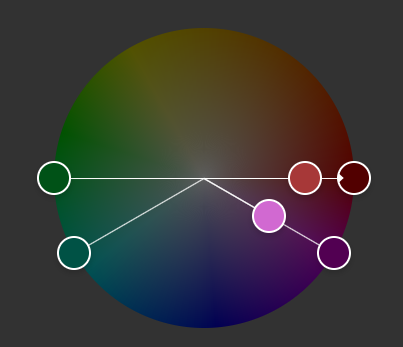
Hey guys! Ever since I added the Color Palette Generator with color harmonies to my add-on, I can’t shake the idea that it would be really helpful to visualize these harmonies directly inside the add-on. Something similar to how Adobe Color displays them (screenshot attached). I’d love to hear any ideas on how this could be implemented! 🤓 Right now, I’m not aiming to create a fully interactive color wheel like Adobe Color—just a simple schematic visualization. The problem is that Blender’s built-in UI widgets don’t support this, so the options seem to be either coding it from scratch or simply displaying pre-made images of the harmony types.🤔 So, if you have any ideas—even crazy ones—I’d love to hear them! Let’s think outside the box! 🔥😊
1 like • May '25
@Victor Stepanov Oh wow! That post from Andrew was especially convincing — thank you for sharing it! > "Set a reasonable price based on the amount of time you are saving and the niche of the workflow (the smaller the niche, the more you can charge)." — That one really surprised me! I actually thought the opposite: that if something is super niche and only a few people use it (like the Compositor), then the price should be lower.🤔 But it turns out that the more unique your market offer is, the more value it has. Whoa — thank you for that insight! >"Also, include a buffer on top of the price so you can do 'sales/deals.'" — So that’s like adding a bit extra to the price in advance so you have room for discounts and sales later, right? It instantly made me think of how everything on Udemy is always on sale for €12.😅 These are such incredibly valuable marketing tips — thank you so much for sharing your experience!
1 like • May '25
@Victor Stepanov Oh wow, this is super helpful – thank you! Going to check it all out now! 🙌
May '25 •
UX in Tools
If you're serious about making your Blender add-ons or tools intuitive, usable, and even fun, then investing time into UX is essential, not just functionality. 🛠️ I’ve been digging into this for a while now, and I highly recommend this excellent set of Game Developers Conference talks on UX in tools https://thetoolsmiths.org/codex/gdc/ui_ux_usability/sessions They’re focused on UI/UX in game development tools, but the insights are incredibly transferable to Blender add-ons and pipeline tools. Whether you're designing a custom panel, operator flow, or full tool suite, these talks will give you tons of practical ideas to make your UI more user-friendly and less frustrating.

1 like • May '25
Thank you, @Victor Stepanov! This looks incredibly useful! Off I go to read and learn! 🏃♀️📚🤓
1-10 of 40

Active 498d ago
Joined Jan 17, 2025
Munich
Powered by