Activity
Mon
Wed
Fri
Sun
Aug
Sep
Oct
Nov
Dec
Jan
Feb
Mar
Apr
May
Jun
What is this?
Less
More
Owned by Sylvie
Marre de toujours recommencer ? Perds du poids durablement, sans reprendre les kilos perdus, ni renoncer aux plaisirs que tu aimes.
Memberships
AYFORM PILATES
28 members • Free
Les entrepreneures ambitieuses
10 members • Free
Skoolers
169k members • Free
Skool Dance for Mavericks
354 members • $99/month
#𝐁𝐢𝐳𝐒𝐢𝐬𝐭𝐞𝐫
2.2k members • Free
2 contributions to What Is Skool?

Feb 17 •
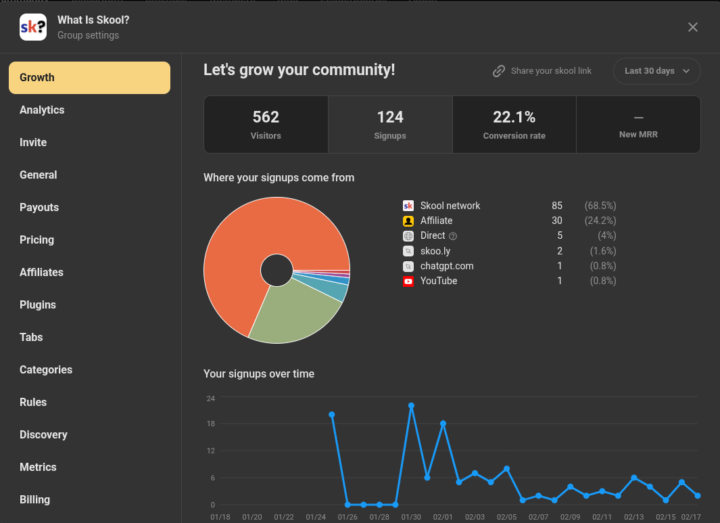
Check Your Group Settings! TRAFFIC SOURCES
I can't help it... I'll make a more in-depth post on this later... BUT I am so excited! 🥳 Christmas in February!

🔥
5 likes • Feb 17
This is sooooo cool ! I just opened the doors to my community today but can't wait to analyse my futur datas !
Jan 6 •
Skool Tax Documents Where to Find Invoices and How 1099s Work
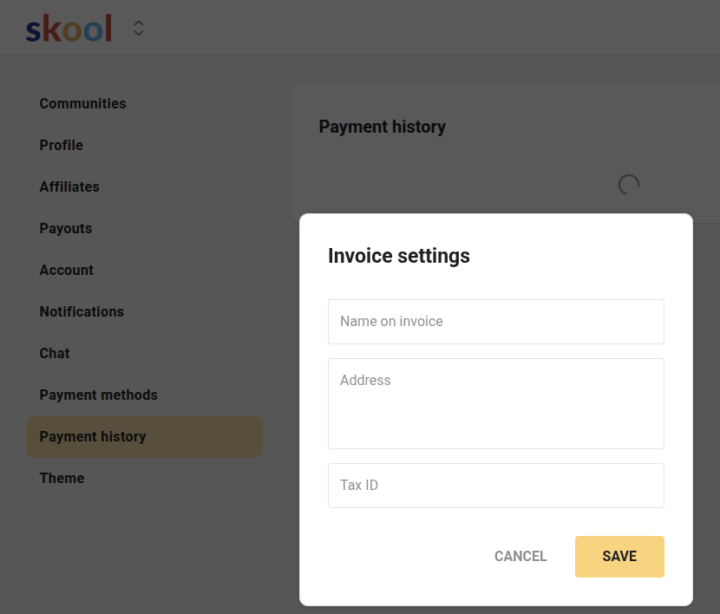
If you make money through Skool and are getting ready for taxes, the biggest thing to understand is where your tax information actually comes from and how it is handled. Skool does not issue 1099 forms. Stripe does. Skool uses Stripe to process all payments. Because of that, Stripe is the platform responsible for tax reporting. If you meet the reporting requirements for your location, Stripe will generate and send your 1099 for the income you earned through Skool. You will not receive a 1099 from Skool support. It comes from Stripe. Whether or not you will receive a 1099, you can still access everything you need inside Skool to stay organized. If you are looking for invoices related to money you earn on Skool, you will find those under payouts. You can go into the community you own, open the group settings, click on payouts, then select any individual payout to view the invoice tied to it. Or you can go to your profile settings, click on Payouts, and see all of your payouts in one place. This includes both your community payouts and your affiliate payouts. If you are looking for invoices related to money you pay on Skool, those are found under Payment History in your profile settings. This includes community memberships, one time purchases, and your monthly subscription payment to run your own community. You can also customize your invoices by adding your business name, address, and tax information. This is available on the settings wheel in Payment History. Once you update that, it applies to your invoices automatically. This helps keep everything consistent when you are organizing your records or sharing them with your accountant. If something is not showing up correctly, you can reach out to Skool support. To make the process go smoothly, be sure to submit the support ticket under the name of the community you need help with. Explain the issue clearly, include a screenshot if you have one, and share the correct information it should reflect. You can submit your request here: https://www.skool.com/support
Poll
26 members have voted
🔥
3 likes • Jan 7
Thank you so much @Jenna Ostrye I am from Belgium. If I understand well once I have payouts from Skool I introduce these payments into my booking as Skool being my "client" and do not have anything to do regarding taxes (TVA) as I am in Europe and Skool is US based right ?
🔥
2 likes • Jan 7
@Jenna Ostrye I will for sure but I wanted to understand it well myself before explaining to him what it is.
1-2 of 2

🔥
@sylvie
J’aide les femmes qui en ont marre de toujours recommencer leur perte de poids à perdre du poids durablement, sans reprendre ni renoncer aux plaisirs.
Active 18m ago
Joined Dec 19, 2025
Brussels, Belgium
Powered by