Activity
Mon
Wed
Fri
Sun
Oct
Nov
Dec
Jan
Feb
Mar
Apr
May
Jun
Jul
Aug
Sep
What is this?
Less
More
Agent Zero
2.8k members • Free
43 contributions to Agent Zero

May 26 •
A0 CLI v1.12 and Agent Zero v1.18 are live!
Hey everyone, A much more capable Browser is finally available inside Agent Zero and its CLI. Browser now clicks and navigates more efficiently. The agent can actually interact with complex modern page structures (the kind that used to silently break automation). These browser improvements come from Space Agent (https://space-agent.ai), our own secondary product focused on browser-native AI. We're back-porting its capabilities into the Agent Zero browser, and this release is the second iteration of that work. Expect more to come. What's new in CLI v1.12 🔐 Remembered protected hosts now reuse the server-authenticated session cookie across CLI restarts. The CLI no longer prompts for login on every launch. 🌐 Support for Agent Zero supplied helpers in host-browser sessions. What's also new in Agent Zero v1.18 🧩 Configurable skills cap The maximum number of active skills is now configurable via max_active_skills in the skills plugin config and the settings UI, replacing the previous hard-coded limit. 🖼️ MCP multimodal content handling fixed MCP image, audio, and resource tool results are now properly preserved and provided to active agents. 🔧 Other fixes and refinements - Desktop profile's .ssh/agent runtime directory excluded from user backups during self-update, preventing live SSH agent sockets from aborting upgrades How to update Agent Zero: Settings > Check for updates > Review update > Restart & Update CLI: if you are on at least v1.7, just run 'a0 update' in your terminal. Or follow the one-line scripts available at: https://www.agent-zero.ai/p/docs/a0-cli-connector/#install Feedback is what shapes these releases. If something feels off (especially in the browser), let us know. See you tomorrow in our Skool Community Call. Join us here at 4PM UTC: https://www.skool.com/live/DlyvNKHbyWw

2 likes • May 30
I attempted to use both Agent Zero v1.18 and A0 CLI v1.12 (on Windows) to accomplish the following with Kimi K2.6 driving both. I know y'all are looking for feedback. This was the mission of my prompt: Systematically optimize LM Studio load parameters and model inference parameters for the **Qwen3.6-27B** model (loaded as `qwen36-test`) to achieve the highest possible score on a strict agentic coding benchmark. Test across multiple quantization levels (Q4_0, Q4_K_S, Q4_K_M, Q5_K_M, etc.) and context sizes to find the best achievable configuration for a 24GB VRAM budget (RTX 3090). Technical issues seen which prevented success: A0 CLI session fractures - I kept seeing session or communication corruption between the two resulting in garbled text in the Windows Terminal PowerShell (latest) terminal. I tried uninstalling/reinstalling the A0 CLI, cache clearing, etc. But couldn't make it work. Agent Zero complaining that Code-exec was not enabled in the terminal when it actually was enabled.
0 likes • May 30
@Alessandro Frau - Thanks for being so responsive! 🙏 I have created a more detailed GitHub Issue for you here: https://github.com/agent0ai/agent-zero/issues/1681 I'm happy to re-test on my side when there is a fix and let me know if you need any additional information.
May 22 •
A0 CLI v1.10 + Agent Zero v1.16 🚀
Hey everyone, Big release day: A0 CLI v1.10 and Agent Zero v1.16 are live. The main dish: Computer Use Cross-platform support for Linux X11/Wayland, macOS, and Windows. This is a beta feature and we're actively looking for feedback from the community. If something feels off or breaks, let us know. Speech is now fully modular The legacy speech system has been split into two independent built-in plugins: Kokoro TTS and Whisper STT. Enable either, both, or neither. Browser-native TTS remains available as a fallback when Kokoro is off. The Whisper mic UI only appears when its plugin is enabled. What else is in this release: 🔒 Screenshots (browser, desktop, computer-use) are now ephemeral and context-scoped by default. They no longer linger on disk. 🧩 Plugin system improvements: simplified ON/OFF toggle, configurable error retry count, skill visibility controls (hide skills from the model-facing catalog), reduced scanner false positives, and a new skills_activate endpoint for connector clients. 🖥️ CLI v1.10: locked release installs with managed CPython 3.11, embedded computer-use backend, skill shortcuts, startup defaults with --chat and --chat-last options, and cleaned up status text. How to update: Agent Zero: Settings > Check for updates > Review update > Restart & Update CLI: if you are on at least v1.7, just run a0 update in your terminal. Or follow the one-line scripts available at: https://www.agent-zero.ai/p/docs/a0-cli-connector/#install Feedback on Computer Use is especially welcome.

2 likes • May 22
My testing case for Computer Use is the following: I have a month subscription to poliigon.com where I have amassed many monthly asset points but I am ready to cancel my subscription. I need to drive a browser to procure the most popular assets from the four categories of assets so that I can cancel my subscription after using up my points balance. Failed attempt #1: Agent Zero integrated browser was not able to authenticate to the site due the browser not handling a site pop-up to capture a one-time code sent to email Failed attempt #2: Agent Zero driving Microsoft Edge on Windows via Chrome debugging (I manually authenticated prior) kept fumbling the process of procuring assets and ended up in loops (Used NVIDIA Nemotron 3 Super model via OpenRouter) Attempt #3: After upgrading to this release of Agent Zero, I will re-attempt via Chrome debugging but with a larger and more capable model (e.g. Kimi K2.6) PS - I’m still finding the CLI app useful for chores with terminal centric tools (e.g. Check a specific tool version and tell me if I was impacted by a particular supply chain cybersecurity attack).
3 likes • May 24
@Fabricio Q I saw the same issue here with v1.16 and v1.17, disabled the default backup option and the upgrade worked.
May 5 •
Agent Zero v1.13 is live — ODF-First Documents + Desktop Lifecycle 📄
v1.13 is now live. The headline change: Agent Zero now defaults to open standards for every document it produces. Office & Document Handling • ODT, ODS, ODP are now the primary formats for Writer, Spreadsheet, and Presentation artifacts • OOXML (DOCX, XLSX, PPTX) remains available as an explicit compatibility option • Full ODF package generation, validation, and read/edit support • Unified Office canvas controls — active-file header in canvas and modal views, shared "+ New" menu, inline Save, Rename/Close from a document dropdown • Live document reload after edits — LibreOffice windows close and reopen instead of relying on canvas repaints • Reduced automatic document triggering — meta-discussions about files no longer create artifacts; explicit file and canvas requests still work Linux Desktop • Persistent Desktop lifecycle — a single Xpra Desktop iframe stays alive across canvas, modal, and keepalive hosts • Explicit shutdown vs. crash state, with an XFCE panel "Shutdown Desktop" launcher (confirmation required); unsafe logout/lock/switch-user affordances are hidden • New desktop_state helper, expanded desktopctl observe-act-verify commands, and Xpra bridge diagnostics • Generalized CLI agent guidance — the Desktop skill now uses a generic nested CLI-agent launch pattern (TARGET_CLI / FALLBACK_CMD) instead of tool-specific instructions Browser • Stable modal switching — Desktop → Browser now reuses existing sessions instead of opening a blank tab • New Focus mode control in the Browser modal header • New browser:screenshot action that writes JPEG/PNG files for vision_load • Extended agent-callable input actions and a browser-forms on-demand skill for label-wrapped form controls. This means better automation! UI & UX • Unlimited canvas sizing — the fixed right-canvas width cap is removed • Surface-switch buttons in modals (Browser/Desktop switcher in modal headers) • Time Travel now uses the standard centered modal shell and shared backdrop • Bash-style chat input history — Up/Down arrow navigation through previous inputs (community contribution); Down-arrow only triggers at end-of-text

0 likes • May 10
Has anyone else found a workaround to Google refusing to play ball with the Agent Zero browser?
Apr 28 •
A0 v1.10 is HUGE! (Native Browser, Time Travel, Office Canvas) ⚡
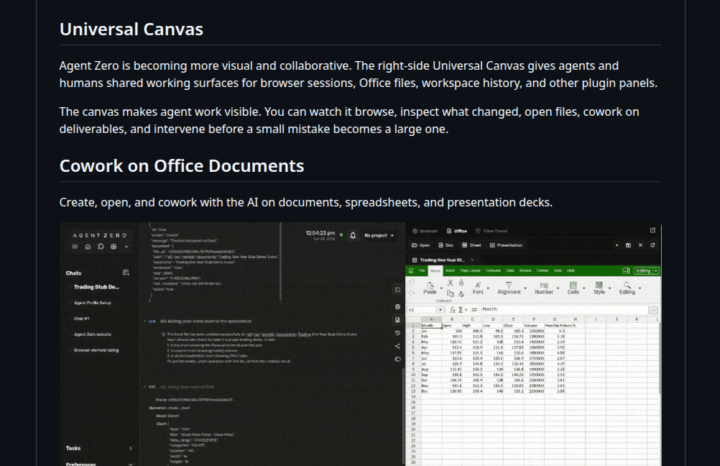
Hey everyone, Version 1.10 is finally here, and it fundamentally changes how you interact with Agent Zero. What’s new? - The Universal Canvas: A brand new right-side panel where you can cowork with your agent. - Native Browser: Watch the agent browse the web live. You can even use the new Annotation Mode to visually select UI elements and tell the agent to fix them. - Office Magic: Work on Word, Excel, and PowerPoint files natively. The agent can even generate real Excel charts for you. - Time Travel: Messed up a file? The workspace now has a snapshot history. Diff, preview, and revert changes easily. Powered by Agent Zero's Space Agent. - OpenAI OAuth: Connect your existing OpenAI/Codex subscription so you don't have to burn API credits. Don't forget the CLI Connector 💻If you want the agent to work on your local machine's files while keeping its code execution safely inside Docker, install the CLI (requires v1.9+). - Mac/Linux: curl -LsSf https://cli.agent-zero.ai/install.sh | sh - Windows: irm https://cli.agent-zero.ai/install.ps1 | iex (Ask the agent to use the a0-setup-cli skill if you need help). Update Agent Zero:Settings > Update > Open Self Update > Restart and Update Go build something awesome. See you all tomorrow, April 29th at 3PM UTC in the Skool Community Call. Join us here: https://www.skool.com/live/DlyvNKHbyWw
2 likes • Apr 29
THIS is the computer use agent I've been hoping Agent Zero would become. It's so much more functional with a browser, productivity apps, and access to the host CLI!
Apr 13 •
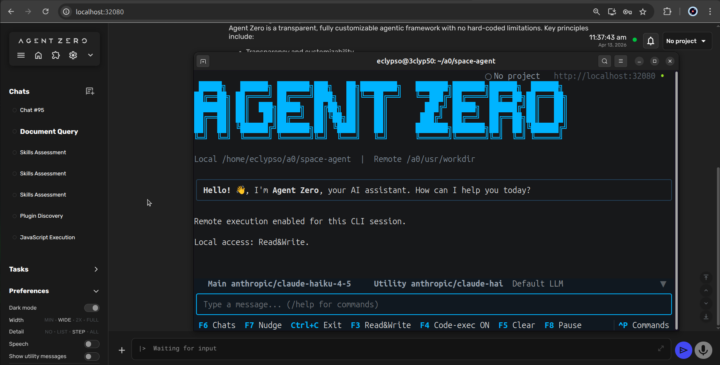
Agent Zero v1.9 is live! Meet the A0 CLI Connector 🖥️
Hey everyone, v1.9 just dropped, and it comes with a brand new tool: the A0 CLI Connector. What it does: It's a CLI that connects your local machine to your Agent Zero instance. It can view and edit files directly on your host machine, while all code execution stays safely inside Docker. Best of both worlds. The only requirement is installing Agent Zero version 1.9. Previous version don't support the CLI connector. Install it now: - Mac/Linux: curl -LsSf https://cli.agent-zero.ai/install.sh | sh - Windows irm https://cli.agent-zero.ai/install.ps1 | iex Or ask your Agent to use the a0-setup-cli Skill to guide you. 🔒 Security Note: This release also patches two CVEs (SSRF and Path Traversal). Please update your instances. Other highlights: - Browser Agent can now use its own dedicated model preset. - /project and /config commands work directly in Telegram, WhatsApp, and Email. - Redesigned messaging settings with clearer setup flows. Update Agent Zero: Settings > Update > Open Self Update > Restart and Update
3 likes • Apr 15
After an unfortunate time away from A0, version 1.9 is a wonderful surprise. From the increased ease of installation (one CLI command install!), the exiting new feature set (WhatsApp chat with the agent), and revamped UI. My interest in the product is renewed. Well done dev team! Potential bug: I was unable to select a newly created project in the WhatsApp connector via the settings drop down.
1-10 of 43

Active 5d ago
Joined Jul 29, 2025
Powered by