Activity
Mon
Wed
Fri
Sun
Jul
Aug
Sep
Oct
Nov
Dec
Jan
Feb
Mar
Apr
May
Jun
What is this?
Less
More
Memberships
Ep - reMarkable Tablet Support
962 members • Free
16 contributions to Ep - reMarkable Tablet Support

May 7 •
A proud Dad
Yesterday was one of those moments in life that reminds you what really matters. My son graduated, and I honestly couldn’t be more proud as a father. For as long as I can remember, he has talked about becoming a doctor and helping people. It was never just a passing idea for him — he stayed focused on it year after year, even when things got difficult, exhausting, or uncertain. Watching him walk across that stage yesterday hit me hard because I’ve seen the work behind the scenes that nobody else sees. What stood out to me most is that success rarely happens all at once. It comes from visualizing where you want to go, staying connected to that vision, and then taking small meaningful steps every single day — even when progress feels slow. Over time, those small steps become something massive. That lesson applies to all of us:business,relationships,health,dreams,purpose. You do not have to have everything figured out overnight. You just have to keep moving toward the life you see in your mind. As a father, seeing my son turn his vision into reality is one of the proudest moments of my life.


1 like • May 8
Congrat, I am sure you are very proud. I wish your son the best as he moves forward.
Mar 10 •
Color
I finally got it to connect, I have built a planner and I have selected color, it is not showing color but gray scale. Am I missing something?
0 likes • Mar 12
The backup pdf is showing color, the reMarkable is grayscale
0 likes • Mar 12
reMarkable is working with other things that are color, just not this planner
Mar 10 •
🚀 CalSync v1.0.31 is Live!
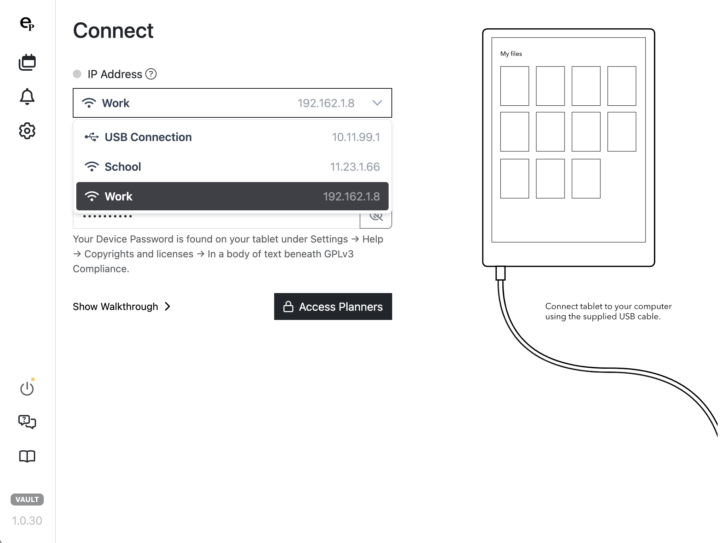
We just released CalSync v1.0.31, bringing a number of improvements to the connection experience and overall usability. This release focused heavily on making device connections more intuitive and stable, especially when switching between USB and Wi-Fi connections. ✨ What’s New • Improved connection selector — You can now easily switch between USB and Wi-Fi IP addresses using the new dropdown interface. • Cleaner device connection UI — Icons and layout improvements make it clearer which connection you are using. • Enhanced connection status indicator — The status orb now better reflects connection states while CalSync is communicating with your tablet. • Better stability during connection attempts — Reduced cases where the connection indicator could get stuck while checking device status. 🔧 Improvements • UI refinements across the Connect screen • Improved IP selection handling • Better feedback during connection checks • General bug fixes and internal cleanup 📌 Reminder For most users, the USB connection (10.11.99.1) will be the fastest and most reliable option. Wi-Fi connections are still available if enabled in CalSync Settings. 🚧 What We’re Working On Next • Better multi-tablet support • Improvements to device cache syncing across devices • Additional planner layout types • More summary page templates As always, thank you all for testing, reporting bugs, and helping shape CalSync. Your feedback directly drives these updates. 🙌 Let us know how v1.0.31 works for you!
0 likes • Mar 10
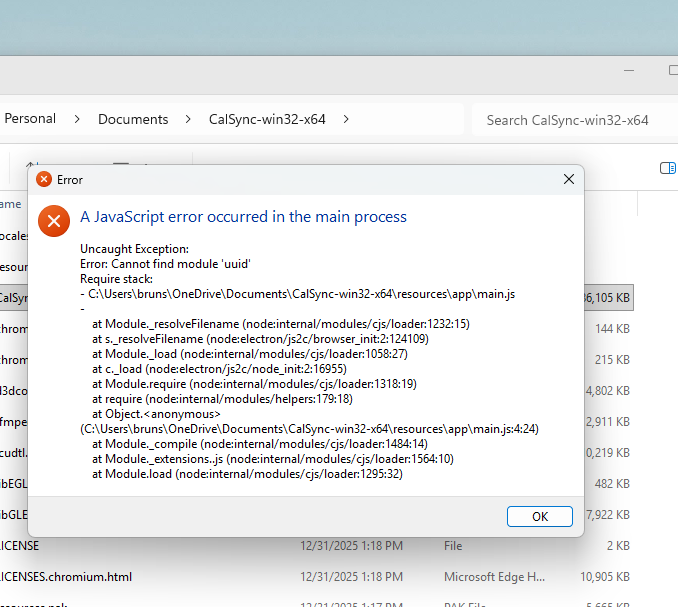
I am still having trouble with the java script error, I cannot get past that on 3 different computers. Any ideas? I am running as Admin
0 likes • Mar 10
windows 11, Intel(R) Core(TM) i7-8565U CPU @ 1.80GHz (1.99 GHz) 64-bit operating system, x64-based processor. This is one, other are about same
Feb 23 •
Issue launching Calsync on Windows
Some are having issues launching calsync and are getting system errors. please reply with your related issues and screenshots of the bugs you are receiving.
0 likes • Feb 25
I am getting the java script on all computers
0 likes • Feb 25
Thanks, I will try
1-10 of 16
Active 7d ago
Joined Nov 5, 2025
Powered by