Activity
Mon
Wed
Fri
Sun
Jul
Aug
Sep
Oct
Nov
Dec
Jan
Feb
Mar
Apr
May
Jun
What is this?
Less
More
Owned by Stephanie
Memberships
The Skool Summit Community
21 members • $9/month
Skool Scale Camp
4.9k members • Free
Grow With Evelyn
2.8k members • $7/month
AI Lab Pro
236 members • $9/month
Skool Growth with Carolina
129 members • Free
Girl Tech HQ
210 members • Free
Notion for your Biz & Brain
413 members • Free
Skool Extensions 🧩
555 members • Free
Coaches Life Lab 2.0
760 members • Free
11 contributions to Skool Growth with Carolina

🔥
14d •
My YouTube Challenge! - Day 2 done! (no day one LOL)
I have a list of video topics that are aligned with the Cosmic Wealth Collective goals, and so today, I finally got around to do the first video!! my 30 day challenge - record and release videos, at least 3 per week! I'll schedule ahead of time, and start dripping them out. here's the first one of the series! https://youtu.be/DRuHg5eAjfM?si=W79EHoOJWdfsfAu7 thanks @Sadie Smiley for the list of ideas!

1 like • 14d
Congratulations Carolina you hit it out of the park! I just listened all the way through and loved it. I’m very much feeling this upcoming Leo energy already. The quintessential Leo rockstar for me is and always will be Robert Plant. I’m an Aries Sun, Capricorn rising. My Neptune is retrograde in my ninth house in Scorpio. Perhaps unwittingly you have given me the surge I needed to get my YouTube and school out in the world. Thank you.June 30 here we come!
🔥
20d •
vip - monthly audit call is happening in 10 mins!
join me at 11am eT and get your questions answered! https://www.skool.com/live/mChsKjh7MSl @Mary Walker @Michelle Simpkin @Sarah Friot @Desiree Zega @Tara Townend @Stephanie Wilson @Jessica Lynn @Monica Linstad @Ayeshia Pompey @Jude Hill @Carey Kaas @Deirdre Jones @Judith Leroy Esvan @Silvia Martinez @Suliet Rivera @Heather Carroll @Karen Milone @Ronda Del Boccio @Pam Allen @Chaela Sumner @Rebecca Paciorek @Ginger Schwartzbeck @Olive Oliver
2 likes • 20d
Sadly missed this, I’m on MST here in Arizona. Too early for my nervous system 😆
🔥
Apr 29 •
Skool Engagement, the holy grail...
In a world, where attention is the new economy, how do you capture it, and maintain it? How do you get your audience to engage with you, vs just being passive? Well... let's look at the problem. Here's what I see inside most Skool groups and the reality of how consumers are navigating this space: - You want attention and engagement for your stuff, yet... you won't give it to others - Your audience is scattered, time limited - Your posts follow a formula, never breaking the mold - People want entertainment WITH education, it's called "edutainment" -- and that's been a thing since the 90s when the internet really kicked off - You rarely show your face and share WHO you are - You sell before you actually build trust and authority; and that turns people off - And onboarding path doesn't exist or leaves people hanging without a path to follow How can we solve for some of this disconnect and lack of engagement? Go back thru that 👆 list, and do the opposite or close to it: - If you see your members in other communities, engage them! - Unless you're saving lives and delivering high-quality content, and has a must use at this time aspect to it... you won't get daily engagement from 100% of your members. Get realistic. - Stop posting the same thing each day. Use polls, emojis, one word posts, highlight your members, etc. - If your community is free/freemium and you want to get people to upgrade to paid layer... then STOP giving everything away for free. What's my incentive to pay you, if you give me all I need for free??? - Stop hiding behind the screen. Share a photo of you, and ask others to do the same. People love to see each other. We are HUMYNS! not computers. - Selling is a craft. Don't be pushy. Let your testimonials, and results build the proof, and sell gently within your classroom, posts, dms, and comments. - You need a breadcrumb path for your audience to your paid offers. AND I mean a loud and obvious thing!! What have you done to drive engagement that's been successful, fun and easy? Share below and let's get the collective brains working! We all thrive by lifting each other up!

3 likes • Apr 29
Hobby Plan purchased yesterday! I’ll be opening my Skool and YouTube mid-May, so I don’t have a history on Skool to share yet. What I do have from my lived experience is this: What you shared around engagement and selling reflects something I’ve lived very directly. I’ve been contemplating Gate 26, the ‘Sacred Trickster’ of late. Essentially, the ‘Salesperson’. Gate 26.1 of the Gene Keys is in my Venus Sequence, my SQ - Spiritual Quotient eg pre verbal, pre defensive self. Your heart essence. We all hold all these Gates within us, however! The pattern I see is surprisingly simple. When action comes from fear or from a sense of needing something back, people feel it. I’ve seen where that leads. Lack begets lack. When the orientation shifts into service, something else begins to move. Not giving to be liked. Not overextending. Being in service to what is actually needed and contributing where there is a gap. That has been the only approach that holds. For me, this connects to the idea that lack sits underneath a lot of what we call “strategy.” When that’s driving, it distorts decisions. There is also no competition when someone is grounded in their own work. No one else can replace that. Nothing needs to be forced or proven. The work becomes about using what you carry well and directing it where it creates value for others. That’s the difference I’ve seen in what sustains and what doesn’t. And at the end of the day, the question becomes very real: What are you actually contributing, and does it make a difference?
2 likes • Apr 29
However, be grounded in your worth. That is essential. This is not giving to be liked.
🔥
Apr 23 •
How To Get Leads & Mentions For Your Skool (A Perk)
Did you see this post about the best spirituality Skools in 2026? That post got a ton of attention outside of this Skool, including leads to those who were mentioned! 🥳🥳🥳 That was the whole goal... including creating SEO content for Google to pick up, because this community is public and public Skools can take advantage of SEO & Google. Would you like to be mentioned in my future roundups that will cover all major Skool listing categories? Yea, I know you do! Read below for ALL of the details... bookmark this and ask me questions below. DO NOT drop your link, save that for later. 🚀 The Fast Track: Guaranteed Mentions (VIP & Paid Members) If you want to guarantee your spot in these high-traffic roundups, the easiest way is to become a paid member. I prioritize my paying clients because they are the ones actively investing in their growth. 💗 Skool Growth Members (Priority Access): You get first dibs on all roundup spots. Sign up now while it's still $5/month! 💗 VIP Workshop Attendees: If you purchase the VIP pass for any of my upcoming workshops, those that I promote, or masterclasses within this Skool, you automatically earn a "Shout-Out Credit" to be used in a future roundup of your choice. 🛠️ The Sweat Equity Track: Earn Your Mention (Free Members) Don't want to upgrade yet? No problem. You can still earn your way into these roundups by helping make this community the best place on the internet for spiritual entrepreneurs. Here is how you can qualify through engagement: 💚 Level 3+ Members: You can get mentioned, but ONLY if you have completed the 4-Day Free Challenge and posted your results in the designated threads. (This proves you are an action-taker). 💚 The "Implementation Gem" Winners: If you share a detailed "Wins" post showing exactly how you applied a piece of free advice from this group to get a result, you earn a mention. I want to highlight people who do the work!
1 like • Apr 28
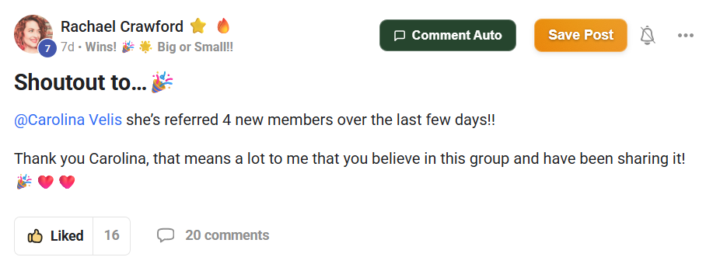
@Ronda Del Boccio great testimonial!
🔥
Apr 28 •
How To Easily Change Your Skool Membership From Monthly to Annual
I just got a great question on how to change a membership payment frequency from monthly to annual, or vise versa. Each of your paid Skool groups, has the ability to move from monthly to annual (if offered) or to move up the tiers for more premium perks. How do you do that? - go to the Skool you want to change the payment for - click on Settings, on the right hand side bar - Pick membership option - Then select "change plan" to go from monthly to annual And that's it! So, if you're a monthly Skool Growth member, and want to pay the full price now of $50/month follow the video and instructions above. 👉💚 TIP: $50/year is a FOUNDER'S price, aka, this low price won't exist forever. The next hike will be coming sooner than you think, as I increase the price to $11/month, then increase again to $22/month. The yearly prices will be lower than monthly, giving you about 2 months free. Before prices are increased, I'll notify you all with plenty of notice, but don't slack as I'm not going backwards in pricing...only forward! And if you know a friend who is prime for hosting a Skool, then don't pass up the opportunity to become an affiliate. The invitation link is in the same "Settings" area, just hit Invite instead of membership to get YOUR unique link.

1 like • Apr 28
@Carolina Velis awesome. I’m on it!
1-10 of 11
@stephanie-wilson-7463
Founder 𐦐 Living Your Design™ Skool community where women embrace decisive self trust to lead and create a legacy aligned with their design.
Online now
Joined Apr 3, 2026
Desert SW
Powered by