Activity
Mon
Wed
Fri
Sun
Jun
Jul
Aug
Sep
Oct
Nov
Dec
Jan
Feb
Mar
Apr
May
What is this?
Less
More
Memberships
Hackathon
2.6k members • Free
AI Automation Made Easy
17.1k members • Free
AI Engineering Collective
88 members • Free
AI Automation Society
362.8k members • Free
AndyNoCode
33.3k members • Free
Digital Builders Academy | BS3
10 members • Free
13 contributions to AI Automation Society

Mar '25 •
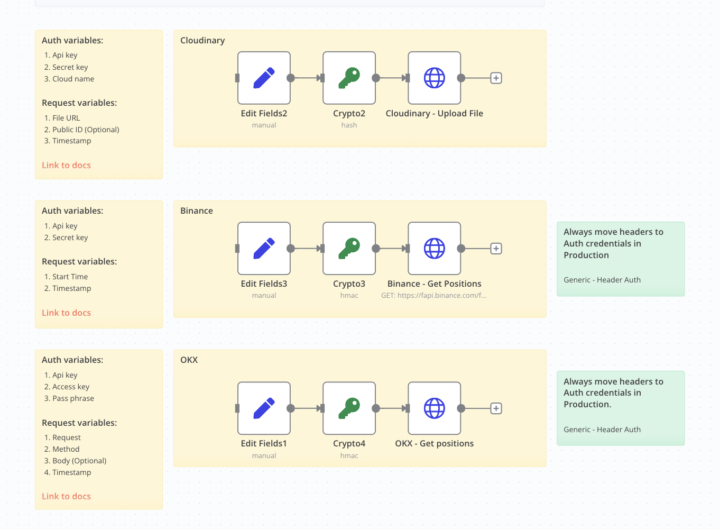
Integrating APIs with SHA-256 Signatures in N8N (Binance, Cloudinary)
Using no-code tools like N8N is great for automation, but when you need to connect with government services, financial platforms like Binance, or cloud providers like Cloudinary, things get tricky. Some of APIs require SHA-256 signatures to secure requests, which means you need to generate a unique signature for every request. This process might sound complicated, but it’s actually straightforward when broken down. 🤔 Why Use Signatures Instead of Just an API Key? Some services don’t accept just an API key for security reasons. Instead, they require a hashed signature to: ✅ Prevent tampering & replay attacks ✅ Ensure data integrity—the server verifies the signature before processing ✅ Use a secret key to sign specific request parameters ⚙️ How the Authentication Process Works in N8N Here’s the basic setup to integrate APIs that require SHA-256 authentication: 1️⃣ Set all required variables in a Set node (API key, timestamp, request parameters). ⚠️ Use Fixed Timestamp → Ensures signature matches request 2️⃣ Generate the signature using a Crypto node (method varies by service). 3️⃣ Send the request using an HTTP Request node, including the signature and required parameters. 📌 API-Specific Logic 🌩️ Cloudinary (SHA-256 Hash - Hex) 🔹 Signature logic: • Uses SHA-256 hashing (not HMAC) • Concatenates parameters + secret → Hashes them in Hex • The secret is appended at the end instead of being used as a key 📈 Binance (HMAC SHA-256 - Hex) 🔹 Signature logic: • Uses HMAC SHA-256 with secret key as the key • Takes request parameters → HMAC Hash → Converts to Hex • Requires a recvWindow (e.g., 5000ms) to prevent expired requests 💰 OKX (HMAC SHA-256 - Base64) 🔹 Signature logic: • Uses HMAC SHA-256 but encodes in Base64 • String format: timestamp + method + path + body • Secret key is used as an HMAC key 💾 Templates for all services attached below! Try it out and let me know if you have questions! 🚀

0 likes • Mar '25
Thanks for this !

Mar '25 •
Kling AI Community Node
Many of us use Kling AI to generate images, videos, lip-sync animations, and more. Now, a dedicated node is available to access these features via their API. To authenticate, you need to use a JWT token. Make sure to check the example JSON in the JWT node — you'll also need to add the public key there. https://www.npmjs.com/package/n8n-nodes-klingai?activeTab=readme
1 like • Mar '25
awesomeeeeee!!!

Feb '25 •
Best self hosted platform for n8n ?
Hey guys, what are the best platform to host n8n in lower cost with smooth performance ?
0 likes • Feb '25
I'm also running a self-hosted Coolify instance with n8n in a Docker container on an AWS EC2. It's a bit on the pricey side, though, thanks to AWS

Feb '25 •
Open AI Quota issue
Looking for some help with an error 'The service is receiving too many requests from you' I am getting back from OpenAI. It's saying I have insufficient quota, but I definitely have credit and I can't figure it out - Help!
0 likes • Feb '25
Don't forget to top up your OpenAI account credits. If you had a zero balance before, you might need to create a new API key.

Feb '25 •
How to Setup WordPress API Credentials in n8n
There is a lot of confusion on how to get the WordPress API credentials properly setup in n8n. This is a quick video to help you figure that out. This is a follow up to this video: https://youtu.be/L2I57hn9q40
1 like • Feb '25
awesome, great tutorial keep up the good work!😀
1-10 of 13

Active 24d ago
Joined Jan 29, 2025
Powered by