Activity
Mon
Wed
Fri
Sun
Aug
Sep
Oct
Nov
Dec
Jan
Feb
Mar
Apr
May
Jun
Jul
What is this?
Less
More
Memberships
RC Agency Owners & Freelancers
6.6k members • Free
Online Business Friends
104k members • Free
AI Automation Club
813 members • Free
Automatable Free
18.5k members • Free
AI Automation Agency Hub
328.4k members • Free
AI Automation (A-Z)
164.4k members • $7/month
AI Income Lab
2.9k members • $29/month
AI Automation Society
422.1k members • Free
12 contributions to AI Automation Agency Hub

2h •
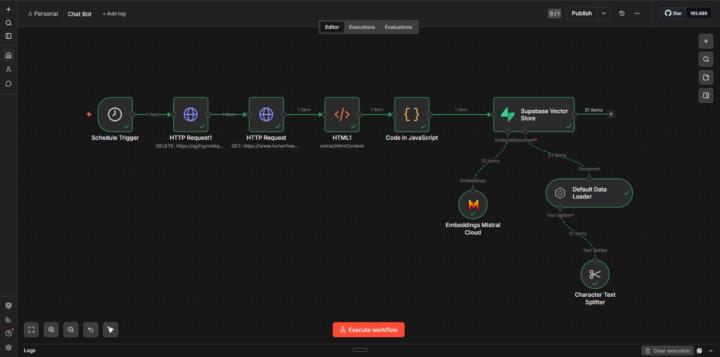
Built a RAG-powered intake chatbot for PI law firms. Here's the full breakdown 👇
What it does for the firm: Visitor lands on the site, describes their injury, bot qualifies them, sends them a confirmation email + SMS, pings the attorney on Slack, and logs the lead to Google Sheets. Zero human involvement until the attorney shows up for the call. How it's built (n8n): Workflow 1 — Ingestion Schedule Trigger → DELETE old vectors → scrape website → extract HTML → chunk with Character Text Splitter → embed with Mistral → store in Supabase Workflow 2 — Chat Chat Webhook → AI Agent → Respond to Webhook Agent tools: Supabase Knowledge Base, Google Sheets, Gmail, SMS, Slack Memory: Window Buffer Memory (keeps conversation context) A fix worth mentioning: First version was stacking duplicate vectors every time the ingestion ran. Added a DELETE call before re-ingestion — wipes the old data, rebuilds clean every time. Stack: n8n · Mistral · Supabase · Google Sheets · Gmail · Twilio · Slack This is a demo but the whole thing is deployable as-is. Would love feedback — especially if anyone's built something similar for legal.
May 14 •
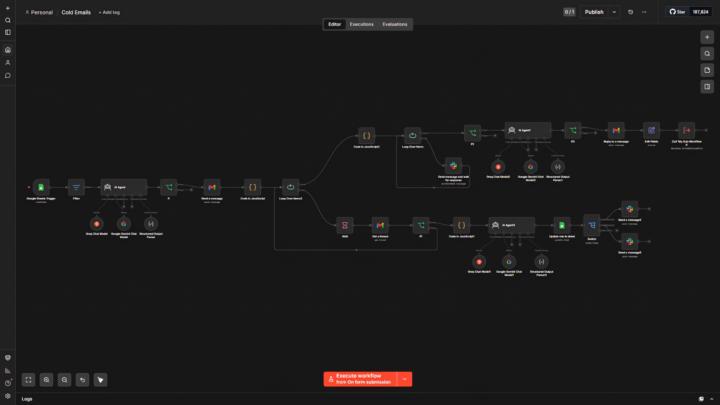
Built a full cold email automation system for myself — here's how it works
Just shipped this after weeks of building and testing. It pulls leads from a Google Sheet, generates AI-personalized cold emails for each agent (name, city, company — all dynamic), and sends them automatically via Gmail. If no reply, it follows up on Day 4 with a different angle. Still no reply, it sends a final breakup email on Day 11 with a Calendly link. The thing that makes it special is human in the loop. It asks permission from me before sending follow-up emails. So I always know what is going on in the pipeline. Every reply gets cleaned, classified by AI (Interested / Ambiguous / Not Interested), and routed to separate Slack channels to notify me instantly. Everything logs back to Google Sheets automatically. Built entirely on n8n — no paid email tools, no Zapier, no shortcuts. Happy to answer questions about it. Also let me know if there is any suggestions about it.
3
0
Mar 21 •
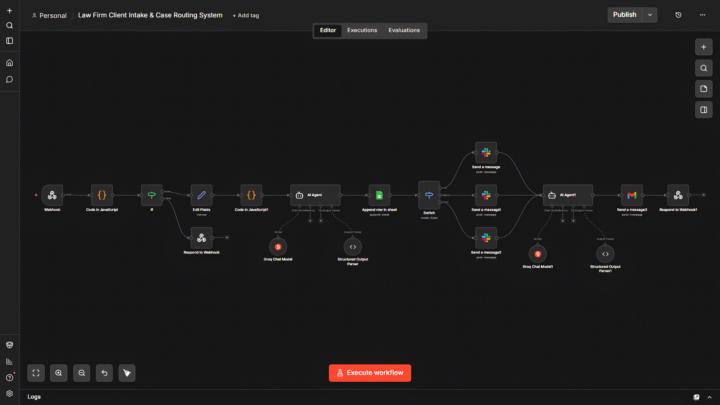
I Built a Law Firm Client Intake & Case Routing System — AI classification from unstructured free text
This one felt different to build because the routing logic isn't based on dropdowns or keywords. The client types their situation in plain English and the AI figures out the case type. The architecture: Webhook → JavaScript (parse + structure) → IF validation → Edit Fields → JavaScript scoring → AI Agent (classification) → Google Sheets → Switch → Slack → AI Agent (email) → Gmail The scoring engine: Two variables only — urgency and referral source. Max 100 points. Urgency: Immediate = 70, High = 45, Standard = 15 Referral: Friend/Family = 30, Google = 20, Social = 12, Advertisement = 8 Hot = 70+, Warm = 40-69, Cold = below 40 The AI classification prompt: The system prompt defines 6 case types with explicit boundary rules. The critical one — divorce with property dispute stays Family Law because the legal matter is the divorce, not the property. The AI prioritizes legal theory over mentioned entities. Model used: LLaMA 3.3 70B via Groq — faster than Gemini for structured classification tasks. What makes this different from previous routing workflows: Every other workflow I've built routes based on dropdown selections — the user picks their category. This one routes based on what the client actually wrote. No dropdowns. The AI reads context and decides. That's a fundamentally different pattern. The form is live on GitHub Pages — real URL, real submissions, real webhook. Not a test form. Happy to share the classification system prompt if anyone wants to see the boundary rules. 👇
1 like • Mar 27
@Celestain Thadius
0 likes • May 5
@Mohit Singh Worked with the setup before but Meta's verification process is a blocker without an existing WABA account. Does the client already have WhatsApp Business API access?
Mar 24 •
Video walkthrough — Real Estate Buyer Lead Management System
Posted screenshots before. Here's the full system running live. What the video covers: The JavaScript scoring engine evaluating budget range (60pts) and property type (40pts) in real time. Hot/Warm/Cold determination happening instantly on form submission. The AI-written confirmation email landing in the inbox within seconds. Google Sheets logging the lead with score and tier. The drip sequence logic — Day 3 and Day 7 follow-ups that stop automatically the moment the lead replies. The reply detection pattern is the most important part technically. Gmail Thread Get retrieves the full thread. messages.length > 1 means the lead replied. The IF node kills the sequence before the next email fires. One condition, clean logic, no AI tokens wasted on a decision that's purely conditional. Happy to answer questions on any part of the architecture. 👇
2
0

Mar 19 •
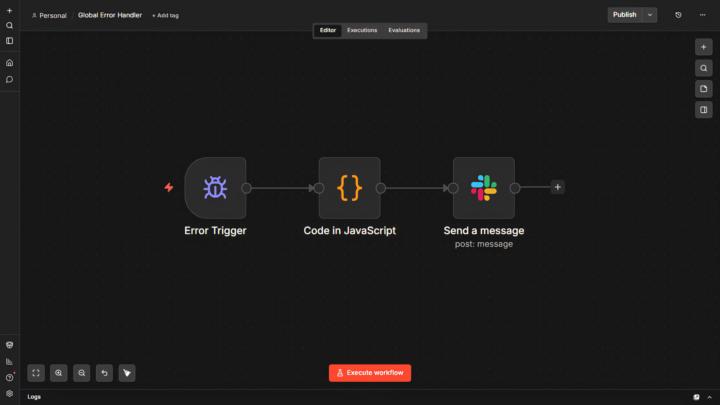
Built a Global Error Handler — 3 nodes, full account coverage
Wanted to share this one because it's not complex — but it's the workflow most people skip and then regret. Before this, any silent failure across my 10 production workflows would go completely undetected. Gmail auth error, API timeout, Sheets quota — nothing. The client just doesn't get their email and I find out days later. The architecture: Error Trigger → JavaScript Code Node → Slack #error channel What the JavaScript extracts: workflowName — which workflow broke nodeName — exact node that failed errorMessage — what the error actually was errorTime — timestamp in local timezone The critical step most people miss: On n8n Cloud, you register the error workflow per workflow individually — not account-wide. Go to each workflow → ... → Settings → Error Workflow → select your handler. Takes 2 minutes per workflow. Test method: Create a temporary workflow with an HTTP Request pointed at a fake URL. Activate it. Run it. It fails. Your error handler should fire within seconds. Tested it live today — alert landed in Slack before I switched tabs. One handler. Every workflow monitored. Zero silent failures. Happy to share the JavaScript if anyone wants it. 👇
2
0
1-10 of 12

@shihab-sakif-2122
n8n automation builder for real estate. I build Speed to Lead, Lead Reactivation & more. Open to collaborations.
Active 2h ago
Joined Mar 14, 2026
Powered by