Activity
Mon
Wed
Fri
Sun
Aug
Sep
Oct
Nov
Dec
Jan
Feb
Mar
Apr
May
Jun
Jul
What is this?
Less
More
Memberships
ambITious AI
2.7k members • Free
𝐀𝐈 𝐌𝐀𝐊𝐄 𝐌𝐎𝐍𝐄𝐘 💵💰
5.6k members • Free
Agency Owners
20.3k members • Free
AI Automation Agency Hub
328.5k members • Free
Brendan's AI Community
26k members • Free
AI Automation (A-Z)
164.5k members • $7/month
Online Business Friends
104.3k members • Free
AI SaaS Launchpad
1.2k members • Free
AndyNoCode
35k members • Free
2 contributions to AI Automation Agency Hub

2d •
I am all in
Hi everyone, my name is Sebastian. I’ve been working as an iOS developer for more than 12 years and now want to start my own AI agency. I’ve been working with AI for several years now, and never before has it offered people as many opportunities as it does today. I’ve already developed a few tools and am currently working on more. the challenge for me is finding clients. So this is my path as a “builder” I’m excited to be here let’s build something big!
1 like • 2d
@Jaison Coley Hey, that sounds great. 🙏

6d •
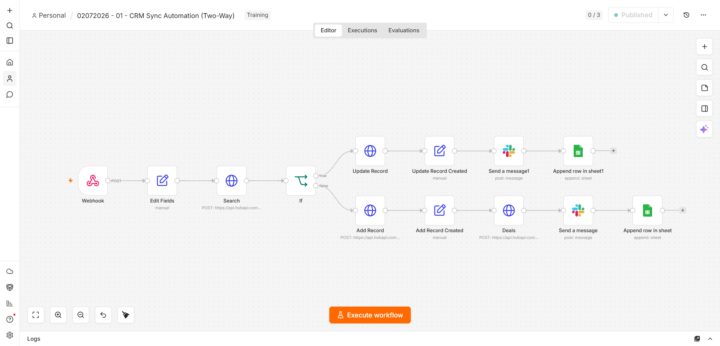
Just shipped my first production automation — CRM Sync with deduplication & error handling. Feedback welcome.
Hey everyone 👋 First real post here. I've been learning from a lot of you silently, and I just finished my first production-grade automation. Wanted to share the build and get your feedback. The Problem Small businesses capture leads via forms, then **manually copy the data into their CRM**. This means wasted hours, duplicate contacts, and a CRM nobody trusts. What I Built An n8n workflow that: 1. Receives form submissions via webhook 2. Normalizes the data 3. Searches CRM for existing contact by email 4. Updates if exists / Creates if not (deduplication) 5. Creates a deal associated with the contact 6. Sends a Slack notification to the sales team 7. Logs everything in a Google Sheet (audit trail) 8. Error Trigger → Slack alert + fallback sheet if anything fails The Workflow [Webhook: POST /crm-sync] ↓ [Set: Normalize fields] ↓ [HTTP Request: GET /contacts/search by email] ↓ [IF: contact exists?] ├── YES → [HTTP Request: PATCH /contacts/{id}] └── NO → [HTTP Request: POST /contacts] ↓ [HTTP Request: POST /deals] ↓ [Slack: Notify sales team] ↓ [Google Sheets: Append audit log] [Error Trigger] → [Slack: Alert] → [Google Sheets: Fallback save] Tech Stack - n8n (self-hosted on Railway) - Tally.so (form) - HubSpot CRM (REST API v3) - Slack (incoming webhook) - Google Sheets (audit log + fallback) What I Learned 1. API docs are everything — reading HubSpot's docs took longer than building the workflow. 2. Error handling is not optional — broke the API key on purpose to test. Silent failures are unacceptable for a paying client. 3. Test with bad data — missing fields, duplicates, special characters. Each edge case found a bug. 4. Audit logs build trust — the Google Sheet isn't just for debugging. It's what makes the client feel in control. What's Next - Two-way sync (CRM → Google Sheets back) - AI lead scoring (form data → OpenAI → route by score) - WhatsApp Business API notifications If you made it this far, thanks for reading. Any feedback, criticism, or "you should've done X instead" is welcome — that's how I'll get better. 🙏
1 like • 4d
Congratulations.👍
1-2 of 2
@sebastian-volling-2471
Happy husband and father, dog person.
Active 32m ago
Joined Jul 6, 2026
Ubud, Mas
Powered by