Activity
Mon
Wed
Fri
Sun
Aug
Sep
Oct
Nov
Dec
Jan
Feb
Mar
Apr
May
Jun
Jul
What is this?
Less
More
Memberships
Agency Owners
20.3k members • Free
AI Creator Profits
27.2k members • Free
AI Automation Agency Hub
328k members • Free
Brendan's AI Community
25.9k members • Free
AI Automation (A-Z)
163.3k members • Free
Online Business Friends
103.2k members • Free
AI SaaS Launchpad
1.1k members • Free
Jack Vs. AI Workflows
10.3k members • Free
AndyNoCode
34.9k members • Free
7 contributions to AI Automation Society

5h •
Headroom & RTK
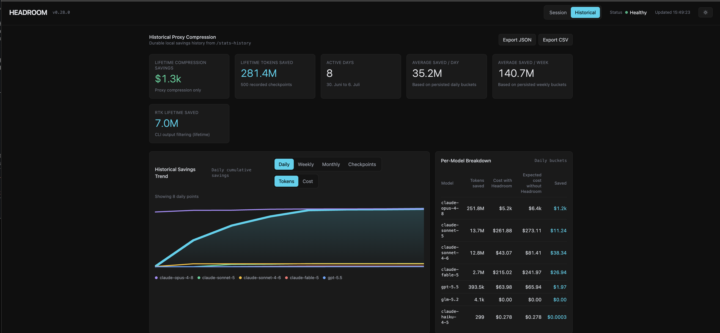
I’ve been tracking my Claude Code token usage over the last week using Headroom and RTK, and I found the combination surprisingly useful. Headroom gives me the long-term picture across models, while RTK optimizes the prompts that actually get sent to Claude Code. Check the umbers of my last 8 days: * Headroom: 281M+ tokens saved (~$1.3k in proxy compression) * RTK: 7.0M tokens saved from 9.0M input tokens (78% reduction) One thing I learned: don’t judge these tools after one session. RTK, for example, dropped below 50% savings for a while because I was working on tasks where there simply wasn’t much redundant context to compress. A few days later it climbed back to 78% as my workload changed. So the percentage depends heavily on: * the type of work you’re doing, * how repetitive your prompts become, * and how long you measure. Looking at a single day can be misleading. For me, the interesting part isn’t the exact percentage, it’s that over hundreds or thousands of Claude Code commands, the savings become significant. The installation of both tools is pretty easy, if anybody want to give it a try: RTK Headroom
0 likes • 58m
@Alex Hamer Hey, it is not listed under supported agents but here it says that Claude Cowork uses the same agentic architecture that powers Claude Code. So i guess when you enable the global hook by using: rtk init --global it should work as well.
5h •
Feedback to my Workflow Overview
Hello, I'd like to apply for a small N8N project to gain some more experience. Could you please give me some brief feedback on the proposal documents I would send to the client? I would really appreciate it.
2 likes • 2h
@Chetan Mishra Thank you very much.I will improve my proposal package.
3d •
Day 2 | Firecrawl
Hi everyone, just finished my 2nd day lesson: the website crawling: i fetched some ios-develoepr-jobs from indeed. - One thing i learned: Claude already knows stuff about the task without i need to tell him. He knew that my target site is protected by Cloudflare and automatically used a Stealth-Proxy. - One use case idea: I could collect similar data from multiple sources and consolidate it in my service so that I can display a larger volume of data: for example, real estate sites.
1 like • 2d
@J T The only difference was that I didn't use VS, I just used a terminal. The rest was probably exactly as described in the video.

4d •
‼️Automated customer bot‼️
I've built an AI chat receptionist, handles customer messages, answers questions, books appointments, the whole thing. Works great on my end. But here's where I'm stuck: when it comes to actually connecting it to a real client's WhatsApp or Instagram account, how does that handoff work in practice? Do you ask them to share API keys? Log into their account for them? Set everything up while they watch? I can't imagine telling a local business owner "send me your Meta Business credentials" and expecting that to go smoothly. How are you guys handling this? Is there a clean way to onboard a client without it turning into a security nightmare or a trust issue?
1 like • 3d
You can create a system user and generate an access token that is either valid indefinitely or expires after 60 days. Business Settings → System Users https://business.facebook.com/latest/settings/system_users?business_id=YOUR_BUSINESS_ID_HERE You must assign your app as an asset to the system user (the user interface was very buggy there, and I added the asset several times before realizing that the UI only updated after I forced the page to reload). This user’s token can be generated so that it never expires.
5d •
Day 1 | Create a newsletter
I followed the steps in the video and ran into more problems than I expected. In the end, I successfully created my newsletter 💪. Since it took me so much longer to get this result than it normally would if I were using my usual Claude Code workflow, I’ll be using my own setup for the next tasks 😜. Still, it was an exciting experience. 🙏
1-7 of 7
@sebastian-volling-2471
Happy husband and father, dog person.
Active 27m ago
Joined Aug 6, 2025
Ubud, Mas
Powered by