Activity
Mon
Wed
Fri
Sun
Mar
Apr
May
Jun
Jul
Aug
Sep
Oct
Nov
Dec
Jan
Feb
What is this?
Less
More
Owned by Allyson
Don’t throw away your shot. Real tax clarity from a CPA who gets creators and knows what the IRS actually cares about.
Duct tape won’t fix your books. Get funder-ready systems and real support from the CPA nonprofit execs call “The Oracle."
Memberships
Sexy After Sixty Weight Loss
16 members • Free
ProveWorth.com Community Proof
418 members • Free
SkoolKit
220 members • Free
💞 Connect & Collab ⭐
482 members • Free
🇺🇸 Skool IRL: North Carolina
53 members • Free
Actual Tax Law
11k members • Free
Business Builders Club
2.9k members • Free
“Your Best Course” Build Lab
82 members • $12/year
Like A CEO
155 members • Free
15 contributions to What Is Skool?

🔥
27d •
Skool Tax Documents Where to Find Invoices and How 1099s Work
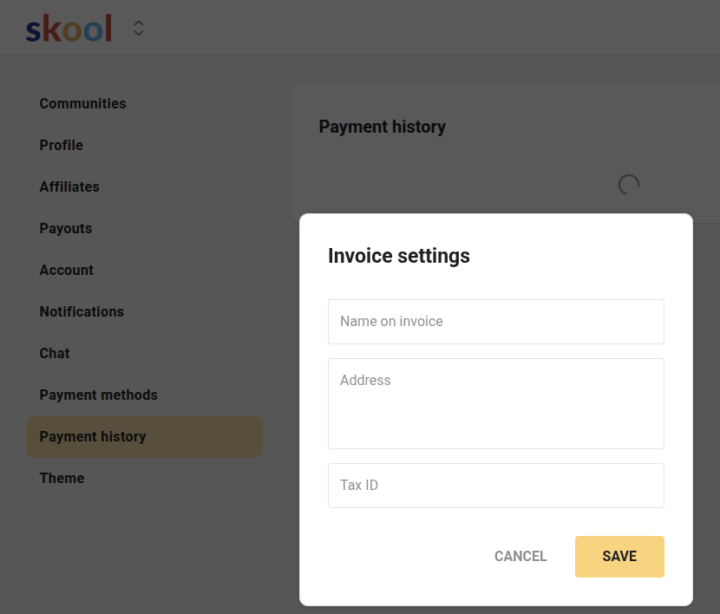
If you make money through Skool and are getting ready for taxes, the biggest thing to understand is where your tax information actually comes from and how it is handled. Skool does not issue 1099 forms. Stripe does. Skool uses Stripe to process all payments. Because of that, Stripe is the platform responsible for tax reporting. If you meet the reporting requirements for your location, Stripe will generate and send your 1099 for the income you earned through Skool. You will not receive a 1099 from Skool support. It comes from Stripe. Whether or not you will receive a 1099, you can still access everything you need inside Skool to stay organized. If you are looking for invoices related to money you earn on Skool, you will find those under payouts. You can go into the community you own, open the group settings, click on payouts, then select any individual payout to view the invoice tied to it. Or you can go to your profile settings, click on Payouts, and see all of your payouts in one place. This includes both your community payouts and your affiliate payouts. If you are looking for invoices related to money you pay on Skool, those are found under Payment History in your profile settings. This includes community memberships, one time purchases, and your monthly subscription payment to run your own community. You can also customize your invoices by adding your business name, address, and tax information. This is available on the settings wheel in Payment History. Once you update that, it applies to your invoices automatically. This helps keep everything consistent when you are organizing your records or sharing them with your accountant. If something is not showing up correctly, you can reach out to Skool support. To make the process go smoothly, be sure to submit the support ticket under the name of the community you need help with. Explain the issue clearly, include a screenshot if you have one, and share the correct information it should reflect. You can submit your request here: https://www.skool.com/support
Poll
26 members have voted

1 like • 22d
@Jenna Ostrye this was super helpful and I'm sharing it to my communities as well! I really liked adding my information to the payment history setting so they show up customized to my business. One thing that helps avoid confusion. A 1099 is more of a heads-up than the full story, and you may not get one every year (for 2025 only if your payouts exceeded $20K). Even if you don't receive one, US tax law requires reporting of all income earned. Keep in mind that Stripe reports based on when payments are processed, not when money hits your bank, so timing can look a little off. And the 1099 number is gross, not what you actually kept after expenses, so be sure to take all deductions that are associated with your business. On the flip side, if you need to send a 1099 out because you paid another business or individual more than $600 in 2025, I have attached a helpful checklist for that as well as other year-end tasks.
🔥
Dec '25 •
Skool Notifications Got An Update!
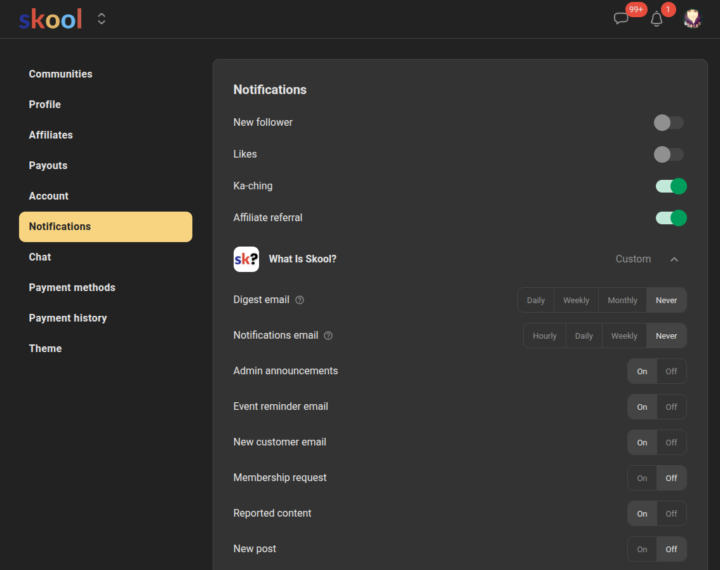
One of the great things about Skool is that Sam Ovens listens when people ask questions or make feature requests inside the Skoolers community. Some questions that came up were: How do I get notified when someone posts in my community? How do I get a notification when a new member requests to join? These were common questions because most owners want to respond quickly and keep engagement moving. Until now there was no way to turn those alerts on. Skool listened and built the solution. You now have them in your notification controls. They are turned off by default. If you want alerts, you can turn them on manually. Here is how to update your notification settings: Click on your profile photo. - Desktop will show you the user menu drop down - Mobile you will have to click the 3 dots in the top right to get to the user menu drop down On the user menu drop down, click Settings. Then click on Notifications. - Desktop it will have tabs on the side and you see "Notifications" there - Mobile you will need to slide it to see "Notifications" Then expand the notification settings for the community you want to change. Click either On or Off for what you want to be notified on. You can turn on notifications for: • Admin announcements • Event reminder email • New customer email • Membership requests • Reported content • New Post This puts you in control of what you stay updated on. Faster approvals. Better responsiveness. A smoother community experience for everyone. Which notification are you turning on first now that the option is finally here?
1 like • Dec '25
Awesome update!! I turned all notifications on in my communities (those I own). I want to be advised immediately if anyone joins or posts so that I can interact.
Nov '25 •
🦃Thanksgiving Skool of Tax Gift
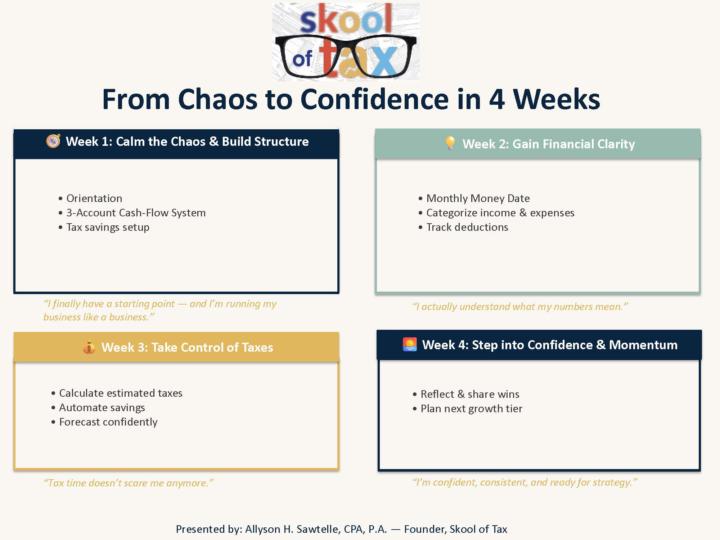
If you’ve been meaning to get your business side sorted, this weekend makes it easy. Premium drops to its lowest price for 72 hours (Thanksgiving through Small Business Saturday) 🌟From $99 to $49 per month🌟 It’s a simple way to: • clean up 2025 • get ready for 2026 • keep more money in your pocket by using deductions the right way • join the 4-week Chaos to Confidence course starting Dec 8 • stop guessing about taxes and feel supported instead No pressure. Just a clear moment to step into “I’ve got this.” See you inside when you’re ready. ✒️📜 Taxes done with you, not to you.
1 like • Nov '25
@Faith Adebayo right there is still time to make a significant difference in your 2025 tax bill. And as someone who knows what it's like during tax season, you want to get advice and get set up correctly NOW instead of trying to do it when your accountant is covered up doing returns.
🔥
Nov '25 •
Courtesy Notice: This Community Will Be Going Public
EDIT: To honor the privacy of everyone, I'm cleaning the community up first. It takes a bit of time to do so, but I'm about 1/2 way there. I want to give everyone plenty of time and transparency around an upcoming change. Starting December 1, this group will shift to a public setting. This means anything posted inside will be viewable to anyone, so please take time now to remove or edit anything you would not want visible publicly. This is also your chance to post about your community while I still have posting open for members. After December 1, only commenting will be available. There may be a name change as well. Still undecided on that. If being part of a public space no longer feels aligned for you, this also gives you time to leave without pressure. No hard feelings whatsoever. This decision connects directly to how I recommend using Skool. A free public community supports SEO and AI discoverability, which helps the right people find practical guidance when they need it most. From there, they can choose to go deeper through paid or tiered communities. What you will continue to see here is focused, practical content that breaks down Skool features, community building strategies, announcements, and new updates in a way that supports you in making smarter decisions for your own community. The goal is for you to clearly understand what to do and why it matters for your growth and visibility. There will also be special things I do here for my paid members (yes, there is a paid community, but that is getting some changes as well.. which is why it's hidden from my profile til changes are made), such as featuring their communities under specific circumstances, while still keeping this space valuable and educational for everyone. Why now? Things shifted when I became a Skoolers moderator. My goal is to make learning more open and more accessible so more people can build stronger communities, avoid common missteps, and feel more confident navigating this platform.
Poll
81 members have voted

7 likes • Nov '25
Thank you Jenna for all the help you have given all of us. You are a treasure and so appreciated. I only have private communities but am interested to hear from you and others why to make a change. Don’t know that I will but want to understand pros and cons.
🔥
Nov '25 •
Where Did You Hear About Skool?
I've seen a lot of people in Skoolers mention they've come from either the Hormozi launch or from seeing the Meta ads.. I want to know where you guys first heard about Skool?? Was it a creator/community owner? Hormozi?? Ads???
2 likes • Nov '25
I followed a business coach from LI to her free skool community in May of 2024. She closed it in August which made me sad. But I'm hooked
1-10 of 15

@sawtellecpa
Your Journey, Your Choice—Guiding Nonprofit Leaders and For Profit Entrepreneurs to Financial Clarity. Led by an Experienced CPA and Nonprofit Exec.
Active 16h ago
Joined Mar 5, 2025
North Carolina, USA
Powered by