Activity
Mon
Wed
Fri
Sun
May
Jun
Jul
Aug
Sep
Oct
Nov
Dec
Jan
Feb
Mar
Apr
What is this?
Less
More
Memberships
Grand Champ Bootcamp [FREE]
16.4k members • Free
8 contributions to Grand Champ Bootcamp [FREE]

Jul '24 •
Directional air roll bind.
Hey guys so i recently peaked champion for first time ever and ive been practicing directional air roll, its been a rough 2 weeks training but im doing it much better even tho i still dont master it. I just need 1 answer because many people say air roll in L2 is much better because it has 100 speeds and bla bla, basically ive been using L2 but other people told me its better to use a normal bind because having always the same speed should be more accurrate and better for your muscle memory, just like mouse acceleration would mess your muscle memory in a shooter game. Please i need advice from you guys if possible from people who is actually a high rank champion-grand champion or ssl if theres someone there who is. Thanks in advance for anyone who takes the time to read this and answer to me i love you :)

0 likes • Jul '24
honestly i only use training packs for wall clears, backboard clears and saves, aerials, air dribbling and ground dribbling etc...
Jul '24 •
How to have the most precise controller experience with ds4.
I will giving you guys some tips to configure your DS4 controller with DS4Windows software, to download this software it is in the link below. https://ds4-windows.com/download/ryochan7-ds4windows/ 1. Using square deadzone: This gives more accurracy and consistency in diagonal flicks, to enable this simply go in your DS4Windows app, profiles, select your main profile and simply press edit, now in axis config scroll down in the LS section and check "Square Stick". (You only need it in Left Stick) 2. Deadzone: Having a good deadzone is important for masking sure you have the most competitive advantage, in this case i recommend in both LS and RS sections to turn "Anti-dead Zone" to 0.00, this will give you the most responsiveness and speed. 3. Deadzone 2: This is to explain the everyday deadzone which i reommend tweaking by yourself, to do this simply turn deadzone in both sticks all the way to 0.00, then go to DS4Windows settings and open "Gamepad Test", now you will start moving the sticks very slightly and if they have a little fake response and move by themselves you increase by 0.01. do this until you reach a number where no matter how you move your joysticks it will never have a fake input, in my case that's 0.06. 4. Rocket league settings: In Rocket League you also need to optimize your controller, but for now i will only explain the joysticks and not keybinds. You want to turn Deadzone in rocket league to 0.00 because we already configured it in DS4Windows. 5. EXTRA Tip: In controler unbind the Touchpad actions, this can be annoying in ranked if you accidentally touch it because it controls your mouse and will make your input change and overall mess your play. to do this just touch the controller drawing in the touchpad and unbind Left touch, Right touch, Multi touch and Upper touch. This is all about controller deadzones and below i will be giving you guys screenshots of my settings in case you can't find a specific setting, also i will be answering to comments and if you need any help please let me know and i will try to help you guys.
1
0
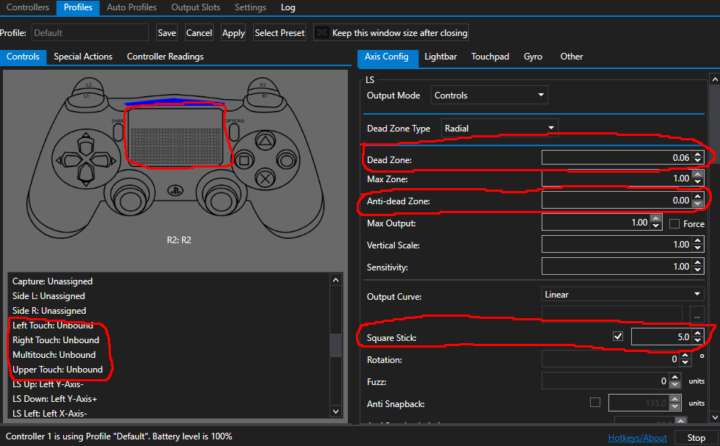

0 likes • Jul '24
I only use the following cars: Fennec for competitive because its really good for 50s and good shots, Octane to have fun with friends because it feels lighter in aerials while still having good competitive advantage, Dominus for freestyle because it has a good handling in the air and can hit the ball very easily. But cars are preference and you can use anything you like

0 likes • Jul '24
I could help you watching your rotations, decisions and mechanics and help you improve what you lack in skill, im not a professional since im just a champion but i can help you if you need.
1-8 of 8
@samuel-gonzalez-3108
Hi i'm Samuel a.k.a cast, im 15 years old and i play rocket league for fun. My discord is "suicideinjapan" add me if you want to play with me :)
Active 505d ago
Joined Jun 25, 2024
ENFJ
Spain