Activity
Mon
Wed
Fri
Sun
Nov
Dec
Jan
Feb
Mar
Apr
May
Jun
Jul
Aug
Sep
Oct
What is this?
Less
More
19 contributions to Free AI OFM Course
Dec '25 •
A better tool for AI Videos!
In my previous AI vids tutorial, I mentioned a tool to make AI vids using Wan 2.2 Animate. Scrap that. I’m gonna show you a better tool—this one is better, with superior face swap and face restoration. Step 1: Get AccessFirst, log in to this website: https://www.runninghub.ai/?inviteCode=jiax64ihYou will obtain 500 free credits. I suggest making multiple accounts since you will be able to generate a vid per day with the daily 100 credits, and even more with the signup bonus. Step 2: GenerateNow go to this workflow: https://www.runninghub.ai/ai-detail/1997771191559630849/?inviteCode=jiax64ih You can start generating videos just by replacing the character with your AI influencer. Regarding Settings:If you know how to tweak the settings you see on the generator, feel free to tweak them. But if you have no idea what any of those mean, don't worry. Just add your image (your AI influencer) and the video (character to replace), and press RUN. I suggest going to my previous posts to learn the basics and how to make realistic assets! AI video tutorial: https://www.skool.com/ai-ofm-course/how-to-make-ai-videos-that-look-realistic-asf images: https://www.skool.com/ai-ofm-course/how-to-make-an-ig-post-or-thread-that-looks-realistic-asf
0 likes • Feb 19
@Magalie Leclercq Nah rn use kling motion control
0 likes • Feb 19
@Niko Don No I use Kling motion control
Dec '25 •
How to make an IG post (or thread) that looks realistic asf!🥵
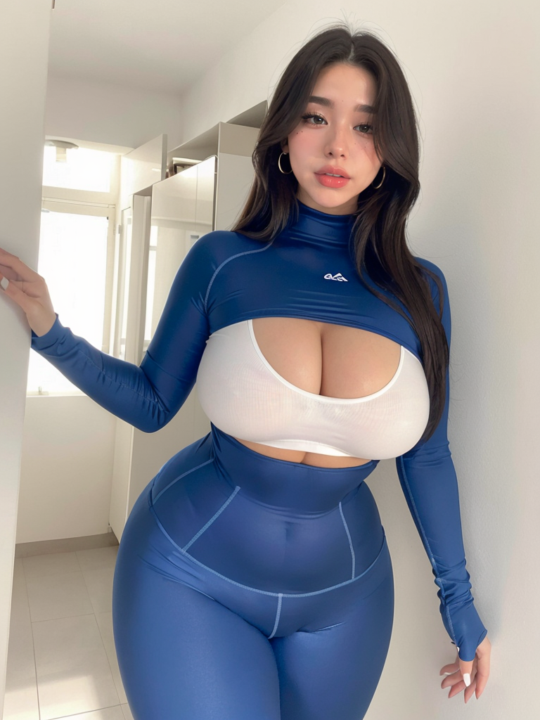
Prerequisites: First off, you need a body picture and a detailed face picture of your AI influencer (I assume you already have one). Take the example of my Chinese AI influencer below. You'll also need multiple email addresses (you're gonna understand why later). Step 1: Finding a Reference The only thing we need now is an IG post of a famous influencer to replicate. It doesn’t actually need to be famous, and it doesn't have to be from Instagram (Pinterest works too), but it needs to be eye-catching for the boys. I’m gonna use this pic from Bunnie Emmie (third image) to replicate, but I'll be replacing her with my AI influencer. Step 2: Generation Next, go to https://higgsfield.ai/image/nano_banana_2. We’re going to use Nano Banana Pro to make our replica. You can also use Lovart AI (just use something where you have access to Nano Banana Pro lvl 3 censorship—this means sexy images are allowed—but I recommend using Higgsfield). Now, upload the picture you want to replicate first, and then the picture of your AI influencer (veryy important). Then, type this prompt: Keep the lighting, location, and pose from Image 1, but replace the person with the girl from the image where she is wearing [the outfit of your AI influencer] (image 2), ensuring her facial features and body structure are preserved. Also make sure to keep the outfit from Image 1 on the replaced figure. Step 3: Variations When it’s finished, the result might be good or bad. If it’s good, you can make some variations using the Nano Banana Prompt Engineer 5.1 GPT on ChatGPT (https://chatgpt.com/g/g-68ae14451c448191837d0e108a48cf89-nano-banana-prompt-engineer). Upload the picture you just made on Higgsfield to the Nano Banana Prompt Engineer GPT and tell it what you want. Ex prompt to Nano Banana Engineer GPT: Change her pose, make her laying, front view, same influencer type pose, same body proportion, same outfit, no distortion.
0 likes • Jan 25
@Kay M https://discord.gg/MrjA96H3
0 likes • Jan 25
@Kay M srry for the late response


2 likes • Dec '25
Crop it so that we don't see the face but it's rlly good!

Dec '25 •
Best AI Video generator
What are he best tool for generate best AI video with a consistant face, and realistic quality ? I try Kling, Wan ... But it's not always consistant and I don't know how to prompt correctly. Do you know how AI model like Marshmallow Zara for exemple create her videos ? They are really good. I would like ton achieve a result like that, but I don't know exactly how they get that almost perfect result and quality. Someone can Help ? Thanks 👍
1 like • Dec '25
I think Wan is pretty good, I alr tested Kling and it was bad! In my opinion Wan 2.6 is very good!
Dec '25 •
How to make AI videos that look realistic asf!🥵
Important Note:Now I'm gonna show you how to make videos. Check out my previous post (it's very important!!!!!) to understand this one. The process is similar, but we are going to do something different. Step 1: Get the Reference Frame First of all, download a video you like. I took a Sophie Rain video as an example (Second video). Next, go to this website: https://mixilab.com/toolkit/frame-extractor. This website extracts a frame from the video (we do this so our AI influencer matches the video vibe perfectly). Pick a frame where she is fully posed and you can see her whole body. (Last pic) Step 2: Generate the Base Image Now, do the same thing we did in the previous post (using Higgsfield/Nano Banana). Upload the video frame you extracted first, and then the pic of your AI influencer. (Second pic) Now just type this prompt: Keep the lighting, location, and pose from Image 1, but replace the person with the girl from the image where she is wearing [the outfit of your AI influencer] (image 2), ensuring her facial features and body structure are preserved. Also make sure to keep the outfit from Image 1 on the replaced figure. Hit generate. Step 3: Animation When the result is done, this is the most important part. Go to this website:https://www.runninghub.ai/?inviteCode=jiax64ih, and login with Google. This is a website where you can run ComfyUI workflows for free with credits. We are going to use this to animate our AI influencer using Wan 2.2 Animate. Credits Tip:When you're signed in, you get 100 credits per day. I also think you get 500 free credits for logging in, so you should have around 600 credits right now. Try having multiple accounts to generate more videos in case your credits run out. Also, even if you have like 5 credits left, you can still generate a video (even 20 seconds long). Basically, having low credits isn't going to stop you from making a full video.

0 likes • Dec '25
@Chris Morales No worries.
1 like • Dec '25
@Puk Soprano Yh u can do it too, but if u use it on Runninghub it's better (in my opinion)
1-10 of 19