Activity
Mon
Wed
Fri
Sun
Aug
Sep
Oct
Nov
Dec
Jan
Feb
Mar
Apr
May
Jun
Jul
What is this?
Less
More
Owned by Ryan
Ran by a certified Airtable builder. Solve Airtable problems faster with support alongside other problem-solvers.
Memberships
Maker Zero: Claude Code, AI
5.8k members • Free
Maker School: AI Automation
2.1k members • $184/m
Synthesizer: Free Skool Growth
44.5k members • Free
Skoolers
165.6k members • Free
19 contributions to Airtable Community

May 25 •
Understanding Interface Page Levels
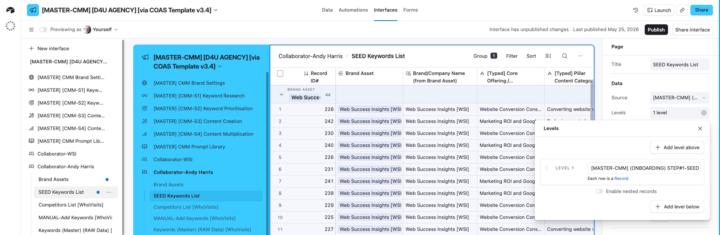
Can anyone help me understand how I might use Page Levels in my shared interfaces? My use case is I have a 'Master' keywords research database that is linked to multiple tables and I'm looking at more efficient and effective ways to share the data with collaborators. I've asked Omni to explain them to me and there are nuggets of interest on my part, but I still don't really understand the reality. Definitely need a 'show and tell' example for the penny to drop! (Can't find anything on YouTube specific to Levels either). This is what Omni told me: Key Points About Levels What They Do: - Levels help display relationships between data across different tables in a visual hierarchy - They allow you to show nested records (e.g., Projects → Tasks → Subtasks) on a single interface page - Users can drill down through the hierarchy to see related information - This interests me but I don't I can't visualise a use case even though I realise many must exist. Available For: - List visualization - Has a "Hierarchy" section with Levels configuration - Dashboard layout - Also supports adding levels of hierarchy - (Both the above interest me if I can find a way to share information more easily with our collaborators. But again, I can't visualise how this looks in reality. When Levels Are Enabled: (The last two interest me but again I can't visualise the use case). - Any existing list configuration moves to the page level - This allows dropdown filters to be created for any of the tables within the hierarchy - Users can collapse or expand levels to focus on specific parts of the data Levels are especially valuable when you need to display related information from multiple linked tables in a single, organized interface page rather than requiring users to navigate between separate pages. [https://support.airtable.com/docs/getting-started-with-airtable-interface-designer]

0 likes • Jun 1
Colin, have you worked with the list view in the data editor in Notion? These function the same. ( sorry for delay in answering, all five of us in my house had covid over the past 2 weeks!)
0 likes • Jun 3
@Colin Clapp oh Whoops I wrote Notion, I meant Airtable! Haha
May 6 •
Using Ai in Simple But Helpful Ways in Automations
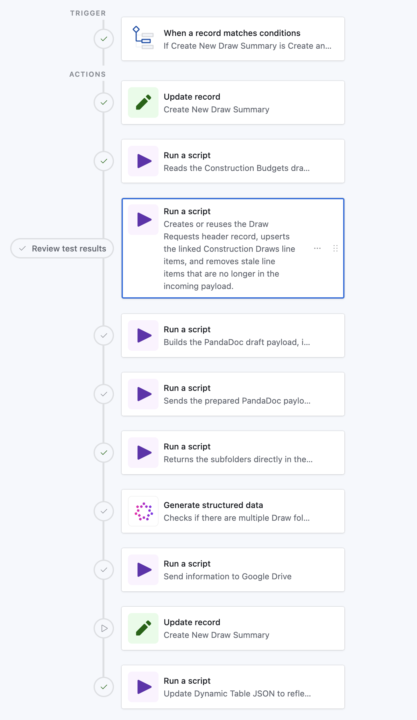
I would MUCH rather have Ai focus on a small bit of information over handling large tasks. Here's a look at what that means (See Pictures) In this automation, we’re trying to create a clean "draw-request folder flow" (client specific language) in Google Drive for each draw against a Construction Loan, then link those exact folders back to Airtable so the team can go straight to the right draw, photos, and invoices. BUT, the problem is that historical loan folders are messy. Some loans already have a draw folder, some do not, some use names like `Draws` or `Draw Requests`, and some even have duplicates. We could hard-code a lot of matching logic, edge cases, and fallback rules, but that becomes brittle... fast. The AI step gives us a much simpler layer. The script just returns the loan subfolder list, very specific and narrowed down data. I don't want Ai digging into everything in Google Drive when a script can just do it QUICKLY. After we get the subfolder list (See Dark Photo), AI interprets that list: - Does a draw-related folder exist? - Are there multiple, and which existing one should be treated as the oldest valid candidate? - That gives the next Google Drive script a clean decision input instead of forcing all that fuzzy logic into code. The win is that the rest of the automation stays deterministic! Scripts do the heavy lifting, AI handles the naming ambiguity, and the folder-creation step can reliably decide whether to reuse a folder or create a new one without a giant pile of special-case code. I KNOW this is a little advanced, but hopefully this opens up the sandbox for you a little!
Poll
1 member has voted
1 like • May 7
@Colin Clapp there’s just SO much less headache using scripts, haha

Apr 30 •
Something That Helped Me Think Differently About Online Presence
Hey everyone 👋 I wanted to share something that might genuinely help someone here. I recently learned how much having even a simple website can change how people see your business or personal brand, it makes things feel more real, more trustworthy, and easier to understand. A friend of mine who’s a professional web designer is currently offering free website design while building his portfolio. It includes basic design and setup, and it’s great for small businesses, creators, or anyone just starting. I’m sharing this purely as a helpful resource in case it supports someone’s journey. If interested, you can reach him directly: WhatsApp: +1 (639) 458-6729 Email: spetersondigital@gmail.com
1 like • May 3
Have you worked with him? Is there a webpage people can take a look at?
Apr 28 •
Two-step record creation process?
This is effectively a follow-up task to my previous post; 'Can I use webhooks to create new records directly into Airtable?' I know the easiest way to create a new record would be to create an Airtable form. But I prefer to use ConvertBox due to it's simplicity and it's ability to split-test form variations. The only problem in this use case, is it would be nice to have a user submit one or more images at the time they complete the form. But ConvertBox doesn't facilitate uploads. However, it does facilitate multi-step forms. And I see I can embed an Airtable form into a ConvertBox step. So that does give me some options. So my question is if a user submits all the text-based information in the first step, how do I make sure the record is created so that the optional image upload step that follows is attached to the newly created record. Mmmm... I think that just writing this post out, I've realised the 'text' form I created in ConvertBox could be redundant if I just embed the Airtable form instead. That way the image field is there right at the time of record creation! PS. I'm leaving this post up as I know the community is always discovering new and interesting ways to use Airtable and this might be of value to someone else one day! PPS. I'll report back on whether my epiphany comes to pass and I nicely marry up ConvertBox and Airtable. If so, that will be a huge win. (And as I think out loud, it also provides a solution to my previous post!).
0 likes • Apr 29
The webhook can be triggered in Airtable. It has its own native webhook in automations. Once you call that webhook from a third party you should be receiving all the data you need. Then it just passes to the next step in the automation chain. Also, I use Fillout.com for forms. They’re just sooooo much better than Airtable forms
1 like • Apr 30
@Colin Clapp It seems like you’ve got your workload pretty much lockdown. Fillout has an integration with Airtable already. It can create records, it can update records and I’ve had some pretty advanced options to where It’ll allow you to build out records across multiple tables. Then on top of that, you can make it look pretty. The way that they have made it to where you can build out forms is very clever and intuitive. I find the logic system also pretty advanced, but still very accessible
Apr 28 •
Can I use webhooks to create new records directly into Airtable?
UPDATE: There is a related follow-up task to this post here; 'Two-step record creation process?'. But as I articulated the follow-up task it slowly dawned on me I may have got the solution to what I'm asking below! ##Original post I'm adding a range of targeted forms to my website with a view to using webhooks to add new records to a range of tables. I'm using ConvertBox as my form tool (lets me split test different forms) and though I've used webhooks with ConvertBox before, I've only used them to trigger a Make scenario. But for this use case, I don't need a scenario to fire. I just need the form inputs passed to my corresponding tables. So wondering what I need to do make that happen. PS. By way of a backup I know I can fire a Make scenario to create a record so feeling like I already have my plan B if no quick and easy Plan A option exists?
1 like • Apr 30
@Colin Clapp yes! Great! I’m going to respond to your other fill out question when I can. It’s been a busy few days! If you have any other questions, let me know!
1-10 of 19

@ryan-plummer-2455
Airtable Master | Creative Ops Tinkerer → I operate Tiller, a high-volume media asset company at the crossroads of data and design.
Active 6h ago
Joined Feb 1, 2026