Activity
Mon
Wed
Fri
Sun
Jun
Jul
Aug
Sep
Oct
Nov
Dec
Jan
Feb
Mar
Apr
What is this?
Less
More
Memberships
Connector University
242 members • Free
Flip School
300 members • Free
The Builders Room
98 members • Free
CoLiving Operations
509 members • Free
The Ultimate Co-Living Edge
95 members • Free
MM
Morby Method Labs
231 members • Free
Coliving Unlocked
277 members • Free
UPLEVEL Premium
124 members • Free
Deal Maker Fast Track
3.3k members • $497/m
2 contributions to The Builders Room

Nov '25 •
Co-Living Model
This one is released and added to other Underwriting Models. This one needs to be tested more for additional improvements.

0 likes • Nov '25
I have a question about the Co-Living calculator. When I enter renovation costs, it looks like the calculator adjusts the Cash to Seller and the Bank Financing amounts. Renovations are completed after closing, and the bank loan is based on the lower of the purchase price or market value. With that in mind, can you explain why these numbers are changing when renovation information is added?
0 likes • Nov '25
I noticed something else in the calculator. The DSCR loan amount is being calculated from the sales price, but lenders usually base their loan on the lower of the sales price or the current value. Should the calculator be using the current value instead, since that would reflect how lenders underwrite the loan?
Nov '25 •
Feedback # 2 on Calculator
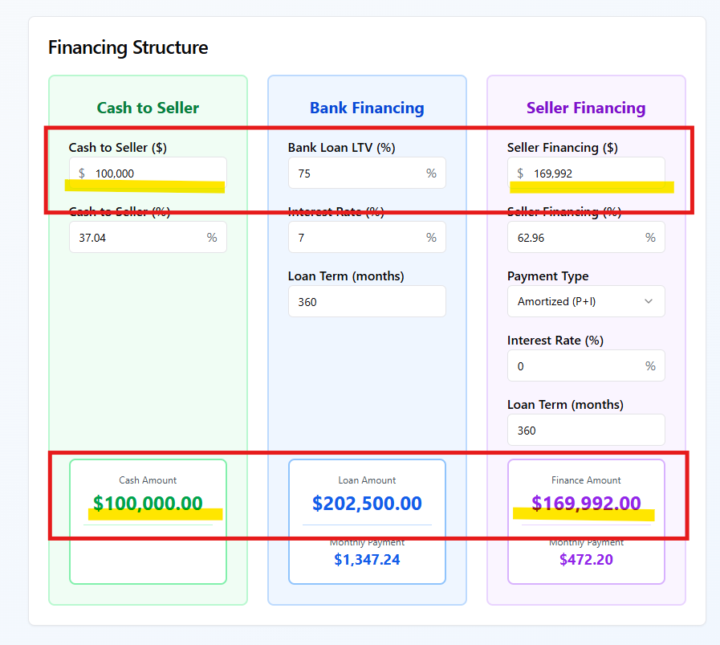
Hey @Mundo Sanchez . Here is some additional feedback on the calculator. I am attaching screenshots...and note it to point what I am looking at.... hopefully it is all clear. ;) Financing Structure Screen The calculator for Cash to Seller and Seller Financing seems to have a rounding or percentage-based calculation issue. For example, if I input a $270,000 purchase price and a $100,000 down payment, the Seller Finance amount should be $170,000, but it’s showing $169,992 instead. It looks like the calculator may be using a percentage formula with decimals instead of a direct subtraction. Deal Analysis Panel - Gross Cash Flow I’m a bit confused about how the Gross Cash Flow is derived. I understand where Net Cash Flow comes from, but I can’t tell exactly what the Gross Cash Flow in this calculator represents or how it’s being calculated. Could you clarify which expenses are included or excluded in that figure? Deal Analysis Panel - Cash-on-Cash Return It looks like the Cash-on-Cash Return is being calculated using the “Cash Needed at Maturity,” which represents the post-refinance scenario. While that’s valid, it would also be helpful to calculate the Cash-on-Cash Return for the current operating period, based on the cash invested now and the annual net cash flow. This would better reflect what a buy and hold investor evaluates for immediate performance. Escrow & Closing Calculations Screen. a. I didn’t see a place to include the cost of transactional funding (for example, fees from a short-term lender used for the first transaction). It looks like the calculator assumes all cash is out of pocket. Could we add a field for a Transactional Funding Fee? b. Could you clarify what “Liquidity Required” represents? Is that a lender reserve requirement or just a safety buffer for underwriting purposes? It might help to include a short note or tooltip explaining that on the screen. Additional Recommendation: At the bottom of the transaction section, it might be helpful to make it explicit in the Escrow area that the seller receives their cash at the end of the first transaction. That would make the flow of funds clearer for users analyzing double close or wrap style structures.
0 likes • Nov '25
@Mundo Sanchez got it.
0 likes • Nov '25
@Mundo Sanchez Thanks for clarifying that it’s a lender requirement.
1-2 of 2

Active 1d ago
Joined Nov 12, 2025
Brooklyn, ny