Activity
Mon
Wed
Fri
Sun
Nov
Dec
Jan
Feb
Mar
Apr
May
Jun
Jul
Aug
Sep
Oct
What is this?
Less
More
Owned by Robb
Stop using AI like a search engine. Learn to build real automation that runs your business 24/7. Free guides, templates, and a community of builders.
Build real AI operations for your business. Advanced guides, live strategy calls, templates, and a community of builders — not spectators.
BCBA Free Group Accelerator
6k
5.0
$1/m
Ecom AI
6
$197/m
Skoolers
150.5k
Free
AI Automation Agency Hub
336.7k
Free
SS
Seller Systems
622
Free
Synthesizer
47.2k
Free
Hamza's Automation Incubator™
48.7k
Free
11 contributions to The AI Upgrade

Mar 14 •
mcp2cli — Turn Any MCP Server or API Into a CLI (Zero Codegen, Massive Token Savings)
If you're running AI agents with MCP tools, you've felt the pain: every tool's full schema gets injected into the system prompt on every single turn. A 50-endpoint API burns 3,500+ tokens of context before your conversation even starts — and that bill repeats on every message. mcp2cli fixes this. It's a Python CLI that turns any MCP server or OpenAPI spec into a fully functional command-line tool — at runtime, with zero code generation. Instead of stuffing thousands of tokens of tool schemas into your AI's context window, your agent just shells out to mcp2cli and gets the exact data it needs. The token savings are insane: 96–99% reduction in wasted schema tokens. HOW IT WORKS → Point it at any MCP server (HTTP/SSE or stdio) or OpenAPI spec → It dynamically generates subcommands from the tool definitions → Your AI agent calls it like any other CLI tool — clean, fast, token-efficient KEY FEATURES → Works with MCP servers AND OpenAPI specs (JSON or YAML) → Built-in OAuth support (PKCE flow, client credentials, token caching) → Secure secret handling (env: and file: prefixes — no secrets in process listings) → TOON output format — token-efficient encoding that cuts another 40-60% for LLM consumption → Smart caching with configurable TTL → Ships with an installable AI skill so Claude Code, Cursor, and Codex can use it natively QUICK START pip install mcp2cli List tools from an MCP server: mcp2cli --mcp https://mcp.example.com/sse --list Call a tool: mcp2cli --mcp https://mcp.example.com/sse search --query "test" Use with OpenAPI specs: mcp2cli --spec https://petstore3.swagger.io/api/v3/openapi.json --list If you're building with MCP or connecting AI agents to APIs, this is a no-brainer addition to your toolkit. Stop paying the token tax. GitHub: https://github.com/knowsuchagency/mcp2cli
18
0
Mar 12 •
Claude Just Got a Whiteboard — And It's a Game Changer
Anthropic just dropped something big today: Claude can now build interactive charts, diagrams, and visualizations directly inside your conversation — no extra tools, no plugins, no subscription required. Think of it like giving Claude its own whiteboard mid-conversation. You're discussing compound interest? It draws you an interactive curve. Exploring the periodic table? It builds a clickable one where each element reveals deeper data. Need a decision tree? Done — with dropdown boxes. What makes this different from Artifacts: → These visuals appear inline in the conversation (not in a side panel) → They're temporary and evolve as the conversation develops → Claude decides automatically when a visual would help — or you can just ask ("draw this as a diagram") → Built with HTML and SVG — this is functional visualization, not image generation Why this matters: This is another signal that AI is moving beyond walls of text. The companies building on top of AI need to think about HOW we present information, not just what we present. Claude choosing the right format — text, chart, interactive tool — based on the task is exactly where this is all heading. Available now to ALL users (including free tier) on web and desktop. Mobile coming later. The competitive angle is interesting too — OpenAI launched something similar for ChatGPT just days ago. The race to make AI SHOW instead of just TELL is officially on. What are you building with this? Drop your best use cases below 👇
1
0
Mar 12 •
Claude Code Just Became a Full Agent Platform — Here's What Changed (Skills 2.0)
Most people are still using Claude Code like a fancy autocomplete. Meanwhile, Anthropic just shipped what I think is the biggest upgrade since launch — and almost nobody is talking about it. Skills aren't instructions anymore. They're programs. Here's what dropped: 🔧 SKILLS SYSTEM (merged with Commands) - Custom slash commands and skills are now the same thing - Every skill gets a SKILL.md file with YAML frontmatter — description, tool restrictions, model routing, execution isolation - Claude auto-loads the right skill based on what you're doing. No manual switching. - Skills are directories now — templates, examples, validation scripts, all bundled together 4 built-in skills ship out of the box: - /simplify — spawns 3 parallel review agents to clean your code - /batch — decomposes large changes into 5-30 independent units, each gets its own agent + PR - /debug — reads debug logs and troubleshoots your session - /loop — runs prompts on a cron schedule ("check if deploy finished every 5 min") 🤖 SUBAGENTS (Specialized Workers) - Dedicated AI workers with their own context window, system prompt, and tool restrictions - Route simple tasks to Haiku (cheap), complex ones to Opus (smart). Per-skill, per-agent. - 5 built-in: Explore (read-only search), Plan (research), General-purpose, Bash, and Claude Code Guide - Custom subagents defined in markdown — store at project or personal level 👥 AGENT TEAMS (Experimental) - Multiple Claude Code instances working together with shared task lists - Teammates message each other directly — not just reporting back to a main agent - Best for: cross-layer changes (frontend + backend + tests), competing debugging hypotheses, research from multiple angles ⚡ HOOKS (17 Event Types) - User-defined handlers that fire at lifecycle points: SessionStart, PreToolUse, PostToolUse, SubagentStart, PreCompact, etc. - Three types: shell commands, HTTP endpoints, or LLM prompts - Can block dangerous operations before they execute
Mar 6 •
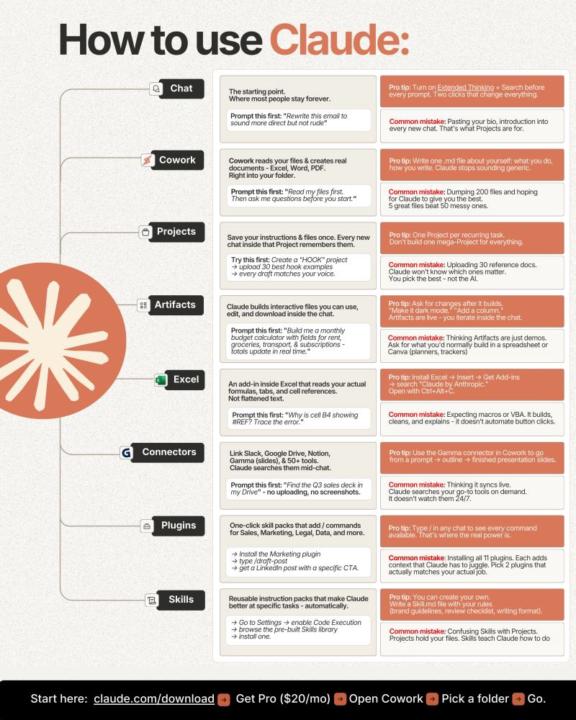
How to Use Claude (Most People Only Use 10%)
Most people use Claude like a search engine. They open a chat, paste something in, get an answer, and close the tab. That's maybe 10% of what it can actually do. This infographic breaks down the 8 ways to use Claude — and honestly, even I learned a couple things from it: 🔹 Chat — The starting point (turn on Extended Thinking + Search every time) 🔹 Cowork — Reads your files and creates real documents right into your folder 🔹 Projects — Save instructions once, every new chat remembers them 🔹 Artifacts — Build interactive tools (calculators, trackers, planners) inside the chat 🔹 Excel Add-in — Reads your actual formulas and cell references, not flattened text 🔹 Connectors — Link Slack, Google Drive, Notion, Gamma + 50 other tools 🔹 Plugins — One-click skill packs with /commands for sales, marketing, legal, data 🔹 Skills — Reusable instruction packs that make Claude better at specific tasks The money line at the bottom: claude.com/download → Get Pro ($20/mo) → Open Cowork → Pick a folder → Go. If you're only chatting with Claude, you're leaving a lot on the table.
15
0
Mar 4 •
Live Claude Code Workshop — This Friday, March 6th at 10 AM AZ
Hey! You answered A to my previous question. I'm hosting a live Claude Code workshop this Friday (March 6th) at 10 AM Arizona time. I'll show you how to use Claude Code — No coding experience needed. We'll go through a few use cases and get you comfortable. Zoom link: https://us02web.zoom.us/j/82356008619?pwd=sVd0kMyEI9c79z1MgnDWbstg4tWZ5N.1 One ask: there's a quick 7-minute setup checklist in the Zoom invite description. Please knock it out before Friday so we can jump straight into the fun stuff. You will get the most out of it if you can play along. Stuck on any of the setup steps? See the detailed instructions in the invite or ask AI. See you Friday!
1-10 of 11