Activity
Mon
Wed
Fri
Sun
Jun
Jul
Aug
Sep
Oct
Nov
Dec
Jan
Feb
Mar
Apr
May
What is this?
Less
More
Memberships
AI Automation Society Plus
3.6k members • $99/month
Automation Station
3.3k members • Free
AI Automation Society
366.4k members • Free
4 contributions to AI Automation Society

Jun '25 •
n8n + GHL for Restaurant Booking & Marketing
Hi everyone, I have an ai chatbot set up to make bookings on a website. I use n8n, google sheets and google calendar. I just set up GHL to start marketing and integrated it into the workflow to add contacts and details when they make a booking. I'm facing some issues with the following: - Contacts are created fine, but I need a way to email the customers based on the dates of their booking - How can I send the booking date to GHL - do I store this as a custom field on the contact, a note? - How can I use the date to set up a trigger to email them AFTER the booking date? Let's start there. Any help would be greatly appreciated!
0 likes • Jul '25
I managed to figure it out. I was using an http node and the V1 API settings. It worked for upserting a contact, but since it's the V2 API, custom fields weren't supported. I ended up making a private app and using the n8n "High Level" node. Super easy after that.
Mar '25 •
403 Error on Google Drive Node when downloading multiple documents
Hey all. I was following this video: https://www.youtube.com/watch?v=iT9xpiUwVbI&ab_channel=NateHerk%7CAIAutomation I got to the "Get Content" node and got a 403 error. I checked all my Google Cloud console settings and made sure all the google drive scopes were set up. I have 5 files in my drive. I hardcoded an ID in the node and it downloaded it 5 times. When I dynamically update the ID it throws the 403. I've been troubleshooting this for hours. It looked so easy in the video, but when I got tot he download file part, I couldn't get past the 403 error. Can anyone help?
2 likes • Mar '25
@James Walls I don't know how I did it, but I did it! Thanks for the tip James! Also, a note. I had to convert ods (google spread sheet files) before going to pinecode. I'm sure there's others unsupported, but I'll update the switch when I see it in future.
0 likes • Apr '25
@Meng Feng Lee yes, will do. Just need to figure out how to do it without sharing personal info. Hold tight.
Mar '25 •
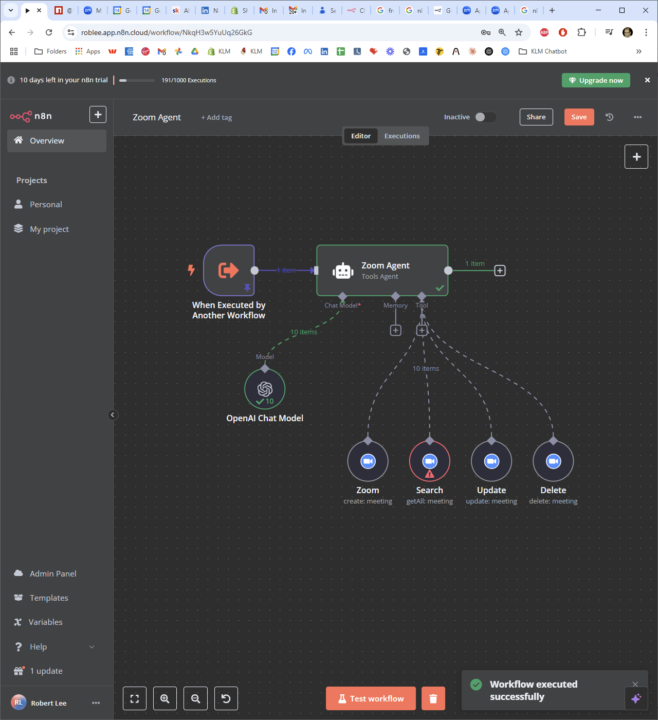
Zoom Agent can't find existing Zoom meetings to update, delete, etc
Hi all, I built a stand alone Zoom Agent that is triggered from my larger Supervisor Agent. In the Zoom Agent, I can create zoom meetings with ease, but I can't update or delete existing meetings. It gets stuck on the search tool. I'm not sure how to get it working. I think I've adding all the appropriate scopes in the app. Anyone have any suggestions? Thanks!
0 likes • Mar '25
I solved it! It was in the System Message to the AI Agent. This is what I used: The current date and time is {{ $now.toString() }} Your job is to assist with Zoom meetings. You will search, create, update, delete zoom meetings. When asked to delete all meetings, you should: 1. First use the Search tool to retrieve all scheduled meetings 2. Then iterate through the results and use the Delete tool for each meeting ID 3. Confirm to the user when all meetings have been deleted Always use the appropriate tools in sequence when handling complex requests.
Mar '25 •
AI Agent and Chat bot can't figure out the right date!
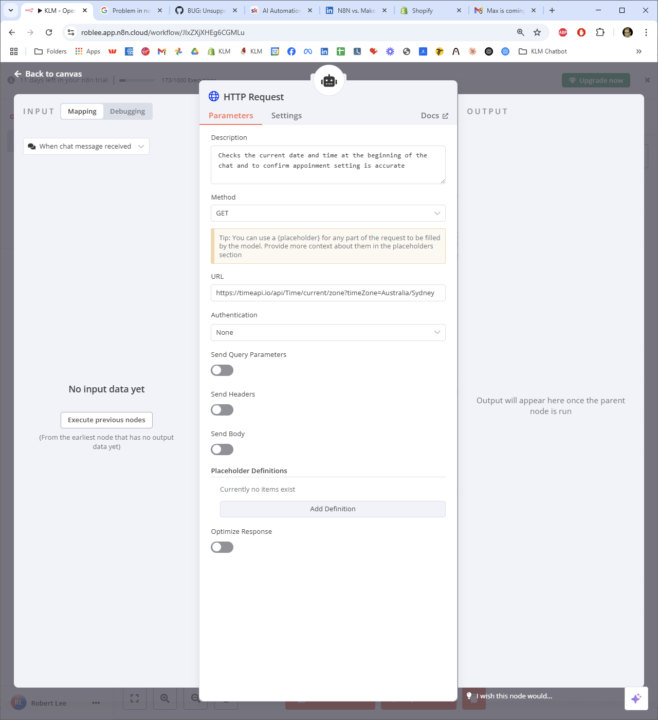
Hi everyone. Have you had a similar issue? You set everything up to schedule appointments, but the chatbot can't figure out the right date. If I say "tomorrow" it thinks it's in 2023! Or "next Saturday" and it sets an appointment for "Saturday 16th March" when it should be 15th March. I went completely overboard in the System Message (attached) to ensure it checks an HTTP Request Tool to: https://timeapi.io/api/Time/current/zone?timeZone=Australia/Sydney at the beginning of the chat, anytime the scheduler runs, anytime there's reference to a date. But it doesn't check it! Only when given explicit instructions in the chat. And even when it does, it still screws it up. Is there any way to make sure the chatbot and ai agent knows today's date so it can set appointments correctly? When I used an http request between the chat trigger and AI Agent, it just spun out and errored, likely from too many requesets. Thanks!
1 like • Mar '25
I went down a whole path to cache and store the date, and fetch before the AI and it got very complicated for a seemingly simple task. I started adding "The current date and time is {{ $now.toString() }}" to my Agent System Messages and it seems to work. I also have an http request node to get the date. I've seen adding a Serp API to do a websearch works as well. Thanks for the help @Pk Saha and @John McGill !
1-4 of 4

@rob-lee-4195
Founder and CEO of BrightCoast AI. Looking for builders and automation specialists.
Active 176d ago
Joined Mar 12, 2025
ENTJ
Potts Point, NSW, Australia
Powered by