Activity
Mon
Wed
Fri
Sun
Aug
Sep
Oct
Nov
Dec
Jan
Feb
Mar
Apr
May
Jun
Jul
What is this?
Less
More
Owned by Quinita
Build an AI-powered funding & donor retention engine inside Google Workspace. Stop donor churn & automate grants without expensive software
Memberships
Skoolers
163.9k members • Free
financial freedom school
1.8k members • Free
Agency Coach Community
4.6k members • Free
Sales Daddy Community
1.6k members • Free
Dementia Care Exchange
212 members • Free
Women Build AI
5.1k members • Free
Leadbase Free
13.5k members • Free
Your First $5k Club w/ARLAN
32.7k members • Free
Being The Fit
70 members • Free
8 contributions to The AI-Powered Nonprofit

9d •
Name Change - The AI-Powered Nonprofit
Why? The real advantage of this community is we setup your Funding and Donor Retention Engine. Tools Cost? Almost $0 How? I'll show you, you just have to attend the workshops. Welcome to The AI-Powered Nonprofit—the exclusive strategy and systems hub for Executive Directors, Founders, and Development Leaders who need enterprise-level funding operations on a lean budget. Most nonprofits are told they need to buy bloated, expensive software like Salesforce or HubSpot to scale. We prove otherwise. We show you how to turn the tools you already use every single day—Google Workspace and Gemini—into an automated, high-precision donor cultivation and grant machine. Inside this community, you will master how to: - 🚨 Protect Major Donors: Deploy automated 'Last-Contact' logic inside your Google ecosystem that alerts you the exact moment a VIP donor is slipping away. - 🤖 Automate Grant Discovery: Program Gemini to instantly dissect complex 990 forms, match your mission to active funders, and draft winning Letters of Inquiry (LOIs) in 60 seconds. - 🚀 Predictive Outreach: Engineer automated workflows that systematically prime your donor base weeks ahead of Giving Tuesday or major campaigns—completely hands-free. This is about building Institutional Capital and Capacity. We provide the exact architecture, data pipelines, and system blueprints required to protect your funding and scale your mission.
0
0
10d •
Introduction to Google Gemini - Recording
Hey Everyone The Introduction to Google Gemini has just been completed. In this workshop, we talked about how to use Google Gemini, including 2 projects that it can help you with. Covered: Creating a CRM Creating a Donor Tracker How to use with Google Sheets How to use with Google Drive Limitations of the Free Plan Feel free to comment on questions or recommendations for the next Google session
0
0

10d •
First Q&A Session
Our First Q&A Session is live! 🎉 Drop in and bring your questions — no topic too big or small. https://www.skool.com/live/qq8w436bDxC What we can dig into: - AI at Work - AI Culture - Data Reporting & Collection - Systems Questions - New Technology - Honestly, whatever's on your mind This Q&A Session is from 12 PM PT/ 3 PM ET to 12:45 PM PT/ 3:45 PM ET Up next: Introduction to Google Gemini at 1 PM PT / 4 PM ET — stick around! https://www.skool.com/live/5p8CWcTZVqn
0
0
15d •
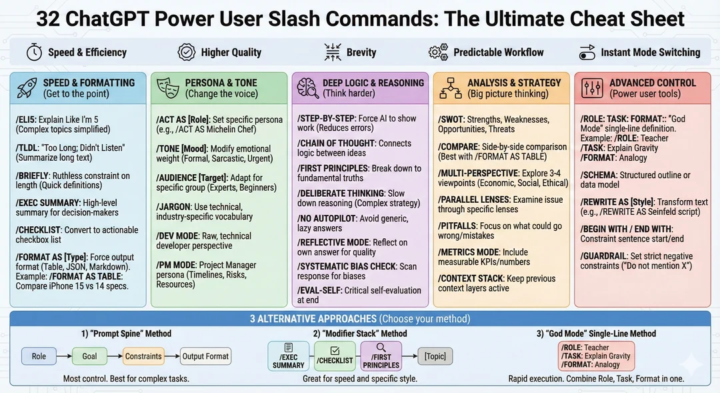
ChatGPT Secret Codes
I was in a training today and a nonprofit brought up using the ChatGPT Secret Codes. Here is the comprehensive list of 32 shortcuts, categorized by how they help you. Speed & Formatting (Get to the point) Use these when you need specific output formats without the fluff. - /ELI5: Explain Like I’m 5. Great for complex concepts (Quantum physics, Blockchain). - /TLDL: "Too Long; Didn't Listen/Read". Summarizes long transcripts or texts into a few key lines. - /BRIEFLY: Forces a ruthless constraint on length. Good for quick definitions. - /EXEC SUMMARY: Generates a high-level summary suitable for a CEO or decision-maker. - /CHECKLIST: Converts the response into a functional, actionable checkbox list. - /FORMAT AS [Type]: Forces the output into a specific format (Table, JSON, Markdown, CSV). - Example: /FORMAT AS TABLE: Compare iPhone 15 vs 14 specs. Persona & Tone (Change the voice) Stop the "AI voice" by forcing a specific perspective. - /ACT AS [Role]: Sets a specific persona. (e.g., /ACT AS Michelin Chef). - /TONE [Mood]: Modifies the emotional weight (Formal, Sarcastic, Urgent, Dramatic). - /AUDIENCE [Target]: Adapts complexity for a specific group (Experts, Beginners, Stakeholders). - /JARGON: Specifically asks the AI to use technical, industry-specific vocabulary (opposite of ELI5). - /DEV MODE: Simulates a raw, technical developer perspective (code-heavy, concise). - /PM MODE: Adopts a Project Manager persona (focus on timelines, resources, risks). Deep Logic & Reasoning (Think harder) Use these to stop hallucinations and force better logic. - /STEP-BY-STEP: Forces the AI to show its work. Proven to reduce math and logic errors. - /CHAIN OF THOUGHT: Similar to step-by-step, but focuses on the connecting logic between ideas. - /FIRST PRINCIPLES: Breaks a problem down to its fundamental truths and builds up from there. - /DELIBERATE THINKING: Forces a "slow down" approach to reasoning (great for complex strategy). - /NO AUTOPILOT: Explicit instruction to avoid generic, cliché, or lazy answers. - /REFLECTIVE MODE: Asks the AI to reflect on its own answer after generating it to check for quality. - /SYSTEMATIC BIAS CHECK: Explicitly asks the AI to scan its response for inherent biases. - /EVAL-SELF: Forces a critical self-evaluation of the response at the end.
0
0
16d •
You don't have to wait too much longer
You got the 75% off on Google Gemini, but still only prompt questions you could Google? Don't feel bad. I also feel my eyes hazing over when looking at the bright white window that holds Google Gemini. But here's the thing. It's not all that different than Claude or ChatGPT. If anything its better. Gemini for Nonprofits is ultra-secure, it's the backend to most AI image generation software, and it comes with Google Workspace. So where do you even start as a Nonprofit? If you have used other AI tools like ChatGPT or Claude. And you have existing CustomGPTs or Projects. I'd work on transitioning those to Google Gems. Google Gems are basically the CustomGPT of Gemini. You can also use Gems to write your own Grant Writing Assistant that can fully integrate with Google Docs. There's something so sweet about being able to stay connected to Google Workspace. Anyways. This is just the surface. That is why I am having a Class for Nonprofits on July 8th "Introduction to Google Gemini". See you there - https://www.skool.com/ai-clarity-for-nonprofits-1475/calendar?eid=ac460c2d864046b5a83d8743b9fd6789
0
0

1-8 of 8

Active 2d ago
Joined Jun 29, 2026