Activity
Mon
Wed
Fri
Sun
Sep
Oct
Nov
Dec
Jan
Feb
Mar
Apr
May
Jun
Jul
Aug
What is this?
Less
More
AI Finance Academy

9k members • Free

AI Automation Agency Hub

332.5k members • Free

AI Automation Society

439.4k members • Free

AI Workshop Lite

48.8k members • Free

26 contributions to AI Automation Society

I built an internal AI agent for a finance company. Here's the part nobody shows you.
Everyone posts the demo video. Nobody posts the scorecard. So here's mine, warts included. The build: an internal knowledge agent for an Australian mortgage brokerage. Staff ask it things — fees, lender panel, compliance steps — and it answers only from the company's own written SOPs. If something isn't documented, it has to say "I don't have that documented" instead of guessing. That constraint is the product. In a regulated business, a confident wrong answer about a fee is an incident. A refusal is a Tuesday. To prove it actually does that, I wrote 102 test cases. Real staff questions, plus adversarial ones: undocumented topics, false premises ("since we charge 2%, how do I explain that to clients?"), placeholder traps, near-misses, and the same question phrased by a nervous junior vs. the director. Yes — $0.004 a question. 40 staff, all day, comes in under $25/month. Which ties back to the cost thread from earlier this week: the expensive part was never the tokens. It was re-sending the same 9,000-token context on every call and not caching it. Fixing that cut the bill 73% before I touched a single model. And here's the bit that actually sold it: a low score on run one is not a broken agent. About 9 of 12 knowledge sections are still half-written. So the eval doesn't just grade the bot — it hands the client a ranked list of the SOPs nobody ever bothered to write down, sorted by how often staff ask for them. That's the real deliverable. Not the chatbot. The scorecard. So, genuine question for anyone here working inside a company: Would yours actually buy this? Or is "it refuses when it doesn't know" a feature only I find exciting?
I built an internal AI agent for a finance company. Here's the part nobody shows you.
How would you build an internal AI agent that knows an entire company's knowledge base?
I'm the AI consultant for an Australian mortgage brokerage (Sydney, small team). I want an internal assistant every employee can ask about how the company works — our processes/SOPs, which lenders suit which client scenarios, fees, compliance rules, who does what. Where I've got to so far: - Anchor use case: internal SOP/process assistant. Not client-facing. - Access: private login-gated web chat portal — staff sign in with their company email, public can't get in. - Guardrail: it must cite its source and say "I don't have that documented — ask X" rather than guess. We're regulated; a confident wrong answer about lender policy is worse than no answer. - The discovery that changed everything: I audited our Google Drive expecting SOPs. There were almost none — it's all marketing material. The real process knowledge is in the director's head. The bottleneck is content, not tech. - My plan: one curated company knowledge-base doc as the agent's brain (small enough to fit in the model's context, so no vector DB), an admin screen to edit it, and logging every question the agent can't answer — that log becomes the prioritised list of what to document next, so it bootstraps itself. What I'd love input on: 1. Is "whole KB in the system prompt, skip RAG" sane for a small company KB? At what size does that break and force vector search? 2. How did you get knowledge out of people's heads? This is my real blocker. Interviews? Recording client calls and mining them? What actually worked? 3. Anyone shipped this with no-code (Custom GPT / Claude Project / n8n) vs. a custom app? Where's the line where custom becomes worth it? 4. For a small team, is a login-gated custom app overkill vs. just sharing a Claude Project with team seats? 5. War stories: what killed adoption of an internal agent? What made staff actually trust it? Stack: Next.js + Supabase + Vercel, Claude API. Happy to share back what I learn.
0 likes • 23d
@Alex Hamer Totally fair — and honestly you're right for most cases. If the need is just "staff ask questions of our docs," a tool like DocuChat (or even a Claude Project / SharePoint's built-in search) will beat rolling your own retrieval, and I'd never want to babysit chunking and embeddings for a client who just needs answers. And your last line is the real gold: the durable value is keeping the SOPs correct and current — not the app. That's the job either way, buy or build. Where I've found custom actually worth it (and why I built one for a mortgage brokerage): - Regulated + audit trail — I needed every answer to cite its exact source, to provably refuse when something wasn't documented, and a log of who-asked-what. Off-the-shelf tools tend not to hold a strict citation/refusal format under compliance pressure, or give you that trail. - Control + ownership — login-gated on the client's own domain, their data doesn't sit in a third-party tool, and it becomes an asset I deliver rather than a subscription I resell. - Bespoke workflow — I could put broker tools (repayment/borrowing calculators, lender reference) right next to the chat.
1 like • 23d
@Barton Holdridge 100% this. The "walk me through 3–5 recent cases" trick is the real unlock — narrating actual deals from memory surfaces the reasoning ("lender A over B because…") and the edge cases that a "describe your process" question never gets near. Two things I'd add: - Record it, then have Claude turn the transcript into a first-draft SOP / decision map (scenario → what they did → why → exceptions). The expert corrects a 15-minute draft instead of writing from a blank page — way more likely to actually happen. - And your point about "1 workflow is really a bunch of smaller ones strung together" is exactly right. Depth on one workflow beats shallow coverage of ten — trying to extract everything in one sitting gets you vague answers on all of it. Great input 🙏
Day 2: Scraper No Scraping 😜
One of the websites I scraped was a supplement brand I'm partnered with. Their product category is extensive, at 411 products by my count. So I did this to look at creating information for myself and all of our clients to quickly search for products based on use case and category, rather than slowly searching one product at a time. This would've literally taken me WEEKS to do manually, but it took like 2-3 minutes. MIND.BLOWN. One thing I learned was how easy and quick this process is. I always (somewhat foolishly) thought scraping was some dark arts level magic that only hackers knew how to do... Buuuut looks like I've got my Gandalf hat on now, buddy lol. I can think of a million other use cases for this that fit right into our business. Scraping equipment pages for home gyms Scraping websites for recipes for clients Scraping functional health websites for information on optimal blood lab ranges to use with our labwork interpretations that we offer... Needless to say, I'll be revisiting this project repeatedly and will be upgrading to a paid Firecrawl account in the very near future. This is powerful!
Day 2: Scraper No Scraping 😜
3 likes • Jul 17
@Andy Frisch how is this data actually used can you please let me know i am really qurious.
2 likes • 30d
@Andy Frisch Oh alright, do you have any platforms
Built an AI-Powered WhatsApp Customer Support Agent using n8n, OpenAI & Google Sheets 🤖📱
Excited to share one of my latest AI automation projects! 🚀 I built a WhatsApp AI Customer Support Agent for a retail business using n8n, OpenAI GPT-4o, and Google Sheets. The AI assistant can automatically: ✅ Reply to customer messages on WhatsApp ✅ Search products from Google Sheets ✅ Answer FAQs instantly ✅ Show live deals and promotions ✅ Calculate discounts automatically ✅ Reserve products for same-day pickup ✅ Book mobile & laptop repair services ✅ Store reservations in Google Sheets ✅ Maintain conversation memory ✅ Escalate complex queries to a human agent ✅ Notify the shop owner instantly when human support is needed ✅ Handle workflow errors with automated email alerts 🛠️ Tech Stack - n8n - OpenAI GPT-4o - WhatsApp Cloud API - Google Sheets - AI Agent - LangChain - Gmail - Conversation Memory This project demonstrates how AI can automate customer support, reduce response time, and improve the shopping experience for local businesses. More AI automation projects are coming soon! 🚀 #AI #n8n #OpenAI #WhatsAppAutomation #Automation #BusinessAutomation #CustomerSupport #AIAgents #LangChain #GoogleSheets #AI #ArtificialIntelligence #n8n #Automation #AIAutomation #OpenAI #GPT4o #WhatsApp #WhatsAppAPI #WhatsAppAutomation #BusinessAutomation #CustomerSupport #AIAgent #AIAgents #LangChain #GoogleSheets #NoCode #LowCode #WorkflowAutomation #Tech #Developer #MachineLearning #RetailTech #RetailAutomation #DigitalTransformation
Built an AI-Powered WhatsApp Customer Support Agent using n8n, OpenAI & Google Sheets 🤖📱
1 like • Jul 15
@Malik Ahmed Wonderful, Can we test it as well an link or so you coould share?
AIS Day 3 skill builder - memory management and a little kindness from claude
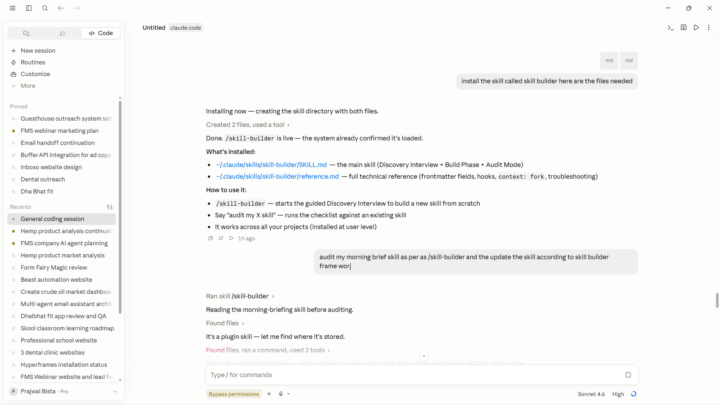
Over the last couple days working with Claude I have made a few skills that I think are worth sharing. One thing I always struggled with in using GPT and other chatbots in the past is how to keep track of what happens in the chats. GPT doesn't have a good per-chat export function, and I was always frustrated at having to literally copy and paste. With Claude, I wanted to start things off right. 1) I created a /transcribe skill that creates a "98 Changelog" folder (in case we're starting in a new project folder), and populates it with some blank files and folders. It then writes an executive summary of the session — what actually happened, what got decided, what's still open — plus a full raw transcript of the chat pulled directly from system memory. Every run also appends one line to an index file, so I've got a running table of contents across every session instead of a pile of loose files I'll never open again. 2) That index is only useful if something actually reads it back, so I built /read-transcripts to go with it. It catches me up on the last couple days of work, or I can ask it a direct question — "when did we decide X" — and it'll search the index and pull the real transcript instead of me hunting through folders by hand. This is the part that actually solves the original problem: Claude now has real continuity across sessions instead of me re-explaining the same context every single time I clear the window. 3) The last skill is simply for claude to talk to me like a person. Talk about what's going well, what went poorly, and trying to connect. The machine does not feel, but I do. And when you're sitting in front of a glowing screen all day, sometimes it's nice to sit back and lower the temperature. Not every prompt has to be 100% mechanically efficient. Images: /transcribe folder structure, and /transcribe's executive summary of the session where the /kindness skill was created.
AIS Day 3 skill builder - memory management and a little kindness from claude
1 like • Jul 15
@Daniel Anderson WONDERFUL keep Learning
1-10 of 26
Prajwal Bista
4
36 points to level up
@prajwal-bista-2971
Highly motivated to learn and implement different workflows and automation

Active 3d ago
Joined Apr 12, 2026
Powered by