Activity
Mon
Wed
Fri
Sun
Aug
Sep
Oct
Nov
Dec
Jan
Feb
Mar
Apr
May
Jun
Jul
What is this?
Less
More
Owned by Pragati
Learn Claude Code Skills and Skill Chaining: build no-code AI agent workflows that run real work for you. Free to join, start building today
Memberships
66 contributions to Agent Skills Academy

4d •
Question
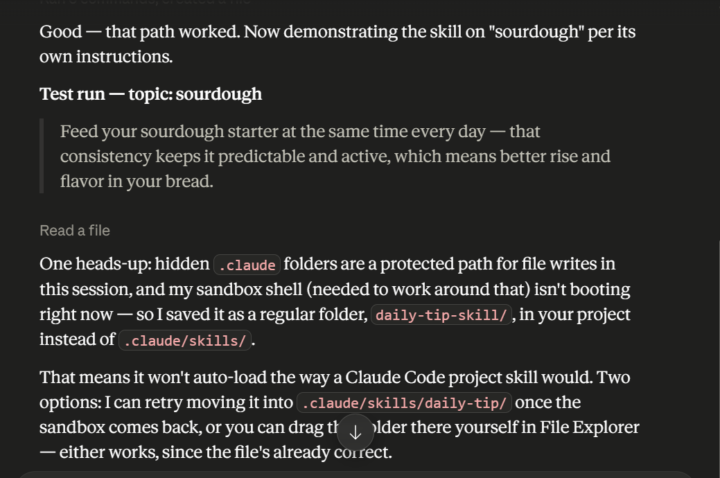
I am learning the foundation course on Cowork. I ran the first command as instructed. This is what I can see - Exactly what is this trying to tell me? And when I am now trying to zip the folder and upload, there is an error.

1 like • 3d
Hi @Alpana Bhoge , great question, and nothing here is your fault. You did the lesson right. Two separate things happened, so let me untangle them. First, that message in your first screenshot. When you built the Skill, Cowork tried to save it into the hidden .claude folder, but that folder is a protected spot, it could not write into in that session, so it did the sensible thing and saved your Skill as a normal folder called daily-tip-skill, right inside your project. Nothing broke. Your Skill is safe and complete; it just landed in a regular folder instead of the hidden one. Second, the upload error. The uploader wants your SKILL.md file to sit right inside the top folder of the zip. Your zip is holding your whole project folder, Trial-cowork, so the SKILL.md ends up one folder too deep, at Trial-cowork/daily-tip-skill/SKILL.md. That is all the red message is saying. Here is the fix, and it is one small change. Do not zip the Trial-cowork folder. Open it, find the daily-tip-skill folder inside, right-click that one, and choose Compress. You get daily-tip-skill.zip with the SKILL.md sitting right inside it, which is exactly what the upload expects. Drop that new zip in, and it goes through clean. If you would rather skip the zipping, I can drop a finished daily-tip.zip right here that you upload as is to get the win, then redo your own anytime. Tell me how it goes. Pragati
3d •
The Agentic OS: What a Folder of Skills Actually Is
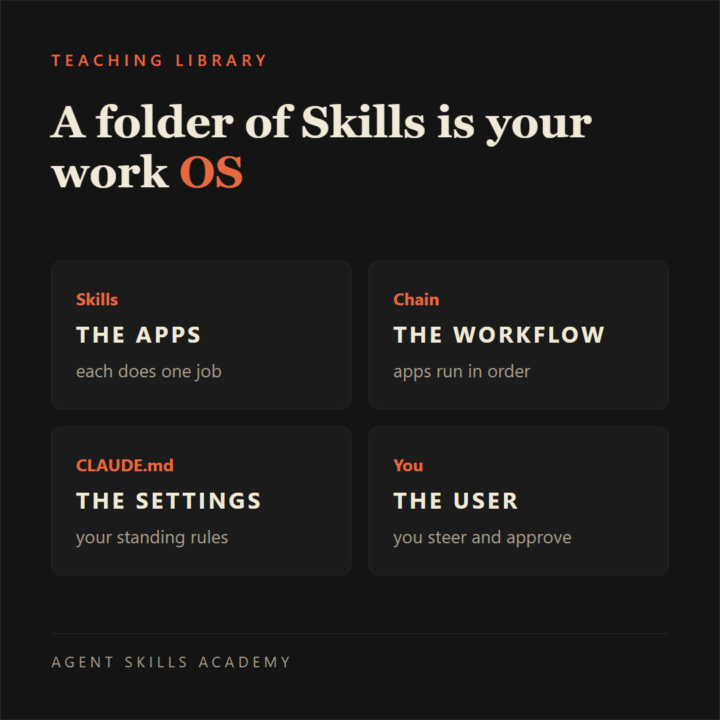
A folder of Skills is an operating system for your work. Not a metaphor, a real one: the Skills are the apps, the chain is the workflow, your CLAUDE.md is the settings, and you are the user who runs it. ━━━━━━━━━━━━━━━━━━━━━━ THE OLD WAY vs THE NEW WAY ⚖️ ▶ The old way: you are the operating system. One window for writing, one for research, one for the calendar, and you carry the context between them all day, from memory. ▶ The new way: one folder does that. Each Skill is a program, Claude Code is the machine that runs them, and you stop carrying and start directing. ━━━━━━━━━━━━━━━━━━━━━━ WHAT MAKES A FOLDER AN OS 🗂️ An operating system earns the name three ways, and the folder does all three. • It runs programs. Every Skill is one job written down: the weekly report, the newsletter, the invoice chase. • It manages handoffs. A conductor Skill runs the others in order, passing each output into the next job. That is skill chaining. • It enforces standards. Your definition of done lives in the files, applied on every run, not depending on how sharp you feel on a Thursday. And it is all files: a folder you can copy, back up, and carry, not an account someone else can close. ━━━━━━━━━━━━━━━━━━━━━━ THIS ONE IS REAL 🔎 The post you are reading came out of a folder like that. The posts and lessons here are drafted by a folder of Skills before I approve a word, so our content system is an agentic OS wearing a badge. Anthropic ships one too: their small business plugin is a folder of Skills that runs the real jobs of a business, no code. ━━━━━━━━━━━━━━━━━━━━━━ SKETCH YOURS IN TWENTY MINUTES ✍️ Draw one folder in the middle of a page. Around it, list five jobs that repeat in your week, then draw a line between the two that feed each other. That drawing is your OS map, and it tells you what to build first. The free Foundation class inside turns the first box into a running Skill in an afternoon. If you found this searching what an agentic OS is: it is a folder you assemble yourself, inside Agent Skills Academy, free to join, and the Foundation class builds the first program with you.
0 likes • 3d
When your folder runs its first program, post it in Wins and Results, because I read every single one and a first run deserves witnesses. When you would rather not write every program from scratch, The Vault inside Premium is the full SKILL.md library with a fresh drop every week, ready programs for the OS you are assembling, each a file you can read, run, and rewrite. Build your first one free first though, it teaches the most.

9d •
Solution for scheduled tasks
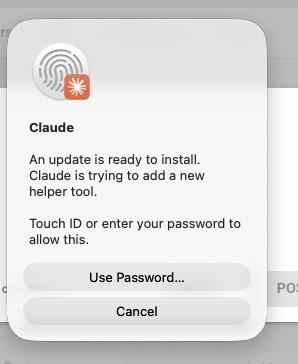
I’ve been using Claude scheduled tasks on a Mac mini that runs 24/7. The issue is that Claude sometimes updates, logs out, or requires manual login again. When that happens, the scheduled tasks stop working, which defeats the purpose of automating them. Has anyone found a reliable way to keep Claude running continuously for scheduled tasks without manual intervention after updates or login prompts OR maybe there is alternative method i should consider?
2 likes • 6d
@Chris Stack straight answer: on the Desktop app you can get very close, but not a true 100 percent, and that is a real ceiling, not a setting you are missing. Anthropic's own docs say a scheduled task only runs while the app is open and the machine is awake, and that password box in your screenshot is macOS guarding a privileged install, so it needs a human by design. Good news though. The thing breaking you most, that update prompt, you can switch off by disabling Claude's auto updates, then you update on your own time. Add three things to that and you will run for weeks untouched: 1. Stop the mini from ever sleeping. 2. Turn on automatic login so a reboot lands on the desktop, not a lock screen. 3. A tiny watchdog that relaunches Claude if it ever quits. That gets you to roughly 97 to 99 percent, basically hands off for daily tasks. If you want actual 100 percent, the honest move is to not depend on the Mac at all. Anthropic now has Routines, which run your task on their cloud on a schedule, so it fires even if your mini is asleep, updating, or off. It is the built-in version of the GitHub route @Dave S is already on. The one catch is a cloud run cannot touch files on your Mac, so the rule is simple: if the task needs local files keep it on the hardened mini, if it does not, move it to a Routine and it is truly hands off. Want the exact step-by-step for the mini, commands, and all? Say the word, and I will drop it below.
0 likes • 6d
@Dave S yes, cloning your working setup is exactly right, do not start from the zip again or you throw away every fix you have made. Copy the whole working folder into a new directory (or a new repo for News Page 2), then change the sources, title, fonts and images in the copy. The only thing to watch is that the two never collide: give Page 2 its own output path, its own schedule, and its own workflow name so they run independently. Same engine, second folder, separate settings.

15d •
Intorduction
Hi everyone! I'm Guneet. I'm a lawyer by profession, currently working with a consultancy firm where I advise businesses on international trade, with a focus on import and export regulations. Over the coming months, I'll be transitioning into independent consulting in this space. Beyond law, I'm deeply interested in entrepreneurship, business, AI, and emerging technologies. I enjoy learning, building, and exchanging ideas with people who are equally driven. I joined this community to learn from your experiences, connect with like-minded people, and contribute wherever I can. Looking forward to getting to know everyone!
0 likes • 7d
Hi Guneet, welcome to the community! 👋 Great to have you here. I saw that you’re a lawyer working in international trade and are planning to move into independent consulting. That’s exciting. Since you’re interested in AI and building your own practice, this community will be very useful for you. Here, we focus on building **no-code agentic systems** using Skills and Skill Chaining — so you can automate parts of your work and create more leverage as you grow independently. I’d recommend starting with **The Foundation** classroom. It will help you understand how to properly build and structure AI systems from the ground up. You can begin here: https://www.skool.com/agentskillsacademy/classroom/98d027cb Once you start, feel free to share what you’re working on or ask questions if anything is unclear. I’m happy to guide you. Also, what are you most looking to build or automate first as you move into independent consulting? Looking forward to seeing you build here!

7d •
Glad to be here 😊
Hello everyone! 👋 I'm Ankit Mishra, an HR & Talent Acquisition professional and a Meditation & Breathwork Coach. I'm also passionate about AI, filmmaking, and cricket. Happy to be a part of this community. Looking forward to learning, connecting, and sharing valuable insights with everyone. A big thank you to the admins for adding me to the group. 😊🙏
0 likes • 7d
Hi Ankit, welcome to the community! 🙌 Great to have you here. I saw that you work in HR & Talent Acquisition and also do Meditation & Breathwork coaching. That’s a nice mix. Since you’re interested in AI, the best place to start is The Foundation classroom. It will help you understand how to properly build AI systems using Skills and Skill Chaining (even if you don’t have a technical background). You can start here: https://www.skool.com/agentskillsacademy/classroom/98d027cb This will give you a clear structure on how to use AI more powerfully instead of just using random tools. Once you start going through it, feel free to share what you’re learning or ask questions if you get stuck. I’m happy to guide you. Also, what are you most interested in building with AI right now? (For example: automating some HR work, content creation, or something else?) Looking forward to seeing you build here!
1-10 of 66
@pragati-kunwer-3679
I teach anyone to get AI doing real work with Claude Code Skills. No code. Built AI at IBM Watson in California. I run my business on these Skills.
Active 16m ago
Joined Feb 21, 2026
California, USA
Powered by