Activity
Mon
Wed
Fri
Sun
Jan
Feb
Mar
Apr
May
Jun
Jul
Aug
Sep
Oct
Nov
Dec
What is this?
Less
More
Memberships
Accelerated Lifestyle Events
478 members • Free
The AI Advantage
65.6k members • Free
Reward Funnel
1.6k members • Free
11 contributions to The AI Advantage

15h •
Where do I find Sabrina Ramanow bonus sesstion?
We where promised a bonus session with Sabrina Ramonow but I can´t find it. Can someone give me the link because I have been looking everywhere. I do not even know if I shall look here in The AI Advantage, or in the Amplifiera Club or in the Research Hub or somewhere else. But I have been looking everywhere and all I find is written info about Sabrina and AI Advantage Summit Day 2. And that is not a bonus session.
23d •
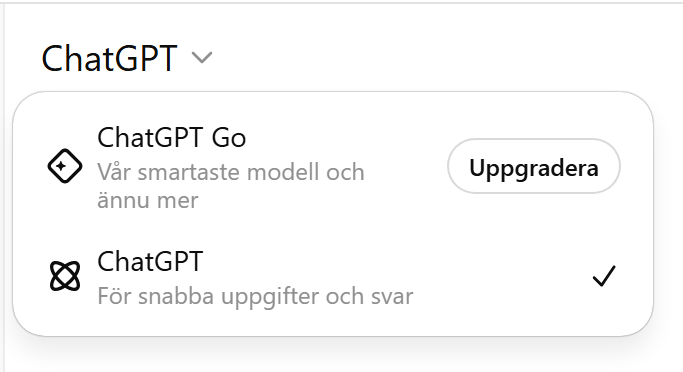
HELP! I can´t find ChatPGT 5.1 again
My Chat GPT 5.1 is missing after I emptied my cache memory. And everything I have asked Chat GPT the last weeks are missing. My uploaded clone is lost. All help I got is lost. Even though I asked Chat GPT to save it. My Chat GPT is an older version - the one I hade before I upgraded. When clicking on Upgrade it is obviously so that I have upgraded already. But Chat PGT 5.1 is still not possible to choose. This is alla I see! What shall I do to get my Chat GPT 5.1 back?
1 like • 22d
@AI Advantage Team I obviusly had 2 different account and have purchaced ChatGPT Pro from the wrong account. So next month I will delete that account and change my subsciption to the correct one.

Nov 6 •
✅Beginner-Friendly AI Tools and their uses✅✨
Here are some beginner-friendly AI tools for content creation, organized by category! VIDEO CREATION AND EDITING Pictory – Turns long videos or articles into short, shareable clips with captions. OpusClip – Automatically finds and edits highlight moments from your videos. Canva Magic Studio – Lets you design and edit simple videos with AI text and image features built in. HeyGen – Creates short spokesperson-style videos from text without needing to record yourself. Descript – Edits video or audio just by editing the transcript, great for beginners. IMAGE AND DESIGN CREATION Canva Magic Studio – Adds AI-generated text, images, and layouts for quick designs. Ideogram – Makes easy, high-quality graphics and social media visuals from text prompts. Midjourney – Creates artistic images and illustrations from short text descriptions. WRITING AND COPY CREATION ChatGPT – Helps you write blog posts, brainstorm ideas, and improve your writing style. Claude – Writes articles, summaries, and educational content in a natural tone. Copy.ai – Generates social posts, ad copy, and email text from short prompts. Writesonic – Creates SEO-friendly articles, headlines, and marketing captions. Notion AI – Helps organize thoughts, summarize notes, and write outlines right inside Notion. RESEARCH AND LEARNING TOOLS Perplexity – Finds accurate information fast and explains it in plain English. ChatGPT – Answers questions, summarizes information, and helps you learn new topics quickly. VOICE AND AUDIO CREATION ElevenLabs – Turns written text into realistic voice narration in different tones. Murf.ai – Creates professional-sounding voiceovers for podcasts or videos. PRESENTATIONS AND STORYTELLING Gamma – Builds ready-to-present slides automatically from your notes. Tome – Creates interactive storytelling presentations with text and visuals.
0 likes • Nov 7
Thanks! Great list

Nov 7 •
What platform is the AI bootcamp using???
What platform will AI bootcamp use to help us create our AI clone? Is the platform a platform created just for this course or is it using a platform that is readily available and the bootcamp is teaching us how to use that platform ie ChatGPT?
0 likes • Nov 7
Free Chat GPT and some others free platform, I was told.

Nov 7 •
How many are planning to continue the monthly subscription to this community?
After 30 days, the $1 fee goes up to a higher monthly fee. I am wondering how many intend to continue the subscription after the event? Does anyone remember how much the monthly fee is?
1 like • Nov 7
It does? I thought 1 dollar was a one thing payment. I have no intent to continue after 30 days. How do I end this subscription?
1 like • Nov 7
@Kenneth K So it is not automatic withdrawing money from my credit card for the next month?
1-10 of 11
Active 44m ago
Joined Nov 6, 2025
Powered by