Activity
Mon
Wed
Fri
Sun
Feb
Mar
Apr
May
Jun
Jul
Aug
Sep
Oct
Nov
Dec
Jan
What is this?
Less
More
Memberships
AI Art Sellers Collective FREE
5.4k members • Free
Abundance School
167 members • Free
Free Skool Course
33.7k members • Free
Kyvora AI Collective
42 members • $5/month
Chase AI Community
34.4k members • Free
Wanner Exclusive Community
3.7k members • Free
3 Day AI Creator Challenge
671 members • $10/m
AI ATM MACHINE
2.2k members • Free
The Insta Masters
262 members • $10/month
6 contributions to AI Fusion Master Family

Jun '25 •
Fusion Master Community 💎 – Unleashing Copilot: Your AI Assistant for Everything
Hey Fusion Fam! 🧠⚡️Ever wish you had an AI sidekick that could help you brainstorm, organize, write, and create—all without leaving your workflow? Meet Copilot.Whether you're building prompts, planning content, editing spreadsheets, or writing full-blown creative scripts—Copilot is the productivity game-changer you didn’t know you needed. 🔍 What Is Copilot? Microsoft Copilot is a built-in AI tool integrated across apps like Word, PowerPoint, Excel, Teams, and Outlook—and it’s designed to think with you. It combines the power of ChatGPT with the Microsoft ecosystem to give you: ✅ Smart content suggestions✅ Automated document drafts✅ Instant data visualizations✅ Prompt help and creative ideas✅ And yes—even storyboarding AI videos! ⚙️ How You Can Use It: 🧠 Prompt Building in Word– Use Copilot to help refine, rewrite, or expand your AI image or video prompts.💡 Example: “Rewrite this prompt in cinematic style with rich emotional tone.” 📊 Concept Mapping in Excel– Organize your fusion concepts, timelines, or multi-scene storyboards with charts, lists, and summaries auto-generated by Copilot. 🎥 Scriptwriting in PowerPoint– Create visual storyboards and pitch decks for your AI videos using Copilot’s “Designer” suggestions and layout magic. 📧 Pitching Ideas in Outlook– Copilot can help draft personalized emails to collaborators, potential clients, or your own community fanbase. 🗣️ Community Action Prompt: If Copilot could help you speed up ONE part of your AI workflow—what would it be?Whether it’s writing prompt templates, sorting your best work, or prepping launch decks—we want to know:💬 How would you use Copilot to level up your AI creation game? Drop your ideas, hacks, or even screenshots below and let’s turn this thread into a productivity powerhouse. 💥🧩

0 likes • Jun '25
Is this program free?

Feb '25 •
Exclusive Free Update: 150 Bonus Prompts! 🎁
Hey Fusion Master Family! 🚀 As promised, here’s a free update to the prompt swipe file, exclusively for this community! I’m always looking for ways to help you level up your AI content game, and this update is packed with 150 bonus prompts for Midjourney, Leonardo AI, and Kling AI. 👉 Grab your free update here: 150 Bonus Prompts Enjoy, experiment, and keep pushing the limits of AI creativity! — Fusion Master 🧙♂️
1 like • Mar '25
Thank you
Feb '25 •
The Winner of the 200 Members Giveaway! 🥇
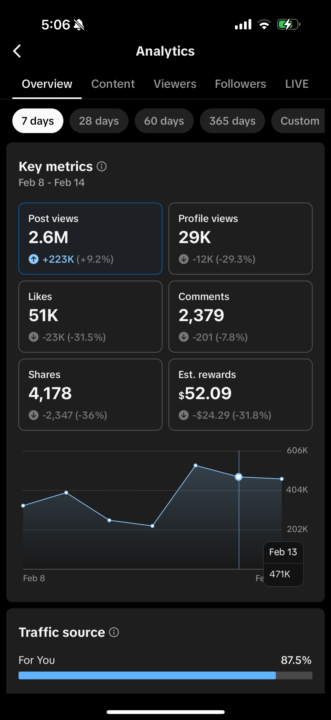
Huge Congrats to Kapdee aka Your AI Fusion—winner of our 200-member giveaway! 🎉👏 He absolutely crushed it with views this week! And remember—this isn’t a one-time thing. Keep stacking those views, and you could be next to win an unexpected prize for your grind! 🧙♂️
0 likes • Feb '25
Congrats
Feb '25 •
🎉 200 Members, $200 Giveaway! 🎉
Hey Fusion Master Family! 🚀 We just hit 200 members, and I couldn’t be more grateful for this community. This space has been growing into something truly special—filled with creators pushing the limits of AI content. I appreciate every single one of you for being part of this journey! To celebrate, I’m giving away $200 to one of you! Here’s how to enter: 💰 How to Enter: 1️⃣ Post a screenshot of your TikTok stats from the last 7 days (I’ll attach an example). 2️⃣ Post a screenshot of your TikTok profile as proof of legitimacy. 3️⃣ Drop both screenshots in the comments below! 🔥 Winner Announcement: - The creator with the highest stats wins $200! - The giveaway ends in 3 days, and I’ll announce the winner shortly after. This is my way of saying THANK YOU for being part of this movement. The energy in this community is unmatched, and we’re just getting started! Let’s keep growing, keep winning, and keep dominating with AI content. Drop your screenshots below & let’s see who takes the prize! 👇💸 — Fusion Master 🎩
0 likes • Feb '25
@Mythic Ai nice job bro I messaged you

Jan '25 •
My New Creation!
I tried to Learn and still learning. I think its interesting watch till end! https://youtube.com/shorts/VKsLY1GBmaQ?si=iow200zYaUoYO3-j Need More suggestions to improve Thanks!
1 like • Feb '25
What's the prompt.?
1-6 of 6
@paul-lange-3584
Hey Guys
I have 3 channels , gaming, crime, and cryto channel, but looking to make a lofi one , good to be here
Active 2h ago
Joined Jan 27, 2025
Powered by