Activity
Mon
Wed
Fri
Sun
Nov
Dec
Jan
Feb
Mar
Apr
May
Jun
Jul
Aug
Sep
Oct
What is this?
Less
More
Grasshopper3D Challenge
545
Free
How to Rhino
37.4k
Free
23 contributions to Grasshopper3D Challenge

Aug 22 •
My experience with Ertunc on his 12 week programme.
I’ve just completed a 12-week one-to-one Grasshopper course with Ertunc, and it has completely changed the way I approach Grasshopper. What makes Ertunc, such a great teacher is that he doesn’t just show you which buttons to press. but instead he starts with the foundational logic, moves into geometry manipulation, and then explores how Grasshopper can help us find better design solutions in architecture. Our weekly exercises and discussions made the learning feel real and relevant, rather than just following another tutorial and hoping for the best! What I appreciated most was his patience and ability to explain things in different ways until they finally click. Mistakes were never a problem—they became part of the learning process (and there were a few!). He always encouraged me to think for myself rather than simply giving me the answer, while being incredibly supportive and motivating throughout. Ertunc, genuinely cares about what you understand, not just what he has taught. After 12 weeks, I now feel much more confident exploring Grasshopper on my own—and, importantly, I’m no longer afraid of the occasional Grasshopper meltdown! Highly recommended
2 likes • Aug 22
Hi Ertunc, thank you so much! I really enjoyed the course and found it highly appropriate to my needs. Your guidance over the past 12 weeks made a huge difference in how approachable Grasshopper feels now. I really appreciate the open offer to reach out and I definitely hope to take you up on it as I dive into more complex projects. Thanks again for such a great course!

Jun 30 •
I built my first Grasshopper plugin
It is called PlusMinus. PlusMinus is a compact number slider that lets you switch between positive and negative output directly on the Grasshopper canvas. The idea came from a small frustration I had while working with long Grasshopper definitions. I kept setting a number slider, then adding a Negative component whenever I needed to reverse the value. It worked, but repeated across long definitions, it added clutter and another place for mistakes. So I wanted a slider with its own positive / negative switch. Now with PlusMinus: -Positive mode stays gray. -Negative mode turns red. -The value stays easy to edit. -The output sign changes with one click. -It is also now published on Food4Rhino. Download PlusMinus here: https://www.food4rhino.com/en/app/plusminus I would love to hear your honest feedback after you test it in a real environment. Would this be useful in your own Grasshopper workflow? Watch here: https://youtu.be/ISGkF2e_lBk
2 likes • Jul 5
For me this plugin is easy to edit and can be used for quick real time adjustments. Ideal for toggling the direction of curves, vectors and extrusions etc without breaking your trian of thought.

Feb 5 •
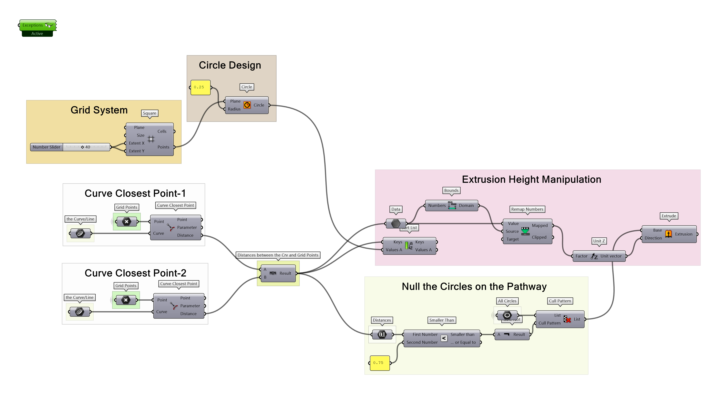
Day -9- Parametric Logic with Attractors
I believe I learnt many things on this exercise but the most important one was working on the paper before the grasshopper. I tried to have the simplest scheme I can imagine and write on the paper, made changes on it a few times and then decide the final scheme. Also, I would like to share my experience with you on this exercise. There was another scheme that Ertunc Hunkar already created but the goal was just to check the structure and create your own. He has a few components I didn't use it before. After I scanned his scheme I tried to create my own with my best. Then I worked with a specialized GPT name as: ''Grasshopper for Rhinoceros3D''. I solved my sketch structure step by step. GPT suggested some possible components to create my own structure. If I had some trouble to finalize my own structure, I knew I can always reach out the Ertunc Hunkar and he could give guidances again. So, I am planning to use this work system for the future cases and open your suggestions!
3 likes • Feb 5
Well done Furcan.
Dec '25 •
28 Day Grasshopper Challenge.
I've been doing the 28 day Grasshopper Challenge course, and honestly, it feels like someone finally cracked the code for learning Grasshopper without crying into your keyboard. The daily mix of drawing, making little models, and reflecting somehow turns parametric thinking into something...fun? It's gentle, brilliantly structured, and sneaks fundamentals into your brain before you realise it. It's not just great for beginners, intermediate users will get a hugh amount out of it too. Its such a cleverly designed course that it really deserves the attention and support of anyone interested in mastering Grasshopper.
Dec '25 •
Day 8. From Paper to Grasshopper
This exercise proved for me that even the simplest Grasshopper steps can give complex and elegant outcomes.

3 likes • Dec '25
Thanks you. Yes it helped a lot.
1-10 of 23

Active 9h ago
Joined Jun 29, 2025