Activity
Mon
Wed
Fri
Sun
Sep
Oct
Nov
Dec
Jan
Feb
Mar
Apr
May
Jun
Jul
Aug
What is this?
Less
More
Memberships
AI Automation (A-Z)
164.8k members • $7/month
ClassAi
38 members • Free
6 contributions to ClassAi

Apr 12 •
Turn Boring Research into Stunning Infographics (NotebookLM + Gemini Demo)
🚀 Level Up Your Research: From Messy Notes to Stunning Steampunk Mind Maps! 🎨 Ever feel like your research notes are just a wall of text that's hard to digest? 🧠 I just put together a quick demo on how to bridge the gap between raw data and creative visualization using two of the most powerful AI tools available right now: NotebookLM and Google Gemini. 🛠 The Workflow: 1. NotebookLM for Structure: Start by uploading your research (PDFs, docs, or web links). With one click in the "Studio" panel, NotebookLM generates a structured, logical mind map that connects all your key concepts automatically. 2. Download & Transfer: Export that mind map as a PNG. It's functional, but let's be honest—it’s a bit "corporate." 3. Gemini for the "Wow" Factor: Take that image into a custom Gemini Gem (specifically one tuned for infographic design). 4. Get Creative: Use a prompt like "Turn this into an old explorer’s journal with a steampunk vibe." Gemini preserves every single data point—from "Ethical Fluency" to "Strategic Leadership"—but transforms them into a visual masterpiece with gears, parchment textures, and beautiful typography. 💡 Why this matters for Education & AI: We often talk about AI literacy, but visual storytelling is a core competency for the future. Being able to take complex information and turn it into an engaging infographic in seconds is a superpower for educators, students, and creators alike. Check out the video below to see the transformation in action! 👇


1 like • Apr 19
This was very useful my students had made their own topics mindmaps
Apr 5 •
How I Built a Professional Game Rulebook Solo (And How You Can This for Course Content!)
Hey everyone! 🚀 I wanted to share a workflow I’ve been perfecting that allows one person to produce professional-grade manuals and documents. I used it for my new game, Sands of the Ludus, but this is 100% applicable if you’re looking to level up your class notes, student handouts, or exercise docs. The Secret? A 4-Phase Pipeline: - Phase 1: The Brainstorm. I used Gemini to get the "big ideas" out. It’s the perfect partner for when you’re stuck on how to structure a lesson or a game mechanic. - Phase 2: The Logic Lock. This is the most important part. I moved everything into NotebookLM. By uploading my specific notes, the AI only speaks from my "source of truth." No more generic AI fluff—just my rules, refined. - Phase 3: Visuals. I used the data to guide the creation of infographics. If you need to explain a complex math formula or a historical timeline, this step ensures your visuals match your text perfectly. - Phase 4: The Export. Going from a mess of notes to a polished PDF that’s ready for print or digital download. Why this matters for your community/students: You can use this to turn a 20-minute video transcript into a structured study guide, a set of practice exercises, and a visual cheat sheet in a fraction of the time it used to take. I’m curious—would a deep dive into the NotebookLM setup be helpful for your own content creation? Drop a comment below! 👇 Tips for formatting your docs: - For Physical Handouts: Use the "Final Assembly" phase to focus on high-contrast layouts and clear headings for easy printing. - For Electronic Docs: Use the "Data Framework" in NotebookLM to generate interactive Q&A's for your students based on the notes you've already created.

0 likes • Apr 5
Thanks mark This is awesome 👍
Mar 20 •
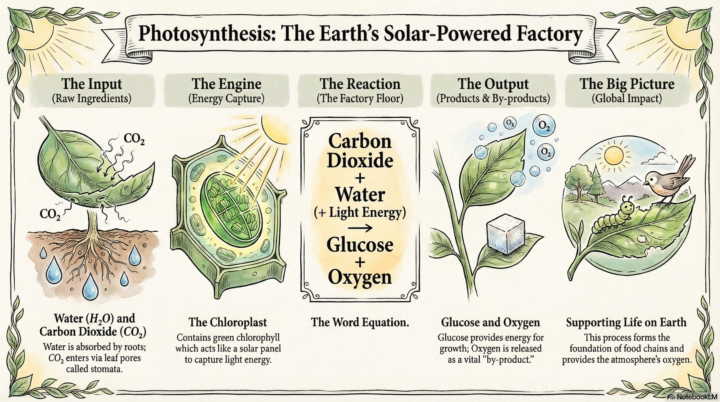
AI infographics for educators
If you are spending too much time turning lesson content into slides, this will help. I have put together a short course on using AI to create clear teaching infographics. Inside the course you will learn: - How to turn lesson content into structured visuals - A simple workflow using NotebookLM - How to guide AI to produce better outputs - Ways to reduce cognitive load for learners - How to use infographics for revision and recap This is built for real classroom use. No theory. Just a process you can apply straight away. Watch the video to see how it works. If you want access to the full workflow and templates, join the community. Start creating better visuals in less time. https://www.skool.com/classai-6627/classroom/178e8974?md=7a6fc4423d0e47b5b6546ab8e1867ce0
0 likes • Mar 22
Yes, that's great, i also tried same concept video to teach photosynthesis process the students love the way of teaching # Catalysing academics through Notebook LM
Mar 12 •
🎨 Stop Your AI Characters from "Shapeshifting" in Your Courses!
One of the biggest headaches we face as instructional designers using AI is what I call "The Shapeshifter Problem." You generate a fantastic healthcare guide for Slide 1, but by Slide 5, she’s magically grown six inches, changed her hair colour, and swapped her scrubs for a suit. 🤦♂️ When our "learning agents" look different on every page, it doesn't just look messy—it actually breaks the learner's cognitive flow. They stop focusing on the content and start wondering why the doctor suddenly looks like a different person. 🔑 The Secret: The "Anchor" Method To build trust and narrative in your programmes, you need consistency. I’ve just finished documenting a workflow that fixes this using three specific Consistency Pillars: 1. Physical Anchors: Locking in the DNA (age, hair texture, skin tone). 2. Uniform Anchors: A "hero" accessory (like a specific teal lanyard) that the AI can track. 3. Style Anchors: Ensuring your "Flat Vector" doesn't accidentally turn into a "3D Render." 🛠️ Free Resource: The Character Consistency Toolkit I’ve put together a Single-Page Application (SPA) Infographic and a Master Guide to help you master this. Inside the guide, you’ll find: - The Master Prompt Workflow: How to architect your character's "ID photo" first. - Scenario Mapping: A list of the 5 essential poses every course needs. - AI Design Assistants: Interactive tools to help you write prompts that actually work. I’ve attached the Character Consistency Guide below. Have a look and let me know in the comments: What’s the most "creative" (or annoying) change an AI has made to one of your characters mid-project? 👇 #InstructionalDesign #AI #EdTech #CharacterConsistency #CourseCreation
0 likes • Mar 13
Thanks sir, i tried this really helpful😄
Mar 5 •
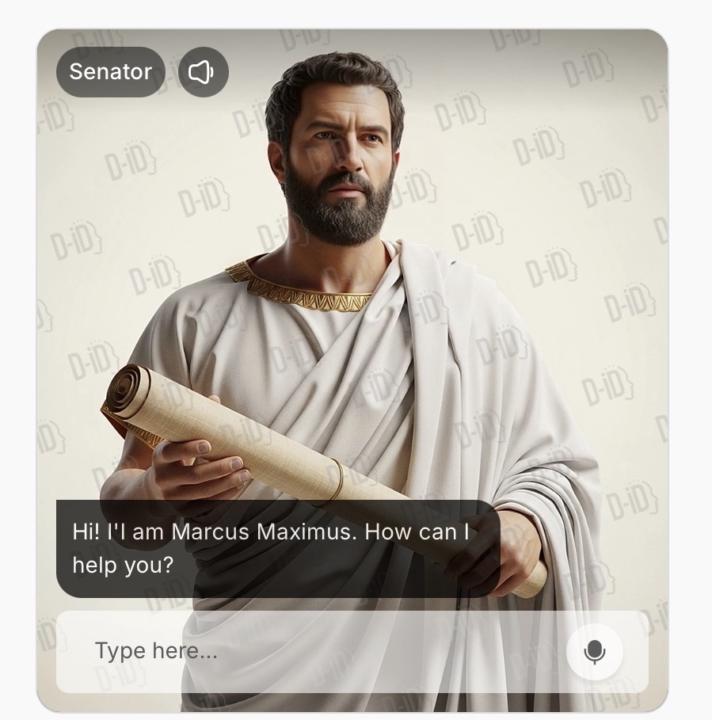
Chat with Maximus
CREATE YOUR OWN AI CLASSROOM AVATAR MXIMUS Want a digital teaching assistant or a Roman Senator in your course or classroom? In this lesson you will learn how to build a talking AI avatar using simple tools. What you will learn • How AI avatars work in education • How to create a talking avatar using D-ID • How to connect the avatar to an AI brain • How to use avatars for tutoring, feedback, and learner support By the end you will have your own classroom AI avatar ready to use. Join the ClassAI community and start building. https://www.skool.com/classai-6627/about
1 like • Mar 5
Thank you sir for your amazing knowledge
1-6 of 6