Activity
Mon
Wed
Fri
Sun
Jul
Aug
Sep
Oct
Nov
Dec
Jan
Feb
Mar
Apr
May
Jun
What is this?
Less
More
Memberships
AI Automation Agency Hub
325.6k members • Free
AI Automation Society
407.3k members • Free
Agexa Intelligence
154 members • Free
The AI Advantage
125.5k members • Free
AI Automation Circle
11.6k members • Free
Transcend Sales
157 members • $89/month
First Time Founders
524 members • Free
AI Automation Vault
17.1k members • Free
Building in public by Daniel
16.1k members • Free
8 contributions to The AI Advantage

4h •
Real test of intelligence in 2026 is what you can still do without AI.
Everyone's AI-maxxing right now. And don't get me wrong, that's great. But here's what I keep noticing. The people who impress me most aren't the ones who did something that took hours previously and did it with AI in fraction of time They're the ones who could prompt AI in a way that got them the result and tell whether what AI gave them back actually is any good That judgment doesn't come from a prompt. It comes from years of experience and getting it wrong. AI gives you options. Fast, plausible, well-formatted options. Whether one of them is actually any good is still on you. AI doesn't know what it doesn't know about your situation. The floor is rising fast. Everyone has the same tools, the same speed, the same outputs. The ceiling belongs to whoever still knows how to think underneath all of it. What's something you learned that no AI could've taught you?

5d •
Fable 5 just got pulled. And it reminded me of something.
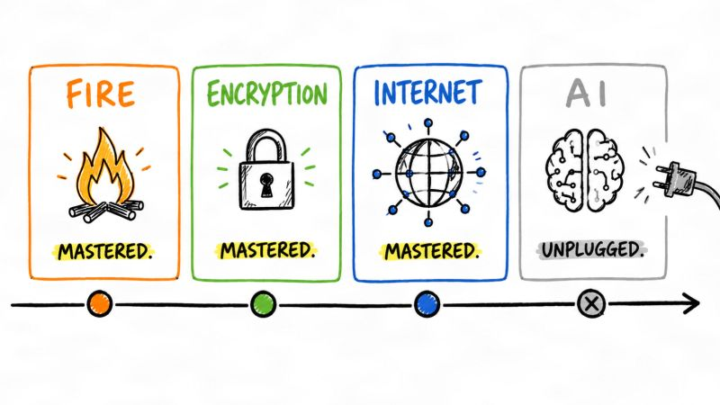
Fable 5 just got pulled. And it reminded me of something. Every powerful tool we've ever had has been a double-edged sword. > Fire. Dangerous. We learned to use it carefully. > Encryption. Dangerous. We learned to use it carefully. > The internet. Dangerous. We learned to use it carefully. The pattern is always the same. Something new arrives that can do real damage in the wrong hands. We panic. We debate. Some people want to ban it outright. Then we figure out that the capability itself isn't the problem. Misuse is the problem. And misuse gets solved through guardrails, not removal. But with AI we keep reaching for the plug. Not because the evidence demands it. Because the capability makes us uncomfortable. Fable 5 wasn't pulled because it was broken. It was pulled because it worked too well. And that's a pattern worth paying attention to. Because every time we unplug something that works, we don't make the risk go away. We just stop being the ones who know how to use it.
7d •
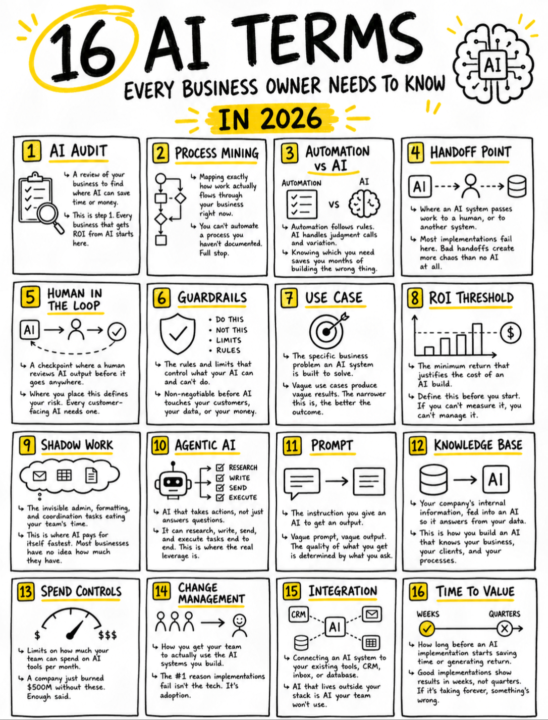
16 AI terms every business owner needs to know in AI age.
1. AI Audit ↳ A review of your business to find where AI can save time or money. ↳ This is step 1. Every business that gets ROI from AI starts here. 2. Process Mining ↳ Mapping exactly how work actually flows through your business right now. ↳ You can't automate a process you haven't documented. Full stop. 3. Automation vs AI ↳ Automation follows rules. AI handles judgment calls and variation. ↳ Knowing which you need saves you months of building the wrong thing. 4. Handoff Point ↳ Where an AI system passes work to a human, or to another system. ↳ Most implementations fail here. Bad handoffs create more chaos than no AI at all. 5. Human in the Loop ↳ A checkpoint where a human reviews AI output before it goes anywhere. ↳ Where you place this defines your risk. Every customer-facing AI needs one. 6. Guardrails ↳ The rules and limits that control what your AI can and can't do. ↳ Non-negotiable before AI touches your customers, your data, or your money. 7. Use Case ↳ The specific business problem an AI system is built to solve. ↳ Vague use cases produce vague results. The narrower this is, the better the outcome. 8. ROI Threshold ↳ The minimum return that justifies the cost of an AI build. ↳ Define this before you start. If you can't measure it, you can't manage it. 9. Shadow Work ↳ The invisible admin, formatting, and coordination tasks eating your team's time. ↳ This is where AI pays for itself fastest. Most businesses have no idea how much they have. 10. Agentic AI ↳ AI that takes actions, not just answers questions. ↳ It can research, write, send, and execute tasks end to end. This is where the real leverage is. 11. Prompt ↳ The instruction you give an AI to get an output. ↳ Vague prompt, vague output. The quality of what you get is determined by what you ask. 12. Knowledge Base ↳ Your company's internal information, fed into an AI so it answers from your data. ↳ This is how you build an AI that knows your business, your clients, and your processes. 13. Spend Controls
8d •
Stop outsourcing your thinking to AI.
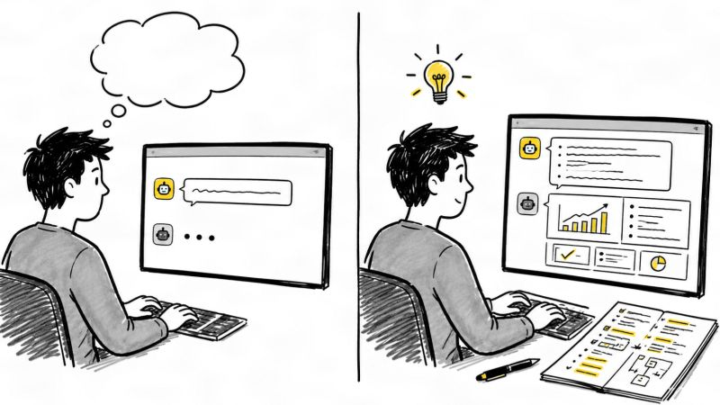
(Your bad output isn't the model's fault) That mediocre output you got? That's YOUR thinking, reflected back at you. Here's how these models actually work. They sit on a massive database of the internet. You send a prompt, they pull relevant context, average it, and return a result. That's the whole mechanism. So if your prompt is vague? They pull vague, average context. And hand you vague, average output. I see this constantly. Someone types: "Write me a proposal for a XYZ client." Shocked the output sounds like it was written by no one, for no one. Because it was. The model had no idea what you do, who the client is, or what you want them to feel. And honestly? You didn't either. You were hoping the AI would figure it out. It can't figure out what you haven't figured out. Failing to provide it relevant context is NUMBER ONE reason your AI outputs sound mid. Try this next time: Open a blank doc before, write what you actually want. Then go to the model. Watch what changes.

⭐
Apr 1 •
🌱 April is here. What are you building this month?
New month, new window. April is a reminder that progress does not come from waiting for the perfect moment. It comes from choosing one thing, committing to it, and building momentum before doubt has a chance to slow us down. This is the month to stop overthinking and start moving. What are we building? A better system? A new offer? Stronger habits? More confidence with AI? More time back in the week? Whatever it is, April is an opportunity to create real traction, not just more intentions. The biggest wins rarely come from doing everything at once. They come from picking a clear goal and working it consistently. One focused month can change a lot. It can cut cycle time, reduce procrastination, sharpen skills, and create the kind of progress that compounds fast. So let’s make this month count. Build the workflow. Launch the idea. Learn the tool. Finish the draft. Start the project. Protect the time. Use April to create something future you will thank you for. No drifting. No waiting. No playing small. April is here. What are you building this month? Comment your April goal.
2 likes • Apr 1
Doubling down on my AI Transformation Agency.
0 likes • Apr 2
@AI Advantage Team content+outreach
1-8 of 8

@nikoloz-naskidashvili-9378
Founder @ Systems Dept. / AI Transformation Partner / Implementing AI and Systems for Growing Businesses
Active 3h ago
Joined Jan 8, 2026
systemsdept.com
Powered by