Activity
Mon
Wed
Fri
Sun
Aug
Sep
Oct
Nov
Dec
Jan
Feb
Mar
Apr
May
Jun
Jul
What is this?
Less
More
Memberships
Harmony
36.3k members • $27/month
Clief Notes
41.9k members • Free
Market Mastery
944 members • $29/month
AI Automation Academy
2.2k members • Free
6 contributions to AI Automation Academy

Dec '24 •
Automating Amazon Affiliate Blogging Website🛒
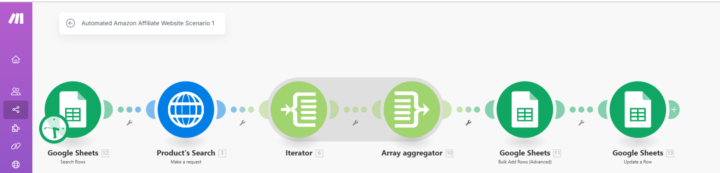
Hey fam, Apologies for the late post—I’ve been busy working on something super exciting that’s going to amaze you. Launching soon🤩 Btw I’ve just developed an incredible new automation solution for creating Automated Amazon Affiliate Blogging websites—perfect for anyone looking to simplify and scale their Amazon affiliate marketing efforts. Why This Is a Game-Changer ⏳ Time-Saving: Automates the entire blogging process from start to finish. 💰 Revenue Boost: Leverages AI to optimize affiliate content for maximum clicks and conversions. 💥 Effortless Scaling: Publish optimized blogs across multiple platforms with just a few clicks. How It Works Scenario 1: Listing and Scraping Products 1. Add the product name you want to promote into a Google Sheet. 2. Make grabs the product name from the sheet. 3. It sends the product name to our secret API, which scrapes product URLs from Amazon’s best sellers. 4. The URLs, titles, and ASINs of the products are updated in your Google Sheet automatically in Bulk. Scenario 2: Creating and Publishing Blogs 1. Make grab one product URL from the Google Sheet. 2. The product URL is passed to the secret API, which scrapes complete details, including title, description, pricing, ratings, images, each and every details that are posted on amazon 3. Using Fal AI Flux, the system generates a custom main image based on the product title. 4. Set Amazon Affiliate ID in set variable. 5. Product titles and slugs are rewritten with OpenAI for SEO optimization. 6. Provide details prompt to OpenAI to write a blog for the amazon product and map all these details: 📸 Product Images 🏷 Product Title 💲 Price ⭐ Rating 🗣 Total Reviews 📜 About the Product 🗂 Product Information 🔗 Affiliate Link 7. The blog is published on your website and the status is updated in the Google Sheet. 8. Also posts the content across multiple platforms, including Instagram, Facebook, Pinterest etc Wanna see Demo? Check out this blog created by the system: https://shorturl.at/qvh0D

1 like • Dec '24
Amazon
1 like • Dec '24
Yes, just to see what it is
0 likes • Dec '24
@Sumit Chaudhary thank you and welcome. I just joined yesterday so brand new as well 🙃
Nov '24 •
Built a Personalized Tone LinkedIn Comment Automation-Chrome Extension 🤖✨
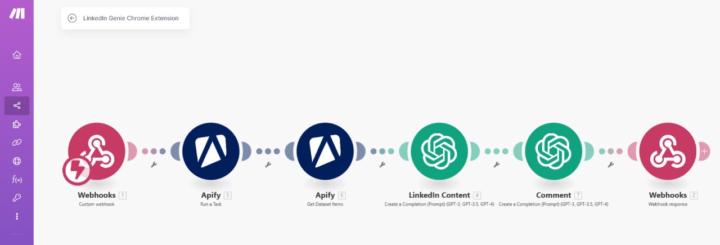
Ever wished you could comment on LinkedIn in your personal tone? 🎯 Well, I just built a solution that does exactly that! Here's how it all started: A brilliant post by @kristine-cristell-7395 in a Skool community caught my eye: "Can you build an Evy ai alternative? I like the idea of Evy ai, but it doesn’t work! Could you create a LinkedIn commenting AI that works inside LinkedIn, trained on your own tone of voice?"_ The idea clicked 💡, and I shared a simple way to train Open AI on your tone and build an automation. Kristine loved it and asked: > "But can you make it into a Chrome extension where Open AI agents can read and comment, like Evy ai?" She wasn’t the only one asking for it—so I took action! Here's what I built: How It Works: 1️⃣ Copy the LinkedIn post link. 2️⃣ Paste it into my extension. 3️⃣ Press a button 4️⃣ In seconds, a personalized comment appears—just copy and post! 😍 Demo: https://www.youtube.com/watch?v=ptT1QFXv6Wc The Building Process (Super Simple! 💪): 1. Webhook Magic: Used Make.com to set up a webhook. 2. I had never built a Chrome extension before, so I turned to Open AI for help. I asked if it knew about Evy ai, and it not only confirmed but also explained what it does. From there, I prompted Open AI to help me build an extension. It provided step-by-step instructions, including how to integrate the Make webhook address. When the extension’s button is pressed, it sends data to the webhook. Open AI generated a folder with all the necessary files. It even outlined the steps to load the folder as a Chrome extension. It might sound complex, but trust me—it’s super simple! 3. Data Scraping: Leveraged Apify to scrape LinkedIn post data. 4. Tone Training: Trained Open AI on your tone to craft comments. 5. Response Handling: Sent comments back to the extension via webhook. If this sounds exciting and you’d love to see the detailed prompts I used to create the extension, Just Follow & drop a "Prompt" in the comments 💬
1 like • Nov '24
Prompt
2 likes • Nov '24
Right when I needed this the most 🙌🏻 thank you 🙏🏻
1 like • Nov '24
@Sterling Matheson

Oct '24 •
How To Build an Inbound AI Leads Agent
Just published a new video going through how you can build an Inbound AI Leads Agent. https://www.youtube.com/watch?v=QgPvDBu3Uec Comment "SDR" below if you want the blueprint
0 likes • Oct '24
SDR 🔥
1-6 of 6

@niels-roest-5589
Chairman & CAIO - PCD Investment Partners
Co-founder of Expeditionair
AI Engineer
Active 1h ago
Joined Sep 5, 2024
Worldwide