Activity
Mon
Wed
Fri
Sun
Aug
Sep
Oct
Nov
Dec
Jan
Feb
Mar
Apr
May
Jun
What is this?
Less
More
Memberships
AndyNoCode - AI Video
110 members • $9/month
IDALL AI
2.6k members • $9/month
AI Video Creators Community
4k members • $15/month
Agent Zero
2.7k members • Free
AI Automation Society
417.9k members • Free
IA Masters Academy
1.1k members • $100,000/month
AndyNoCode Premium
139 members • $59/month
AI Automations by Jack
3.2k members • $87/month
AI Automation Society Plus
3.8k members • $99/month
57 contributions to AI Automation Society

2d •
Fable is not really for planning — did you know that, or am I wrong?
Fable is not really for planning — did you know that, or am I wrong? From what I understand, Opus is stronger for planning and architecture, Sonnet is better for executing clear tasks, and Fable is better for long, difficult, or ambiguous execution where the model needs to investigate, test, review, and close the loop. So Fable can plan during execution, but it is not mainly “the planning model.” The confusion is thinking that Fable is the planning model and Sonnet is the execution model. That is not quite right. The practical rule is: Opus is best for planning. Sonnet is best for executing well-defined tasks. Fable is better for difficult, long, or ambiguous work because it tends to investigate, test, review, and close the loop more carefully. Use Opus when you need to design the architecture, write a spec, define phases, or think through the strategy before touching the code. Use Sonnet when the plan is already clear and the task is to implement, edit files, run tests, and fix clear issues. Use Fable when the project is still unclear, has hidden bugs, requires investigation, involves multiple steps, or needs more autonomous execution. There is also an important difference in Claude Code: Using `/model opus` means using Opus for everything: planning, execution, and review. Using `/model opusplan` means using Opus for planning and Sonnet for execution. So, simply telling Opus “I want to plan” does not automatically activate `opusplan`. To use that hybrid flow, you need to explicitly select `/model opusplan`. Final summary: Opus thinks through the plan. Sonnet executes the plan. Fable handles the work when it is difficult, long, or ambiguous. `opusplan` combines Opus for planning with Sonnet for execution. https://platform.claude.com/docs/en/build-with-claude/prompt-engineering/prompting-claude-fable-5

0 likes • 8h
@Jay Mansperger all is moving.
0 likes • 8h
@Sterling Haylett In simple terms, Fable is good for long and complex executions because it keeps validating and checking throughout the process. It also plans the execution before starting, which is one of its strengths. OpusPlan is good for planning an entire process and figuring out how to solve a problem. Then, Sonnet or Fable can be used to execute the plan.
11h •
TOKENS 90% Less
You may be burning AI tokens without realizing it. In Claude Code, **prompt caching** can reduce the cost of reading repeated context by up to 90%. But here is the critical detail: Cache does not last forever. It can have a TTL of 5 minutes or 1 hour. If you keep the session active, the cache stays warm. If you stop for too long, the cache gets cold. The next call may need to read everything again. Cache stays alive when you keep: * same model * same effort level * same tools * same `CLAUDE.md` * same project * stable context Cache breaks when you: * switch models * change effort * add or remove tools/MCPs * edit `CLAUDE.md` * change the beginning of the prompt * let the session go cold past the TTL The rule is simple: Cheap AI is not just about using a cheaper model. It is about stable context and warm cache. ====== **1.You are paying AI to reread what it already read. **2.Claude’s cache can expire in 5 minutes. **3.One wrong pause can increase your token cost. **4.Switching models can break your cache. **5.Prompt caching can cut repeated context cost by up to 90%. **6.The secret is not just better prompts. It is warm cache. **7.Professional Claude Code starts with stable context. **8.Change the beginning of the prompt, lose the cache. **9.Cold cache = expensive AI. Warm cache = efficient AI. **10.The invisible mistake making your AI bill higher.
1
0

1d •
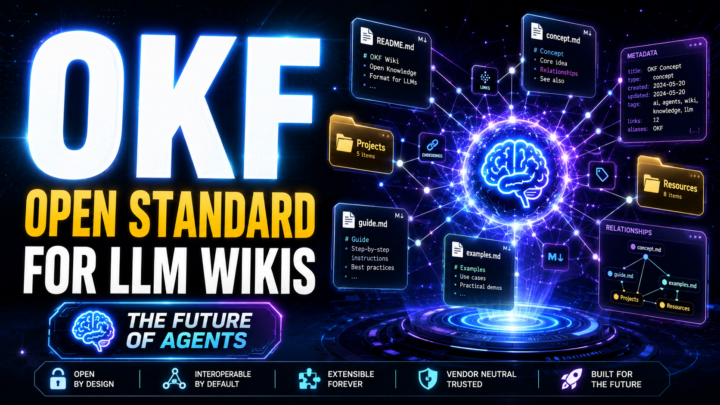
OKF: The Open Standard for LLM Wikis
OKF: The Open Standard for LLM Wikis OKF — Open Knowledge Format is an open standard for organizing LLM Wikis: personal, team, or project knowledge bases designed to be read, maintained, and updated by AI agents. Direct Summary The idea is simple: instead of dumping loose documents into a RAG system, you create a structured wiki in Markdown, with organized pages, links between concepts, entities, summaries, and metadata. With this structure, the AI agent does more than search documents. It reads, understands, extracts important information, and integrates that knowledge into a living system that can evolve over time. The problem is that everyone builds their wiki differently. One person uses one folder structure, another uses a different one. Field names change. Metadata changes. Links between pages change. This makes it harder to share knowledge bases across agents, teams, and systems. OKF solves this by creating a simple standard for organizing these wikis. It mainly defines two things: 1. How files and folders should be organized. 2. Which metadata fields should appear at the top of each document. The most important field is type, which identifies the kind of content: concept, video, entity, note, decision, resource, project, and so on. Other fields may include title, tags, relationships with other content, links, related videos, and connections between concepts. The Big Advantage OKF allows different agents to understand knowledge bases created by other people or teams. This opens the door to: - a more organized personal second brain; - shareable knowledge bases; - team wikis; - knowledge packages from content creators; - agents that navigate concepts more accurately; - better integration with Markdown, Obsidian, Notion, GitHub, and coding agents; - reuse of knowledge across different projects. n practice, OKF tries to do for knowledge bases what standards like MCP do for tools: create a common way for systems to communicate. The agent no longer depends on a random structure. Instead, it can find information inside a predictable organization.
0 likes • 22h
@Olga Nikitina see the link
0 likes • 22h
Versioning an **OKF / LLM Wiki** works best using **Markdown + Git**. The logic is: **OKF organizes the knowledge base.** It defines folders, files, indexes, and metadata. **Git controls the history.** It shows what changed, when it changed, and allows you to restore previous versions. **YAML stores document metadata.** Each file can include information like: ```yaml type: concept title: AI Agents tags: [ai, agents] version: 1.0 updated: 2026-07-03 ``` ## Simple Workflow The agent should work like this: 1. Read the wiki index. 2. Identify the right files. 3. Change only what is necessary. 4. Update the metadata. 5. Record the change. 6. Commit everything to Git. Example: ```bash git add . git commit -m "Update OKF wiki structure" git tag v1.0 ``` ## Practical Versioning Model ```text 1.0 = first stable version 1.1 = small improvement 1.2 = new content 2.0 = major structural change ``` ## Ideal for Agents Use a file called: ```text CHANGELOG.md ``` In this file, the agent records: ```markdown ## 2026-07-03 ### Added - Created OKF structure. ### Changed - Updated metadata. - Improved concept links. ``` ## In One Sentence OKF defines the structure of the knowledge base; Git stores the history; YAML shows the version of each document; and the changelog explains what changed.
2d •
Fable 5 is BACK Until July 7 and 50%
Fable 5 is back and that it is the newest model, designed to handle harder tasks with fewer interruptions. The main point is about usage limits: Until July 7, users can use Fable 5 with up to 50% of their weekly plan limit. If they reach the limit, they can keep using Fable 5 with usage credits. It also says that Fable 5 consumes usage faster than Opus 4.8, meaning it is more powerful, but it uses more of your quota. Enjoy

0 likes • 2d
@Frank van Bokhorst my pay have a bug kkkk
1 like • 2d
@Alex Maren lol spend at all nigth 50% 😕
2d •
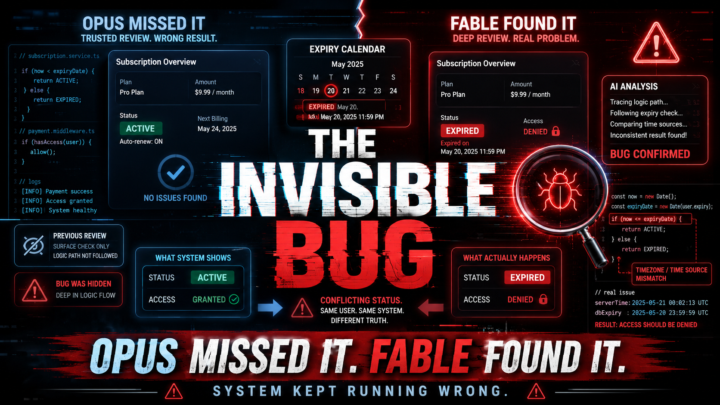
FABLE 5 found a bug in my payment system.
1. The Invisible Bug Opus Missed — But Fable Found 2. The System Didn’t Crash. It Did Something Worse: It Kept Running Wrong 3. The Silent Bug That Can Break a Subscription System FABLE 5 found a bug in my payment system. The most dangerous bug was not that the system crashed. It was that the system kept running while being wrong. In the previous high-effort review with Opus, important issues had already been found in the payment and subscription flow. But in the new review, Fable found an even more serious variant of the same problem. The pattern was this: when the system could not confirm a critical piece of information, it could still continue the flow as if it were certain. In other words, a technical failure could be treated as real business data. In a subscription system, that is serious. It can affect expiration dates, renewals, user access, and already-paid periods. The strongest part is that Fable did not just find “another bug.” It identified the pattern behind the bugs: the system was too tolerant of uncertainty. When an error happens, the system should not continue. It should stop, protect the current data, log the problem, and only modify anything after it can verify the state safely. The main fix was simple in concept: if the system cannot verify, it must not modify. And an expiration date should never move backwards automatically. This is the kind of finding that shows the difference between a surface-level review and a deep technical review. Opus found important issues. But Fable saw the root cause: the system was not just buggy. It was confusing technical failure with business truth. ------------------------------------------------ ```txt Technical Review Summary (26 agents, 24 verified findings, 0 refuted) The 10 findings were consolidated, ranked, and reviewed. What matters for the decision: Convergence with the previous review: the 2 findings classified as important in the previous review were re-confirmed through independent verification.
2
0
1-10 of 57
Online now
Joined Mar 6, 2025
Powered by